Hybrid work is the only arrangement in which you have two workplaces and are properly
equipped in neither. The office was fitted out for a full-time employee who no longer sits
there five days a week, and your home was fitted out for evenings and weekends. Everything
that actually decides whether a hybrid week goes well happens in the gap between them —
the adapter in the other building, the meeting you joined from a kitchen, the printout that
came home and never went back. That gap is where a list of hybrid work
essentials has to aim, and it is the one place neither your employer nor any
regulator has put anything.
The seven products below are arranged in the order a hybrid week actually meets them:
the home end that is set up wrong, the hardware that has to travel or be duplicated, the
camera that now points at two different rooms, the meeting held in a room you are not in,
the hours nobody can see, the paper that arrived at your house, and the paper you are
legally forbidden to destroy. We picked them on whether the role is real rather than on
whether the product is impressive, which is why the highest-scoring item here costs $6.99
and the most expensive one spends a paragraph arguing against itself.
Two of these hybrid
work essentials cost less than $16 and remove more friction than anything else on the list.
Prices, ratings and links go to Amazon.com and carry our affiliate tag. UK readers can
search the same models on Amazon.co.uk — every one of these is sold there under the
same name, though prices and availability differ, and one of them ships in a 110 V
version that matters.
Because hybrid working is regulated very differently on the two sides
of the Atlantic, this guide also sets out what the law actually says in each country about
requesting it, who is responsible for your home workstation, and what you may and may not do
with paper and recordings. That section is cited throughout to government sources, and it is
the part of these hybrid work essentials that no product can solve.
Hybrid Work Essentials — Quick Comparison
| # | Product | Role | Key spec | Best for | Price | Score |
|---|---|---|---|---|---|---|
| 1 | BESIGN LSX7 Swivel Laptop Stand | The desk that is not there | 360° rotating aluminium riser, 10–15.6in laptops | Anyone whose home end is a kitchen table | $21.99 | 8.3 |
| 2 | OUTUXED 36-Grid Organizer Box (2-Pack) | The hardware that lives in the other building | 2-pack, 36 adjustable grids, 10.8 x 7.0 x 1.8in | Dongles, adapters and the spare charger | $14.99 | 8.4 |
| 3 | CloudValley Webcam Cover Slide | The camera that sees both rooms | 0.6 mm aluminium alloy sliding cover | A laptop that is used at home and in the office | $6.99 | 8.7 |
| 4 | Plaud Note Pro AI Voice Recorder | The meeting you were not in the room for | 64 GB, 30 g, AI transcription and summary | Anyone who dials into meetings held in a room | $189.00 | 8.5 |
| 5 | KADAMS Pomodoro Cube Timer | The hours nobody can see | 5/10/25/50-minute rotating cube with LED ring | Days at home with nobody to mark the time | $16.99 | 8.1 |
| 6 | JIKIOU Mini Hand-Crank Paper Shredder | The work paper that came home | Hand-cranked strip cut, 3 mm strips, 1 L bin | Small volumes, no power, no noise | $15.99 | 7.4 |
| 7 | DocSafe Fireproof File Organizer | What must not be shredded and must not travel | Hard shell, 13-pocket accordion, lock, water-resistant | Tax records you are legally required to keep | $42.98 | 8.4 |
- Quick comparison table
- The 7 best hybrid work essentials in 2026
- Buyer’s guide: what to look for
- US vs UK: what changes when you work in two places
- Which one should you buy?
- Who is legally responsible for the desk in your spare room?
- Frequently asked questions
- Final thoughts
- Sources and further reading
essentials are chosen to close that gap rather than to rebuild an office.
The 7 Best Hybrid Work Essentials in 2026
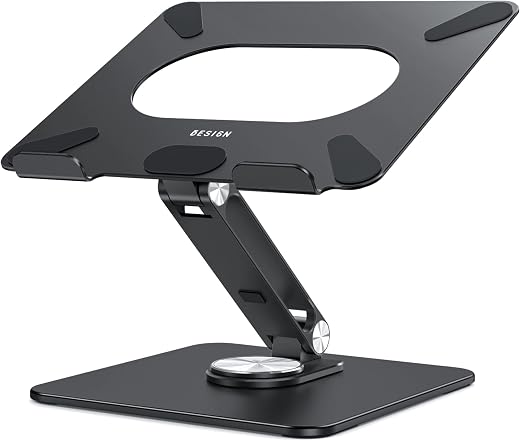
1. BESIGN LSX7 Swivel Laptop Stand — Best Hybrid Work Essentials Pick for the Home End
Price: $21.99 | Amazon rating: 4.6 / 6,044 | Role: the desk that is not there | Key spec: brushed aluminium, 360° rotating base, fits 10–15.6in laptops, holds 6 kg (13 lb), weighs 1.29 kg
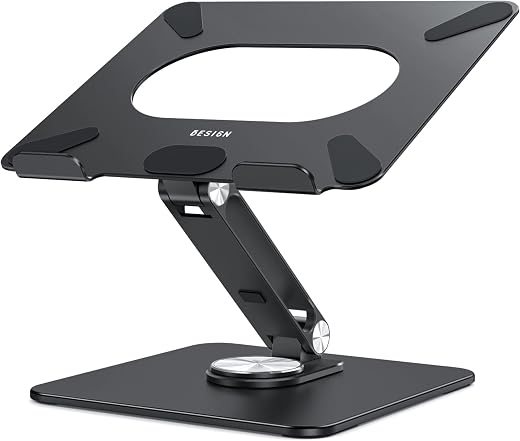
The office end of a hybrid arrangement is usually fine. Somebody bought a monitor, a chair and a desk at the right height, and that somebody was not you. The home end is a laptop on whatever surface was already in the room, and it is roughly 30 cm too low. This is the single most common gap in a list of hybrid work essentials, and it is also the cheapest to close, because the answer is not furniture. It is a piece of folded aluminium that puts the screen where your eyes already are.
The LSX7 is a brushed aluminium riser with a 360-degree rotating base, adjustable without tools by pushing or pulling, and rated to hold six kilograms. The rotating base is the part that earns its place in a hybrid context rather than a fixed one: when somebody at home leans over to look at what you are doing, or when you want to show a screen to a person standing beside you, you spin the laptop instead of moving it. It also leaves room underneath for a separate keyboard, which is the other half of the fix and which most people already own.
Two honest caveats. At 1.29 kg this is not a thing you carry — it is a thing you leave at the home end and forget about, and any guide to hybrid work essentials that tells you to pack a metal riser twice a week has not tried it. And a riser on its own makes your posture worse, not better, if you then reach up to the laptop’s own keyboard. The stand is half a solution and it only works with the other half.
Best for: You work at home two or three days a week on a laptop, you already own a separate keyboard or are willing to buy one for $20, and your home surface is a table rather than a desk.
Skip if: You want something to carry between buildings, you have a proper monitor at home already, or you are unwilling to add a keyboard — in which case the riser will make the ergonomics worse rather than better.
Read the full BESIGN LSX7 Swivel Laptop Stand review →
Where to Buy — BESIGN LSX7 Swivel Laptop Stand
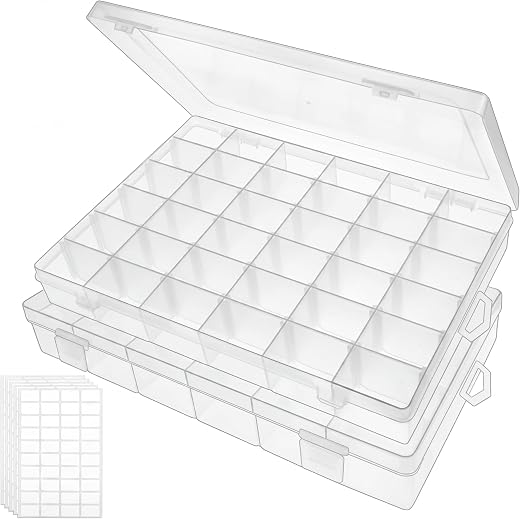
2. OUTUXED 36-Grid Organizer Box — Best Hybrid Work Essentials Pick for Everything That Travels
Price: $14.99 | Amazon rating: 4.6 / 13,111 | Role: the hardware that lives in the other building | Key spec: two boxes, 10.8 x 7.0 x 1.8in each, 36 grids with movable horizontal dividers, clear PP
Every hybrid worker loses the same forty minutes, repeatedly, to the same cause: the small piece of hardware is in the other building. The USB-C to HDMI adapter, the display dongle the meeting room needs, the charger, the spare pen, the key for the pedestal drawer. Nobody plans for this because each item costs almost nothing and feels too trivial to think about, which is exactly why it is never where you are. No list of hybrid work essentials fixes this with a better laptop.
This is sold as a bead and tackle box and that is the reason it is fifteen dollars for two rather than forty for one. What it actually is: two clear polypropylene trays with thirty-six compartments each and movable horizontal dividers, so you can take out three walls and make a channel long enough for a cable. One box stays at home, one lives in the bag or the office drawer, and the two are laid out identically. When you look in the lid and see an empty compartment, you know what you left behind before you need it, which is the whole point.
The reason this beats a zipped pouch is visibility. A pouch tells you nothing until you tip it out; a grid tells you at a glance. On a list of hybrid work essentials it is the least impressive item and the one that removes the most friction, and a 4.6 average across more than thirteen thousand ratings suggests a lot of people arrived at it from a lot of different directions.
Best for: You carry adapters, cables and small kit between two workplaces and you are tired of discovering a gap at the moment you need the thing.
Skip if: You carry nothing but a laptop and a phone, or you want something that protects fragile items — the lid latches but this is a light craft box, not a case.
Read the full OUTUXED 36-Grid Organizer Box (2-Pack) review →
Where to Buy — OUTUXED 36-Grid Organizer Box (2-Pack)
3. CloudValley Webcam Cover Slide — Best Hybrid Work Essentials Pick for Two Rooms
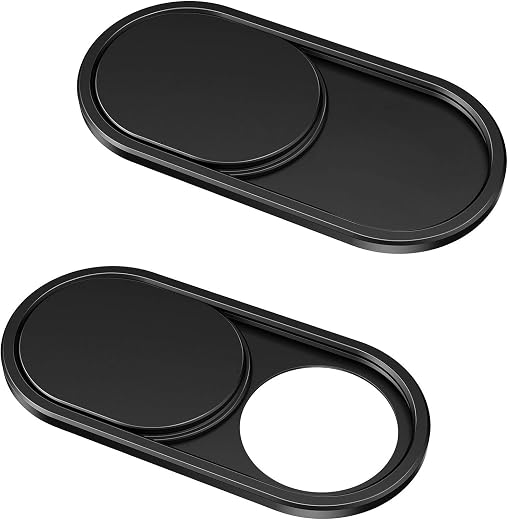
Price: $6.99 | Amazon rating: 4.5 / 54,862 | Role: the camera that sees both rooms | Key spec: space aluminium alloy, 0.023in (0.6 mm) thick, fits most laptops and tablets
A full-time office worker’s laptop camera only ever points at an office. A full-time home worker’s only ever points at home. The hybrid laptop is the one device that does both, and it moves between the two without anybody changing anything about it. That is a new situation and it is the reason this seven-dollar strip of aluminium belongs in a set of hybrid work essentials rather than in a paranoia bin.
The cover is 0.6 mm thick, which matters more than it sounds: a thicker slider stops the lid closing flush and, on a thin laptop, can press the keyboard into the screen. It sticks on, it slides across, and it fails safe — when it is shut, nothing gets through, regardless of what any indicator light claims. No driver, no permission prompt, no software that stops working after an update. It is the only privacy control in this list that cannot be misconfigured.
The real argument for it is not espionage, it is the accident. It is the call you join two minutes early from a bedroom, the meeting that starts before you meant it to, the shared laptop somebody else opens. At 4.5 from nearly fifty-five thousand ratings this is one of the best-evidenced products on our site, and at $6.99 it is the highest-scoring item here by a clear margin while also being the cheapest. Among hybrid work essentials, cheap and unbreakable usually beats clever.
Best for: Your laptop goes between home and a workplace, you take video calls from rooms you have not tidied, and you want one control that works without software.
Skip if: Your laptop already has a built-in physical shutter, or you have a very thin lid with almost no gap — measure before buying, because even 0.6 mm is not zero.
Read the full CloudValley Webcam Cover Slide review →
Where to Buy — CloudValley Webcam Cover Slide
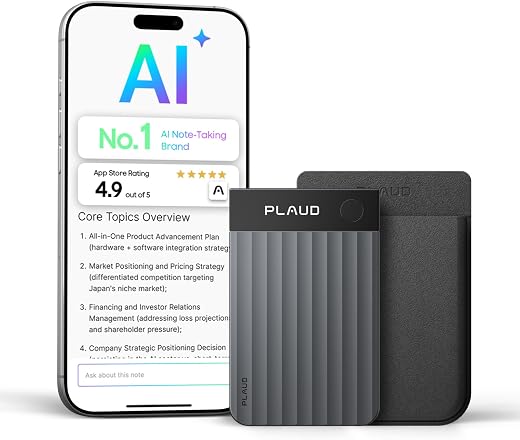
4. Plaud Note Pro AI Voice Recorder — Best Hybrid Work Essentials Pick for the Meeting You Missed
Price: $189.00 | Amazon rating: 4.5 / 2,758 | Role: the meeting you were not in the room for | Key spec: 64 GB storage, 30 g, 2.13 x 3.37 x 0.12in, Bluetooth 5, transcription and AI summary
The defining failure of hybrid work is the hybrid meeting: half the participants in a room with one microphone, half on a screen at the end of the table, and a set of decisions that only the people in the room actually heard. The most expensive item in this list of hybrid work essentials exists because of that specific failure, and it is also the one that most deserves an argument before you buy it.
The Note Pro is a 30-gram card, roughly the footprint of a credit card and three millimetres thick, with 64 GB of storage, Bluetooth 5, a press-to-mark button for flagging a moment while it is happening, and cloud transcription with an AI summary afterwards. Used at the office end it captures the room you are in; used at home it captures the call. The marking button is the genuinely useful part, because finding the thirty seconds that mattered in a ninety-minute recording is the job, not the recording itself. That is a narrow job, and narrow jobs are what the best hybrid work essentials do.
Now the argument against. Your phone already records audio, and your meeting software probably already transcribes. What you are paying $189 for is a device that starts instantly, is not your phone, and does not put a recording banner into somebody else’s call. Whether that is worth it depends entirely on how many rooms you are not in. If the answer is fewer than two a week, buy nothing and use the software you already pay for.
Best for: You attend meetings remotely that are physically held in a room, you need an accurate record of what was agreed, and you have told the other participants that you are recording.
Skip if: Your meetings are already recorded and transcribed by the platform, your employer forbids third-party recording devices, or you are in a jurisdiction that requires every participant’s consent — see the law section below before buying.
Read the full Plaud Note Pro AI Voice Recorder review →
Where to Buy — Plaud Note Pro AI Voice Recorder
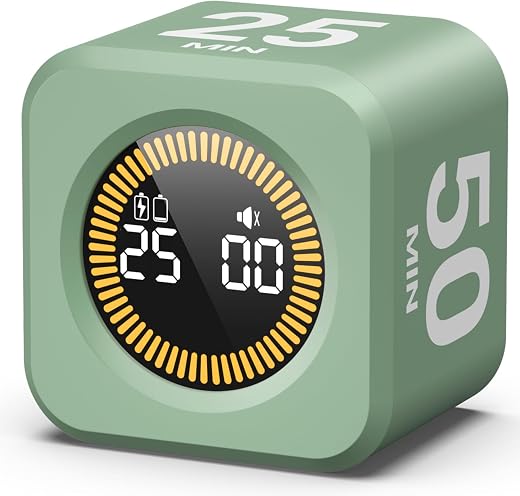
5. KADAMS Pomodoro Cube Timer — Best Hybrid Work Essentials Pick for the Hours Nobody Sees
Price: $16.99 | Amazon rating: 4.7 / 594 | Role: the hours nobody can see | Key spec: flip-to-start cube, 5/10/25/50 minutes, visual LED ring, 2 x 2 x 1.5in, 77 g
An office day has a shape imposed on it by other people: somebody arrives, somebody goes to lunch, somebody starts putting their coat on. A home day has none of that, and the two failure modes are opposite and equally common. Some people drift and finish nothing; others do not stop at all and finish the day at eight in the evening having never left the room. Both are time problems, and both are worse on the home half of a hybrid week. Hybrid work essentials that address time are easy to dismiss and hard to replace.
The KADAMS cube is the lowest-technology answer available. You turn it so the face you want is on top — five, ten, twenty-five or fifty minutes — and an LED ring fills as the time goes. There is no app, no account, no notification, and nothing about it appears on the screen you are already staring at, which is the entire point. Fifty minutes is the face that matters for work; twenty-five is the classic Pomodoro interval.
It is worth being clear about what this does and does not do. It will not make you work and it does not track anything, so it is no use at all if what you need is evidence of hours for somebody else. What it does is end a session, which is the harder half. Among these hybrid work essentials it has the smallest evidence base — 594 ratings — though the 4.7 average is the highest of the seven.
Best for: You work at home some days, you struggle either to start or to stop, and you want a physical object rather than another piece of software competing for the same screen.
Skip if: You need to log or prove your hours, you dislike audible alarms in a shared room, or you already have a working routine — this fixes a problem you may simply not have.
Read the full KADAMS Pomodoro Cube Timer review →
Where to Buy — KADAMS Pomodoro Cube Timer
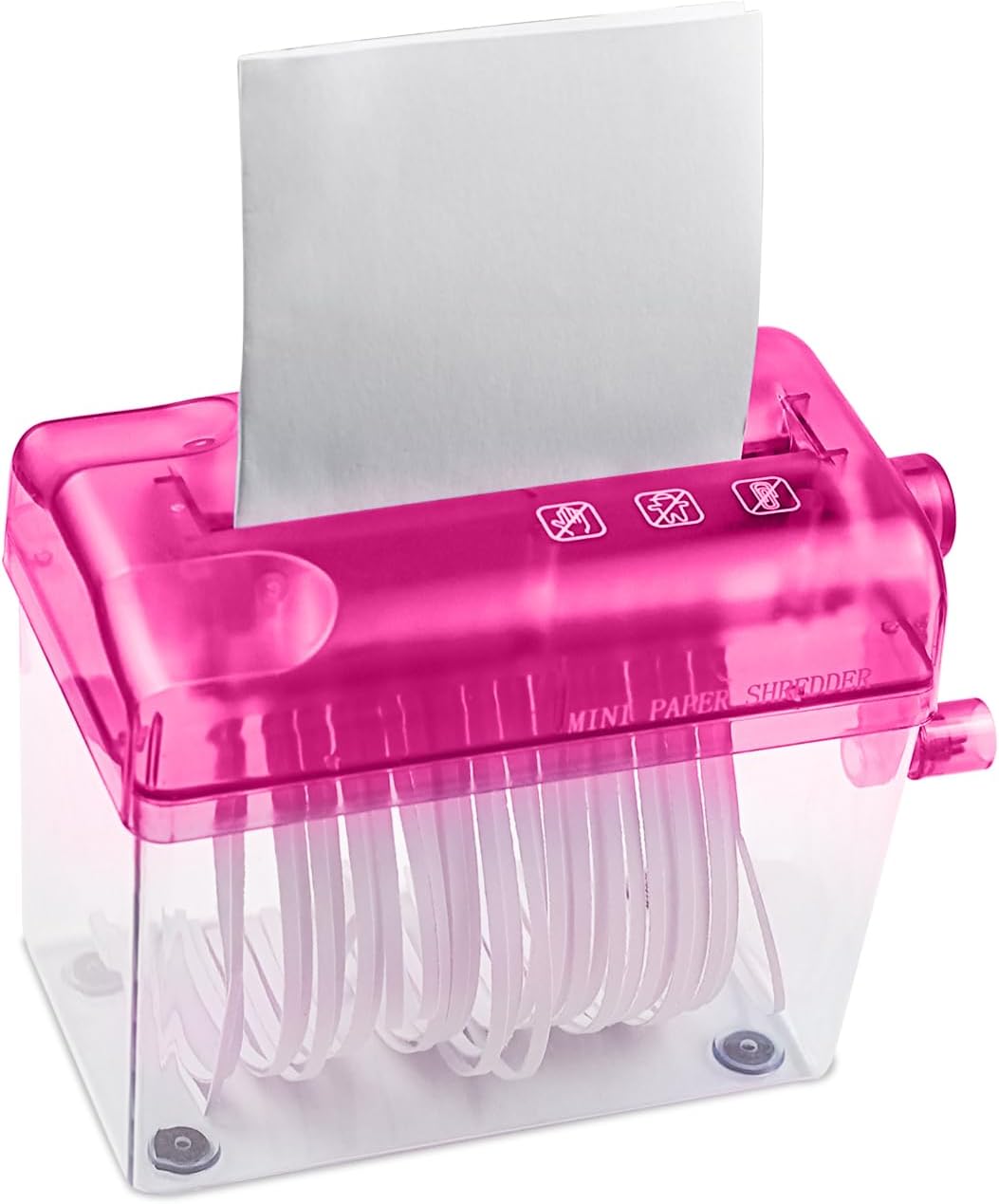
6. JIKIOU Mini Hand-Crank Paper Shredder — Best Hybrid Work Essentials Pick for Paper That Came Home
Price: $15.99 | Amazon rating: 4.1 / 404 | Role: the work paper that came home | Key spec: manual hand crank, strip cut at 0.12in (3 mm), 4.92in (12.5 cm) inlet, 1 L clear bin, 6.1 x 3.3 x 5.7in
The office has a confidential waste bin that somebody else empties. Your house has a recycling box that goes out to the kerb on a Tuesday. Nothing in the hybrid arrangement bridges those two facts, so the printed agenda, the payroll letter, the delivery note with a colleague’s home address on it and the printout of a spreadsheet all end up in ordinary household rubbish. Of all the hybrid work essentials here, this is the gap people are least aware of.
The JIKIOU is a hand-cranked desktop shredder with a 12.5 cm inlet — half the width of A4, so British readers fold once — that reduces paper to three-millimetre strips and drops them into a one-litre clear bin. It needs no power and makes no noise, which makes it usable in a bedroom at nine at night in a way that a motorised shredder is not, and at $15.99 it costs about what one visit to a commercial shredding service would. Among hybrid work essentials it is the only one here that needs no socket and no consumables at all.
Here is the part the listing will not tell you, and it is why this entry scores 7.4 rather than 8.5. This is a strip-cut shredder. The US National Archives, setting the standard for destroying controlled unclassified information, approves cross-cut shredders producing particles of one millimetre by five millimetres and lists strip-cut shredders as not approved. Three-millimetre strips of full page length are fine for junk mail and bank statements; they are not what a regulator means by destruction.
Best for: You bring home a modest amount of paper with names, addresses or figures on it, you want something silent and unplugged, and you understand it is a domestic tool rather than a compliance one.
Skip if: You handle client or patient records, personal data at any volume, or anything your employer would call confidential — buy a cross-cut machine, or take it back to the office bin.
Read the full JIKIOU Mini Hand-Crank Paper Shredder review →
Where to Buy — JIKIOU Mini Hand-Crank Paper Shredder
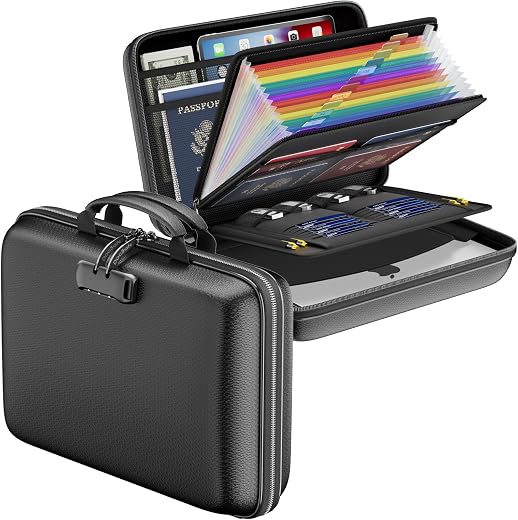
7. DocSafe Fireproof File Organizer — Best Hybrid Work Essentials Pick for What You Must Keep
Price: $42.98 | Amazon rating: 4.5 / 2,065 | Role: what must not be shredded and must not travel | Key spec: hard shell with silicone-coated fire-insulating layer, 13-pocket accordion folder, lock, water-resistant, 15.55 x 11.5 x 3in, 2 lb
The shredder’s opposite number. Working for yourself, or partly for yourself, creates a category of paper that you are not allowed to destroy: invoices, receipts, mileage records, the paperwork behind every figure on a tax return. Britain requires the self-employed to keep records for at least five years after the 31 January submission deadline. The United States sets a general three years and stretches it to six, seven or indefinitely in named circumstances. Neither country cares that your filing system is a drawer.
The DocSafe is a hard-shell case with a silicone-coated fire-insulating layer, a 13-pocket accordion folder inside, a lock and a water-resistant outer, sized for both letter and legal paper. Two pounds, a carrying handle, and big enough to hold a laptop as well. The accordion inside is the underrated part: a box you have to sort through is a box you stop putting things into, and thirteen labelled pockets is the difference between a filing system and a pile. It is the least portable of these hybrid work essentials and much the most permanent.
One honest note about the marketing, and it is the reason to read the listing rather than the headline. The listing cites a UL94 V-0/5VA flame-retardant test, which describes how the case material itself behaves when a flame is applied to it. It is not an interior-temperature rating, and the listing states no internal temperature or duration — which is what a document fire rating actually consists of. Treat this as a very good water-resistant, lockable, grab-and-go organiser with useful fire resistance, not as a safe.
Best for: You are self-employed, freelance or running a side business alongside a job, you have paper you are legally required to keep, and you want it in one lockable place you could carry out of the house.
Skip if: You expect a rated fire safe, you keep nothing on paper at all, or your documents are already in a bank deposit box — and note that a portable box is easy for a burglar to carry out too.
Read the full DocSafe Fireproof File Organizer review →
Where to Buy — DocSafe Fireproof File Organizer
Hybrid Work Essentials — Buyer’s Guide: What to Look For
Hybrid Work Essentials: Buy for the Handover, Not for the Desk
There is one test that sorts this entire category, and it is not about specifications. Ask
of any candidate: does this still do something useful on the day I am in the other
building? A thing that only works in one of your two places is a thing you will carry,
resent and eventually leave at home. A thing that works in both, or that removes a decision
you would otherwise have to make twice a week, earns its place. Applied honestly, that one test removes about half of what gets sold as hybrid work essentials.
This is why the best hybrid work essentials tend to be either permanently stationed at the
weak end or genuinely pocketable, and almost never in between. The laptop riser here lives at
home and never moves. The webcam cover weighs nothing and never comes off. The organiser box
exists in two identical copies. Nothing on this list is designed to be packed and unpacked
every time, because in practice nobody does that for more than a fortnight.
Which Hybrid Work Essentials to Duplicate, and Which to Carry
The instinct when you start splitting your week is to buy a second set of everything. That
is the expensive wrong answer, and it is also wrong in a subtler way: two sets means two
places where a thing can be missing. The rule that works is a split by price. Anything under
roughly $20 should exist twice, in both buildings, so that its location is never a question.
Anything over that travels with you, deliberately, in one known place.
On this list that means two chargers, two cheap organiser boxes, two webcam covers if your
household has two laptops — and exactly one recorder. It is a cheaper way to build a set
of hybrid work essentials than it sounds, because the duplicated items are the ones that cost
almost nothing, and the carried items are the ones you would notice were gone.
What Your Employer Should Be Buying Instead of You
Before you spend anything, ask. In Great Britain an employer’s health and safety duties
follow the worker home, and the Health and Safety Executive is explicit that its display
screen equipment rules apply to people who work at home long term or who “routinely
split their time between their workplace and home” — which is the legal description of
a hybrid worker. That means a workstation assessment, training and equipment where it is
needed, not a shopping list for you.
In the United States the position is close to the opposite, and it is set out in a single
OSHA directive: “OSHA will not conduct inspections of employees’ home offices” and “will not
hold employers liable for employees’ home offices”. Good American employers still pay for
home equipment; they simply are not made to. Knowing which of those two systems you are in
tells you how hard to push before reaching for your own card, and it decides who pays for your hybrid work essentials.
Hybrid Work Essentials: Paper Is the Part Everyone Forgets
Every hybrid setup guide talks about monitors, chairs and webcams. Almost none of them
mention that a hybrid arrangement quietly relocates a portion of your employer’s paper into a
house with domestic bins, no confidential waste collection and other people living in it.
That paper divides into exactly two piles and both need somewhere to go.
The first pile is paper that must be destroyed, and it needs a shredder or a trip back to
the office bin. The second is paper you are legally obliged to keep — and for anyone
with self-employed income alongside a job, that obligation runs for years. Any list of hybrid
work essentials that ignores both piles is describing a desk, not a working arrangement.
Power, Plugs and Voltage When Hybrid Work Essentials Cross Borders
Almost everything on this list either charges over USB or needs no power at all, which is
deliberate: a hybrid kit that depends on mains adapters is a kit that fails in the other
building. The two exceptions to watch generally are heated items and anything with a moulded
plug. American homes run 120 V at 60 Hz; British ones run 230 V at 50 Hz
through a BS 1363 plug that carries its own 3 A or 13 A fuse.
A travel adapter changes the shape of the pins and nothing else. If you are buying hybrid
work essentials across the Atlantic, check for a stated input range of 100–240 V
before you buy, and treat anything that heats — a lunch warmer, a desk heater, a mug
plate — as a domestic-market-only purchase.
US vs UK: What Changes When Your Hybrid Work Essentials Cross the Atlantic
Hybrid work looks the same from the outside in both countries and is built on completely
different legal foundations. Britain has written a statutory right to ask for it, a regulator
that names hybrid workers explicitly, and a national data protection authority with a
seventy-two-hour clock. America has a federal agency that has formally said it will not look
at your spare room, no federal right to request flexible hours at all, and a paper-destruction
standard precise to the millimetre. The differences are not decorative — two of them
change which of these hybrid work essentials you should actually buy.
Vocabulary: Hybrid Working, WFH and Return to Office
Britain says hybrid working and, in law, flexible working,
which is a much broader term covering hours, days and place. America says hybrid
work and frames the argument as return to office or
RTO, a phrase with almost no currency in British workplaces. Beyond that:
American PTO is British annual leave or holiday; an American
cubicle is a British desk; an American schedule is a British
timetable or diary; vacation is holiday; a
resume is a CV; and an American first floor is a British
ground floor, which matters when somebody tells you which floor the meeting room is
on. A British secondment has no tidy American equivalent at all.
Hybrid Work Essentials Begin With a Right Britain Has and America Does Not
This is the sharpest divergence in the whole subject and most people on both sides of it do
not know. In Britain, flexible working is a day-one statutory right to request.
GOV.UK states plainly that “employees can apply for flexible working from their first day in a
job”, that they “can make 2 applications for flexible working in any 12-month period”, and that
the employer “makes a decision on it within 2 months — or longer if agreed with the
employee”.
The revised Acas Code of Practice, published as statutory guidance, adds the teeth:
“Employers must not reject a request without first consulting the employee”, and all requests
“including any appeals, must be decided and communicated to the employee within a period of two
months from when the employer first receives the request”. A refusal must rest on one of eight
listed business reasons — cost, reorganisation, recruitment, quality, performance,
customer demand, insufficient work, or planned structural changes.
The United States has no federal equivalent whatsoever. The Department of Labor’s position is
a single sentence: “The Fair Labor Standards Act (FLSA) does not address flexible work
schedules”, and “alternative work arrangements such as flexible work schedules are a matter of
agreement between the employer and the employee”. There is no statutory request, no deadline,
no list of permitted reasons and no appeal. Britain regulated the conversation;
America left it to the negotiation. None of that is about equipment, and all of it changes which hybrid work essentials you end up buying yourself.
Hybrid Work Essentials and the Workstation: HSE Assessment vs OSHA Directive
The mirror image is just as clean. HSE guidance on display screen equipment covers workers
who “work at home on a permanent or long-term basis” or who “routinely split their time between
their workplace and home”, and says the rules “don’t apply to workers who use DSE occasionally
or only for short periods of time at home”. For the long-term group, “you should carry out a DSE
assessment for individual workers” — though employers “do not need to visit them”, because
“workers may complete a self-assessment provided they have been given suitable training”.
HSE also notes something that should save people money: a worker may “achieve a comfortable,
sustainable posture” and “may not need office furniture or equipment at home to achieve this”.
And on breaks, “the law says employers must plan work so there are breaks or changes of activity
for workers”.
America’s answer is OSHA directive CPL 02-00-125, which states that “OSHA will not conduct
inspections of employees’ home offices”, “will not hold employers liable for employees’ home
offices, and does not expect employers to inspect the home offices of their employees”. Two
qualifications survive, and both are worth knowing: employers “are responsible in home worksites
for hazards caused by materials, equipment, or work processes which the employer provides or
requires to be used in an employee’s home”, and injury recordkeeping continues “regardless of
whether the injuries occur in the factory, in a home office, or elsewhere”. Both qualifications matter when the hybrid work essentials in question were issued by your employer.
How Many People Actually Work This Way — and the Two Countries Count It Differently
The Office for National Statistics reports that “more than a quarter (28%) of working adults
in Great Britain hybrid worked between January and March 2025”. The distribution is stark:
41% of those with a degree or equivalent hybrid worked against 4% of those with no formal
qualifications, and “almost half (45%) of workers with an income of £50,000 or more hybrid
worked, compared with only 8% of those with an income of under £20,000”.
The American measure counts something different. The Bureau of Labor Statistics’ American Time
Use Survey found that in 2025, on days they worked, “35 percent of employed people did some or
all of their work at home” and “70 percent of employed people did some or all of their work at
their workplace” — figures that overlap precisely because so many days are split.
The education gradient is the same shape: “Fifty-one percent of employed people with a bachelor’s
degree or higher performed some work at home on days worked, compared with 19 percent of those
with a high school diploma and no college.” Britain counts the arrangement; America
counts the day. The two numbers are almost never comparable, and the gradient underneath
them is identical. Either way, something close to a third of the workforce now needs hybrid work essentials of some kind.
Shredding: One Country Names a Particle Size
This is the difference that changes a purchase. In the United States the Information Security
Oversight Office, part of the National Archives, sets the destruction standard for controlled
unclassified information on paper: “cross cut shredders that produce particles that are 1mm by
5 mm”, with strip-cut shredders explicitly listed as not approved. Separately, the FTC’s Disposal
Rule at 16 CFR 682.3 requires anyone holding consumer information for a business purpose to take
“reasonable measures to protect against unauthorized access to or use of the information in
connection with its disposal”, giving “burning, pulverizing, or shredding of papers… so that
the information cannot practicably be read or reconstructed” as the paper example.
Britain publishes no household particle size. It reaches the same place through data
protection law: if paper containing personal data is lost or exposed, that is a personal data
breach, and the ICO is blunt about the clock — “by law, you’ve got to report a personal
data breach to the ICO without undue delay (if it meets the threshold for reporting) and within
72 hours”, running “from when you discovered the breach, not when it actually happened”. Its own
examples are mundane rather than cinematic: “a laptop was stolen from a car or you’ve lost files
because of a flood”.
The practical consequence for your hybrid work essentials is the same in both countries and it
is unwelcome: a cheap strip-cut shredder is a domestic convenience, not a compliance tool. If the
paper coming home has other people’s names on it, it needs a cross-cut machine or a trip back to
the confidential bin at the office.
Recording a Meeting: One Party, All Parties, or Neither
If you bought the recorder, read this first. US federal law, at 18 U.S.C. §2511(2)(d),
makes it lawful “for a person not acting under color of law to intercept a wire, oral, or
electronic communication where such person is a party to the communication or where one of the
parties to the communication has given prior consent to such interception” — unless it is
done “for the purpose of committing any criminal or tortious act in violation of the Constitution
or laws of the United States or of any State”.
That final phrase is doing real work: the federal
rule is a floor, and state law sits on top of it, which is why the same recording can be lawful
in one state and not in another.
Britain has no comparable patchwork, but it does have a different route to the same caution.
A recording of a meeting contains other people’s personal data, and the moment it leaves purely
personal use — shared with a colleague, uploaded to a transcription service, kept in a work
folder — it becomes processing that needs a lawful basis, with the ICO’s seventy-two-hour
breach clock behind it. The advice that survives both systems is the same and it is free:
say out loud that you are recording, at the start, every time. No product in this list of hybrid work essentials removes that obligation.
Hybrid Work Essentials: Units and Sizes That Do Not Translate
Paper is the main one. American Letter is 8.5 x 11in; British and European A4 is 210 x
297 mm — narrower and longer, which is why an American document organiser sized for
legal paper swallows A4 easily while an A4 wallet will not take Letter comfortably sideways. The
shredder’s 12.5 cm inlet is half the width of A4 and a little under half of Letter, so both
markets fold once. Beyond that: 1.29 kg is 2.8 lb, 6 kg is 13 lb,
0.6 mm is 0.023in, and a 15.6in laptop is a 15.6in laptop everywhere.
Hybrid Work Essentials — Which One Should You Buy?
Under $20: The Hybrid Work Essentials Starter Set
If you are buying once and want the largest change for the smallest money, buy three things
that together cost under $40. Start with the
CloudValley Webcam
Cover Slide at $6.99, which is the highest-scoring item in this entire guide and the only
privacy control here that cannot be misconfigured. Add the
OUTUXED 36-Grid
Organizer Box at $14.99 for two boxes, one for each building. Then, if either starting or
stopping is your problem, the
KADAMS Pomodoro
Cube Timer at $16.99.
Working partly from home changes two things beyond the desk: where exercise happens and how the day winds down. Our home gym essentials guide covers the first in the space a flat actually has, and the self care essentials guide covers the second.
That set does not touch your desk, your chair or your screen, which is the point. It closes
three handovers: what your camera can see, where your small hardware lives, and when the working
day ends. For a lot of people these three hybrid work essentials are the whole job.
$20–$60: The Hybrid Work Essentials That Fix the Home End
The middle tier is where the home half of the week stops being a compromise. The
BESIGN LSX7 Swivel
Laptop Stand at $21.99 raises the screen and rotates, and it is only half a fix — budget
another $20 for a separate keyboard, or it will make your posture worse. If paper is coming home,
the JIKIOU Mini
Hand-Crank Paper Shredder at $15.99 handles small domestic volumes silently, with the
strip-cut caveat above.
At the top of this tier, the
DocSafe Fireproof
File Organizer at $42.98 is the one most people skip and the one that matters most if any part
of your income is self-employed. If you also want the desk-side view of this problem rather than
the two-buildings view, our
desk setup essentials guide
covers the room itself.
Over $60: The One Hybrid Work Essentials Purchase Worth Arguing About
Only one product here costs more than sixty dollars and we would rather you thought about it
than bought it quickly. The
Plaud Note Pro AI
Voice Recorder at $189.00 solves one problem completely — the meeting held in a room you
are not in — and solves nothing else. If you are on the screen at the end of somebody’s
conference table twice a week and keep losing the thread of what was decided, it is the best
answer in this list. If that happens once a month, your existing meeting software already does
enough.
Two of these hybrid work essentials also appear in adjacent guides for different reasons, which
is worth knowing before you double-buy: the stand and the cover are discussed as room problems in
our desk guide, and the wider question of equipping a home workspace from scratch is covered in
home office essentials.
This guide deliberately assumes you already have a desk somewhere and a laptop on it.
Who Is Legally Responsible for the Desk in Your Spare Room?
Almost nobody working a hybrid week knows the answer to this, and it is different depending on
which country you are standing in. The short version: in Great Britain your employer’s duties
follow you home and there is a statutory process for asking to work this way at all. In the
United States the federal safety regulator has formally stepped back from your house, and there is
no federal right to ask. Everything below is quoted from the regulators themselves. Knowing the answer is worth more than any of the hybrid work essentials above it.
The Right to Ask: Flexible Working in Britain
Since the Employment Relations (Flexible Working) Act 2023 took effect, the request is a
day-one right rather than something earned after six months. GOV.UK: “Employees can apply for
flexible working from their first day in a job.” Two applications are permitted in any twelve-month
period, and the employer “discusses the employee’s request with them and makes a decision on it
within 2 months”. If the answer is no, “they must tell the employee giving the business reasons for
the refusal”, and the employee may take a complaint to an employment tribunal.
The Acas Code of Practice, issued as statutory guidance, is where the duty to engage lives:
“Employers must not reject a request without first consulting the employee.” The two-month window
covers the whole process, appeals included. And the eight permitted business reasons are a closed
list — burden of additional costs, inability to reorganise work among existing staff,
inability to recruit additional staff, detrimental impact on quality, detrimental impact on
performance, detrimental effect on ability to meet customer demand, insufficient work during the
periods proposed, and planned structural changes.
America’s Answer: A Matter of Agreement
There is no federal counterpart. The Department of Labor says only that “the Fair Labor
Standards Act (FLSA) does not address flexible work schedules” and that such arrangements “are a
matter of agreement between the employer and the employee (or the employee’s representative)”.
That is the whole of the federal position. An American hybrid worker’s arrangement is a term of
employment and nothing more; a British one sits on top of a statutory process with deadlines
attached.
OSHA Will Not Inspect Your Spare Room — but the Injury Still Counts
OSHA’s directive on home-based worksites is unusually direct. “OSHA will not conduct inspections
of employees’ home offices.” It “will not hold employers liable for employees’ home offices, and
does not expect employers to inspect the home offices of their employees”. Other home-based
worksites, such as home manufacturing, are inspected only on a complaint or referral indicating a
threat of physical harm or an imminent danger.
Two things survive that step back, and hybrid workers should know both. Employers “are
responsible in home worksites for hazards caused by materials, equipment, or work processes which
the employer provides or requires to be used in an employee’s home” — so the kit your
employer told you to use is still their problem. And recordkeeping does not move: employers remain
responsible for records “regardless of whether the injuries occur in the factory, in a home office,
or elsewhere, as long as they are work-related”.
HSE Names the Hybrid Worker Explicitly
British guidance is the opposite in posture and, unusually, describes hybrid work by name. HSE’s
display screen equipment rules apply to those who “work at home on a permanent or long-term basis”
and to those who “routinely split their time between their workplace and home”, while they “don’t
apply to workers who use DSE occasionally or only for short periods of time at home”. For the
covered group, “you should carry out a DSE assessment for individual workers”, employers “do not
need to visit them”, and “workers may complete a self-assessment provided they have been given
suitable training”.
Two further duties are worth quoting because they cost an employer money rather than paperwork.
Employers must “provide workers with training in the use of their workstation and DSE equipment”,
and “the law says employers must plan work so there are breaks or changes of activity for workers”.
Against that, HSE is realistic about kit: a worker “may not need office furniture or equipment at
home” to reach a comfortable, sustainable posture. Ask before you buy your own hybrid work
essentials, because in Britain some of them may not be yours to buy.
Hybrid Work Essentials and Paper: What Must Be Destroyed
The American standard is a number. The Information Security Oversight Office approves, for
paper holding controlled unclassified information, “cross cut shredders that produce particles that
are 1mm by 5 mm”, and lists strip-cut shredders among the methods that are not approved. For
consumer information specifically, 16 CFR 682.3 requires “reasonable measures to protect against
unauthorized access to or use of the information in connection with its disposal”, naming
“burning, pulverizing, or shredding of papers”.
The British route is data protection rather than a particle size, and it bites in a different
way: losing paper is a breach, and a reportable breach carries a seventy-two-hour clock that starts
“from when you discovered the breach, not when it actually happened”. Neither system was designed
with a bedroom in mind, which is precisely the problem a hybrid week creates.
Hybrid Work Essentials and Paper: What Must Be Kept
The other pile is the one people get wrong in the opposite direction. GOV.UK tells the
self-employed: “You must keep your records for at least 5 years after the 31 January submission
deadline of the relevant tax year”, stretching to fifteen months from submission if the return is
more than four years late. If records are lost, stolen or destroyed and cannot be replaced, you must
give HMRC your best figures and say whether they are “estimated figures — your best guess when
you cannot provide the actual figures” or “provisional figures”.
The IRS works from a period of limitations instead. “Keep records for 3 years” in the ordinary
case; seven “if you file a claim for a loss from worthless securities or bad debt deduction”; six
“if you do not report income that you should report, and it is more than 25% of the gross income
shown on your return”; and indefinitely “if you do not file a return” or “if you file a fraudulent
return”.
Employment tax records go “at least 4 years after the date that the tax becomes due or is
paid, whichever is later”. Neither revenue authority has any interest in the fact that your
filing system is a kitchen drawer, which is the entire argument for one lockable,
fire-resistant, water-resistant box among your hybrid work essentials.
Hybrid Work Essentials — Frequently Asked Questions
What are the hybrid work essentials most people forget?
Paper and small hardware, in that order. Almost every guide covers screens, chairs and
microphones and then stops. Nobody plans for the printed page that arrives at a house with no
confidential waste bin, or for the fact that the display adapter is reliably in the building you
are not in. Those two gaps cost more time and create more risk than an imperfect chair. They are the two hybrid work essentials nobody budgets for.
Should my employer pay for my hybrid work essentials?
In Great Britain, often yes. HSE’s display screen equipment rules cover workers who “routinely
split their time between their workplace and home”, which means an assessment, training and
equipment where the assessment shows it is needed. In the United States there is no equivalent
obligation — OSHA “will not hold employers liable for employees’ home offices” — though
many employers still provide a budget. Ask before you buy.
Can my employer refuse to let me work a hybrid week?
In Britain they can refuse a request, but only for one of eight listed business reasons, only
after consulting you, and only within two months of receiving the request including any appeal. In
the United States there is no statutory right to request at all: the Department of Labor treats
flexible schedules as “a matter of agreement between the employer and the employee”.
Is a cheap manual shredder good enough for work paper?
For junk mail and your own bank statements, yes. For anything with other people’s names, addresses
or figures on it, no. The National Archives’ standard for controlled unclassified information is a
cross-cut shredder producing particles of “1mm by 5 mm”, and strip-cut machines are listed as not
approved. A 3 mm strip-cut is a domestic convenience.
How many hybrid work essentials do I actually need to buy?
Three, for most people, and they cost under $40 together: a webcam cover, a pair of small
organiser boxes and something that ends the working day. Add a riser and a keyboard if your home
surface is a kitchen table. Everything above that is specific to your job rather than to hybrid
working in general.
Is it legal to record a work meeting I am dialling into?
US federal law permits it where you are a party to the conversation, under 18 U.S.C.
§2511(2)(d), but that is a floor and state law sits on top of it — some states require
every participant to agree. In Britain the risk is data protection rather than wiretap law: a
recording of colleagues is personal data as soon as it leaves purely personal use. Announce it out
loud, every time, in both countries.
How many people actually work hybrid?
The ONS found that “more than a quarter (28%) of working adults in Great Britain hybrid worked
between January and March 2025”. The US Bureau of Labor Statistics counts differently, reporting
that on days worked in 2025, “35 percent of employed people did some or all of their work at home”.
The two figures measure different things and should not be compared directly.
How long do I have to keep my paperwork if I have freelance income too?
In Britain, “at least 5 years after the 31 January submission deadline of the relevant tax year”.
In the United States the IRS default is three years, rising to six or seven in defined circumstances
and indefinitely if no return was filed or a fraudulent one was. That obligation is the reason a
lockable document box belongs on a hybrid work essentials list at all.
Will these hybrid work essentials work in the UK as well as the US?
All seven are sold in both markets and six of them need no mains power, so they travel without
modification. The only things to check when buying across the Atlantic are paper sizes — Letter
is 8.5 x 11in, A4 is 210 x 297 mm — and any heated accessory, because a travel adapter
changes the pins and not the 120 V versus 230 V supply behind them.
What is the single best-value item among these hybrid work essentials?
The webcam cover at $6.99, which scores 8.7 and carries an evidence base of nearly fifty-five
thousand ratings. It is the cheapest thing in this guide and the highest-scoring, which happens more
often than the pricing of hybrid work essentials would suggest. The organiser box at $14.99 for two
is a close second on time saved per dollar.
Hybrid Work Essentials — Final Thoughts
The striking thing about assembling this list is how little of it is about work and how much is
about the seam between two places. Nothing here makes you better at your job. What these hybrid work
essentials do is remove the small, repeated frictions that only exist because your working life has a
join in it — the screen at the wrong height, the adapter in the wrong building, the camera
pointing at a room you did not intend to show anyone, the meeting you can hear but not follow, the
day that never ends, and the paper that has nowhere to go.
Total cost for all seven is under $320,
and the three that matter most come to under $40.
The other striking thing is how much of the real answer is not a product. Britain gives you a
day-one right to ask for this arrangement and a regulator that names you; America gives you neither
and leaves it to what you can negotiate. Your employer may owe you a workstation assessment and some
equipment, and in one of those two countries it is worth asking before you spend anything at all. Buy
the cover and the boxes today, ask the question this week, and let the answer decide whether the rest
of these hybrid work essentials come out of your budget or somebody else’s.
Sources and Further Reading
- GOV.UK — Flexible working: applying for flexible working
- GOV.UK — Acas Code of Practice on requests for flexible working
- US Department of Labor — Flexible Schedules
- OSHA — Directive CPL 02-00-125, Home-Based Worksites
- HSE — Working with display screen equipment at home
- Office for National Statistics — Who has access to hybrid working in Great Britain?
- US Bureau of Labor Statistics — American Time Use Survey, 2025 results
- National Archives / ISOO — CUI destruction methods (PDF)
- eCFR — 16 CFR 682.3, proper disposal of consumer information
- ICO — 72 hours: how to respond to a personal data breach
- GOV.UK — Business records if you’re self-employed: how long to keep them
- IRS — How long should I keep records?
- Cornell LII — 18 U.S.C. §2511, interception of communications
Affiliate disclosure: links in this guide go to Amazon.com and carry our Associate tag, which
means we may earn a commission on qualifying purchases at no extra cost to you. Prices and ratings
were read on the morning of publication and Amazon changes both without notice. UK readers should
search the same model names on Amazon.co.uk and check paper sizes and voltage before ordering across
the Atlantic.
Nothing here is legal, tax or health and safety advice: the shredder in this guide is
strip-cut and is not a compliance tool, the document box is not a rated fire safe, and if you handle
other people’s personal data at home you should follow your employer’s policy and your regulator’s
guidance rather than a buying guide.