A good desk charging station solves a problem that has nothing to do with electricity: the socket is behind the desk, the devices are on it, and the six inches between them is where cables go to become a nest. Our pick of the five is the Anker Nano Power Strip 10-in-1, which clamps to the desk edge and puts ten ports at forearm height, but it is not the right answer for every desk and the reason is a tape measure rather than a specification.
These five cover the four shapes a desk charging station actually comes in — clamp-mounted, retractable-cable, vertical and tower — plus one wireless stand. Prices run from $29.99 to $79.99, port counts from two devices to fourteen, and USB-C output from 5 W to 100 W. They were judged on ports usable at once, real single-port USB-C wattage rather than the sum printed on the box, surge protection with a joule number attached, desk footprint and price.
This comparison is research-based. We did not physically test these products; specifications, ratings and prices are taken from the live listings on the date shown. Links go to Amazon.com; readers in Britain can search the same models on Amazon.co.uk, and the US vs UK section below covers the one difference that genuinely matters when this kind of product crosses the Atlantic.
Desk Charging Station — Quick Comparison
| # | Product | Role | Key spec | Best for | Price | Score |
|---|---|---|---|---|---|---|
| 1 | Anker Nano Power Strip 10-in-1 (Desk Clamp) | Best overall | 6 AC outlets + 4 USB, 70 W USB-C, 1,500 J surge | A permanent desk, straight edge | $69.99 | 8.8 |
| 2 | Anker Nano Charging Station 7-in-1 (Retractable) | Best for cable tidiness | 3 AC outlets + 4 USB, 100 W USB-C, two retracting cables | Cable tidiness | $79.99 | 8.6 |
| 3 | TESSAN 9-in-1 100W Charging Station | Best value | 3 AC outlets + 6 USB, 100 W PD, GaN, 1,250 W AC | Capability per dollar | $38.99 | 8.4 |
| 4 | TenTrend 230W Power Strip Tower | Most ports, lowest price | 6 AC outlets + 8 USB (65/20/15 W tiers), flat plug | Most ports, least money | $29.99 | 8.2 |
| 5 | Belkin UltraCharge 2-in-1 Qi2.2 | Best wireless | 25 W Qi2.2 magnetic + 5 W AirPods pad, folds flat | A recent iPhone | $53.99 | 7.6 |
What is in this desk charging station guide
- The 5 Best Desk Charging Station Picks in 2026
- Desk Charging Station — Buyer’s Guide
- US vs UK: Plugs, Fuses and What Crosses the Atlantic
- Desk Charging Station — Which One Should You Buy?
- Desk Charging Station — Frequently Asked Questions
- Desk Charging Station — Final Thoughts
- Sources and Further Reading
The 5 Best Desk Charging Station Picks in 2026
1. Anker Nano 10-in-1 Desk Clamp — Best Overall Desk Charging Station
Price: $69.99 | Amazon rating: 4.8 from 768 ratings | Role: Best overall | Key spec: 6 AC outlets + 4 USB, 70 W USB-C, 1,500 J surge
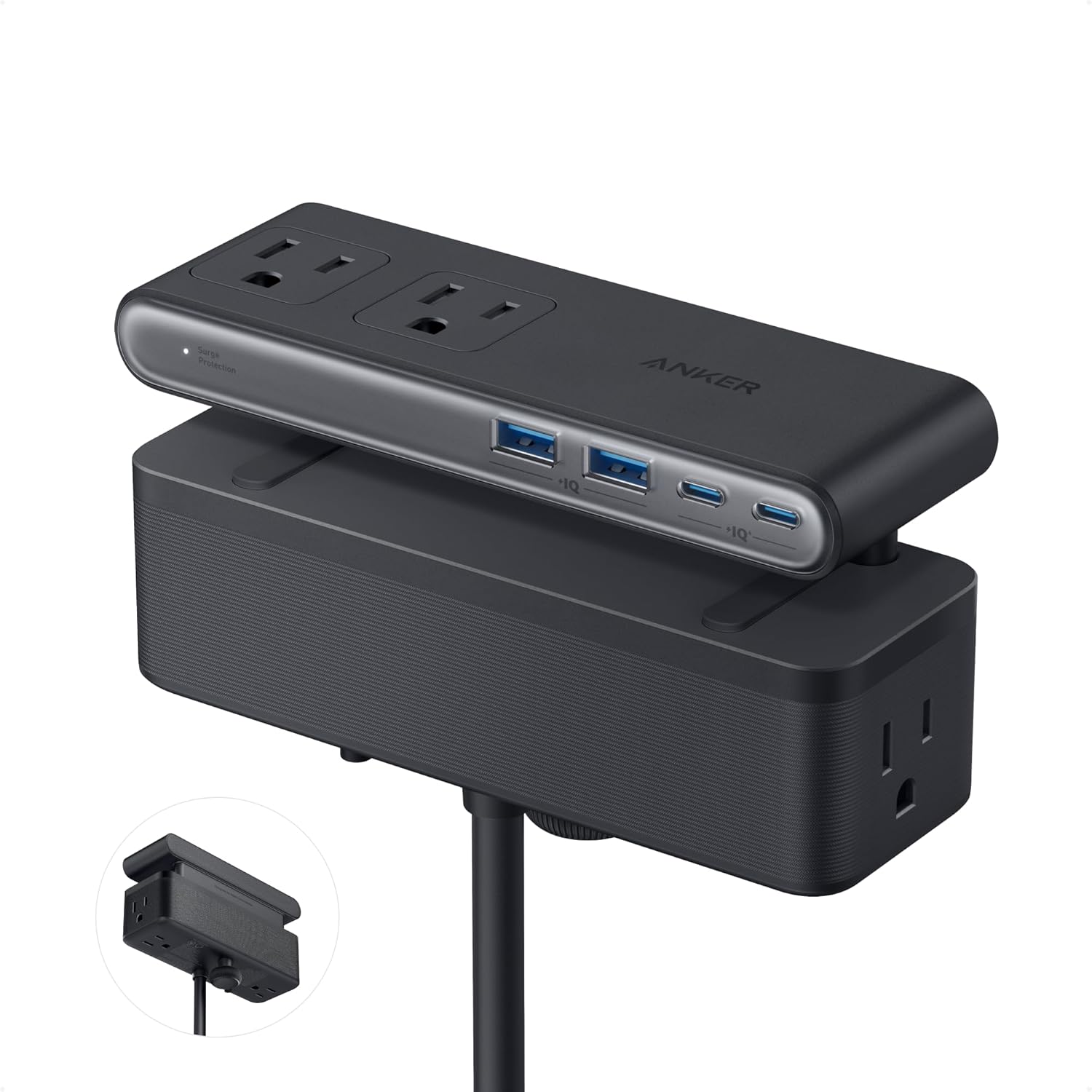
This is the only product in the group that changes the shape of a desk rather than tidying it. The clamp puts six AC outlets and four USB ports at forearm height on the desk edge, in two separated zones so the AC side and the USB side never compete for space. Anker makes one-hand operation an explicit claim: the clamp “holds securely, allowing you to plug or unplug devices with one hand without shifting”. Nothing else here can be used without looking.
It also has the numbers. The 1,500 J surge rating is five times the retractable model in the same range, the warranty is 24 months rather than 18, and the 4.8 Amazon average from 768 ratings is the highest in this comparison. USB-C output is 70 W using GaN, which suits an ultrabook and falls short of a 16-inch workstation laptop under load. The other check is a tape measure: it fits desk edges 0.6–1.8 in (15–45 mm) and is “not compatible with curved edges, edges sloped over 45°, or desks without an edge for clamping”.
Best for: A permanent desk with a straight edge 15–45 mm thick, and equipment worth a real surge rating.
Skip if: Your desk edge is curved, sloped over 45° or outside 15–45 mm, you hot-desk, or you need more than 70 W over USB-C.
Read the full Anker Nano Power Strip 10-in-1 (Desk Clamp) review →
Where to Buy — Anker Nano Power Strip 10-in-1 (Desk Clamp)
2. Anker Nano 7-in-1 Retractable — Best for Cable Tidiness
Price: $79.99 | Amazon rating: 4.6 from 832 ratings | Role: Best for cable tidiness | Key spec: 3 AC outlets + 4 USB, 100 W USB-C, two retracting cables
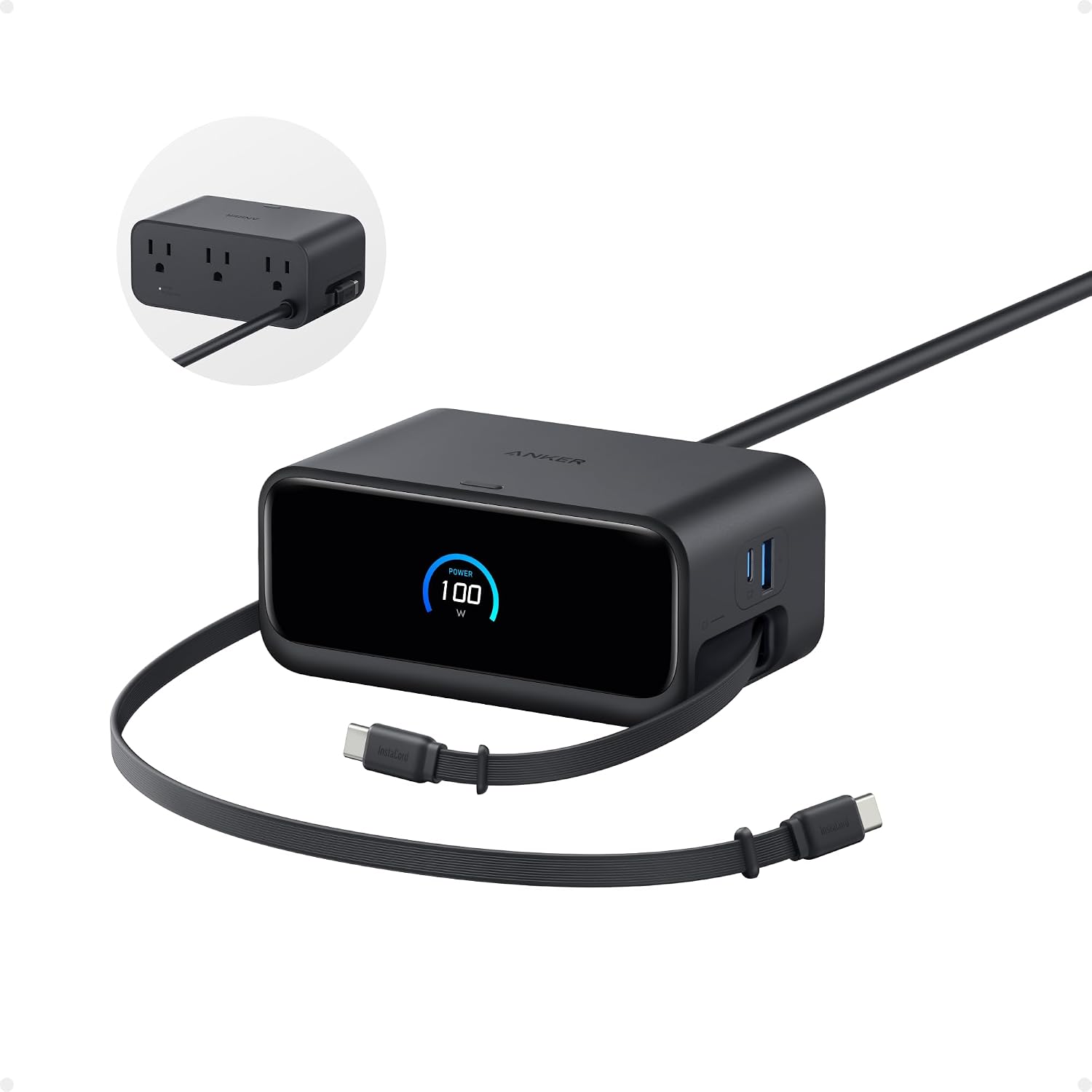
The problem this solves is cable custody, not wattage. Two USB-C cables live inside the housing and pull out to 2.3 ft (70 cm) before retracting in about a second, which means the two loosest leads on a desk acquire a permanent home. Around them sit one more USB-C, one USB-A and three AC outlets, with the AC and DC sides physically partitioned so a laptop brick cannot foul a phone cable.
Anker is unusually straight about the headline figure: each USB-C port gives up to 100 W when used alone, with power shared once several devices are attached, and the worked example is a 16-inch MacBook Pro to 50% in 35 minutes. The limits are price and reach. At $79.99 it is the most expensive thing here, the surge rating is only 300 J, and 70 cm of cable plus a recommended 3 ft to the outlet describes a specific desk. The listing’s specification table also states 240 volts on a unit sold into 120 V American sockets — read the label on the housing, not the table on the page.
Best for: A settled desk with a socket close by, where the irritation is loose cables rather than charging speed.
Skip if: You need reach beyond 2.3 ft of cable, a serious surge rating, or the most ports for your money.
Read the full Anker Nano Charging Station 7-in-1 (Retractable) review →
Where to Buy — Anker Nano Charging Station 7-in-1 (Retractable)
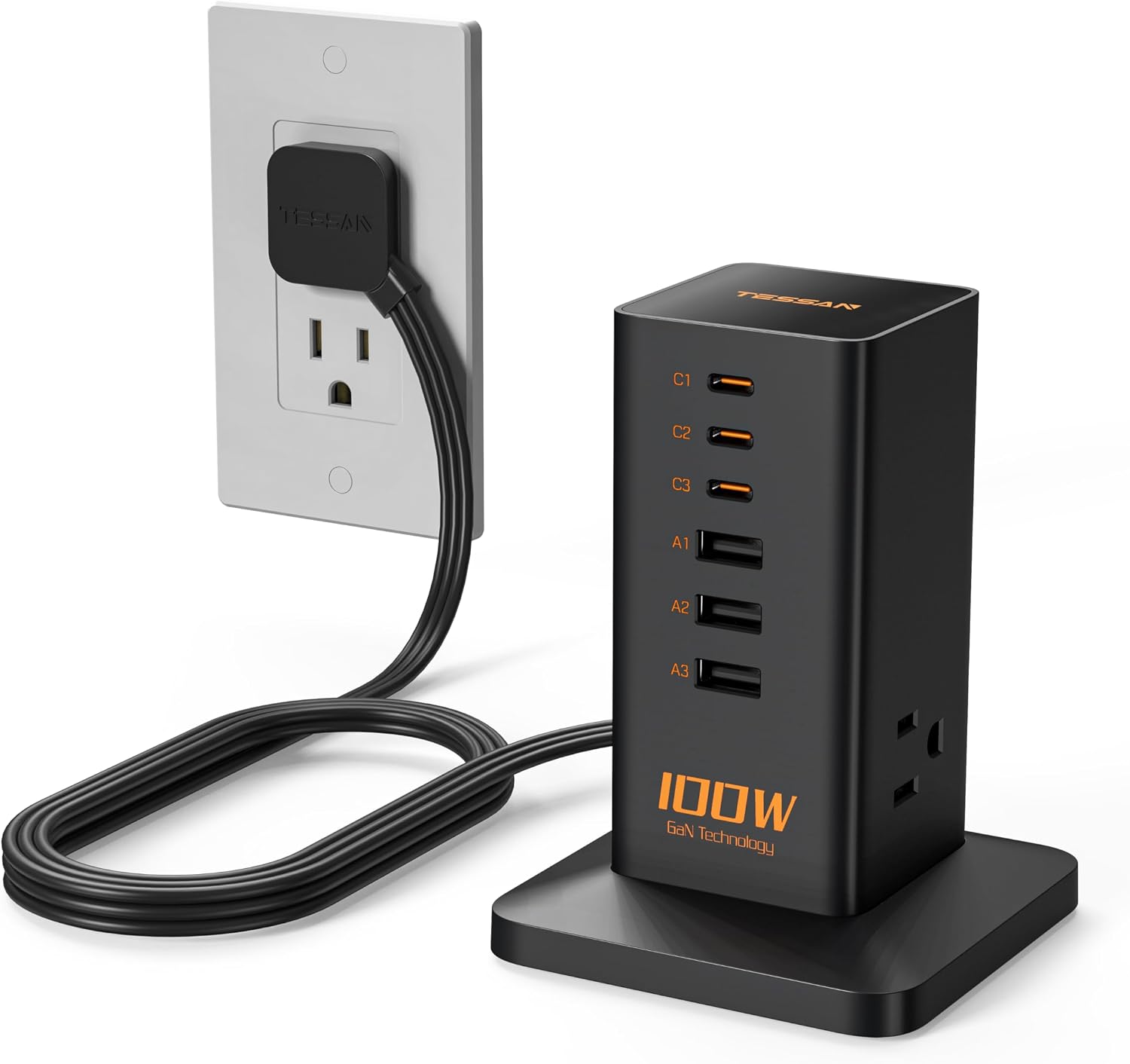
3. TESSAN 9-in-1 100W — Best Value Desk Charging Station
Price: $38.99 | Amazon rating: 4.6 from 357 ratings | Role: Best value | Key spec: 3 AC outlets + 6 USB, 100 W PD, GaN, 1,250 W AC
A vertical block that plugs straight into a receptacle and turns it into three AC outlets, three USB-C and three USB-A — nine devices at once, with no floor cable at all. For $38.99 that is the most capability per dollar in this comparison from a brand with a real rating count behind it. GaN internals and what the listing calls “dynamic temperature sensors” keep it cooler than the non-GaN blocks it competes with, and heat is what kills chargers.
Two things need reading carefully. The 100 W is a shared USB budget, and the AC side is rated 1,250 W in total — a monitor, a laptop brick and a lamp, not a heater. And the listing’s claim of “5 times faster than ordinary plug” has no stated baseline, so treat the specification table as the trustworthy part and the prose as marketing. There is also no joule-rated surge protection anywhere in the listing: the named protections are over-current, over-voltage, short-circuit and grounded, which is not the same thing.
Best for: An accessible socket and a need for quantity: nine ports for $38.99 is the best capability per dollar here.
Skip if: Your only socket is behind furniture, or you want a joule-rated surge suppressor.
Read the full TESSAN 9-in-1 100W Charging Station review →
Where to Buy — TESSAN 9-in-1 100W Charging Station
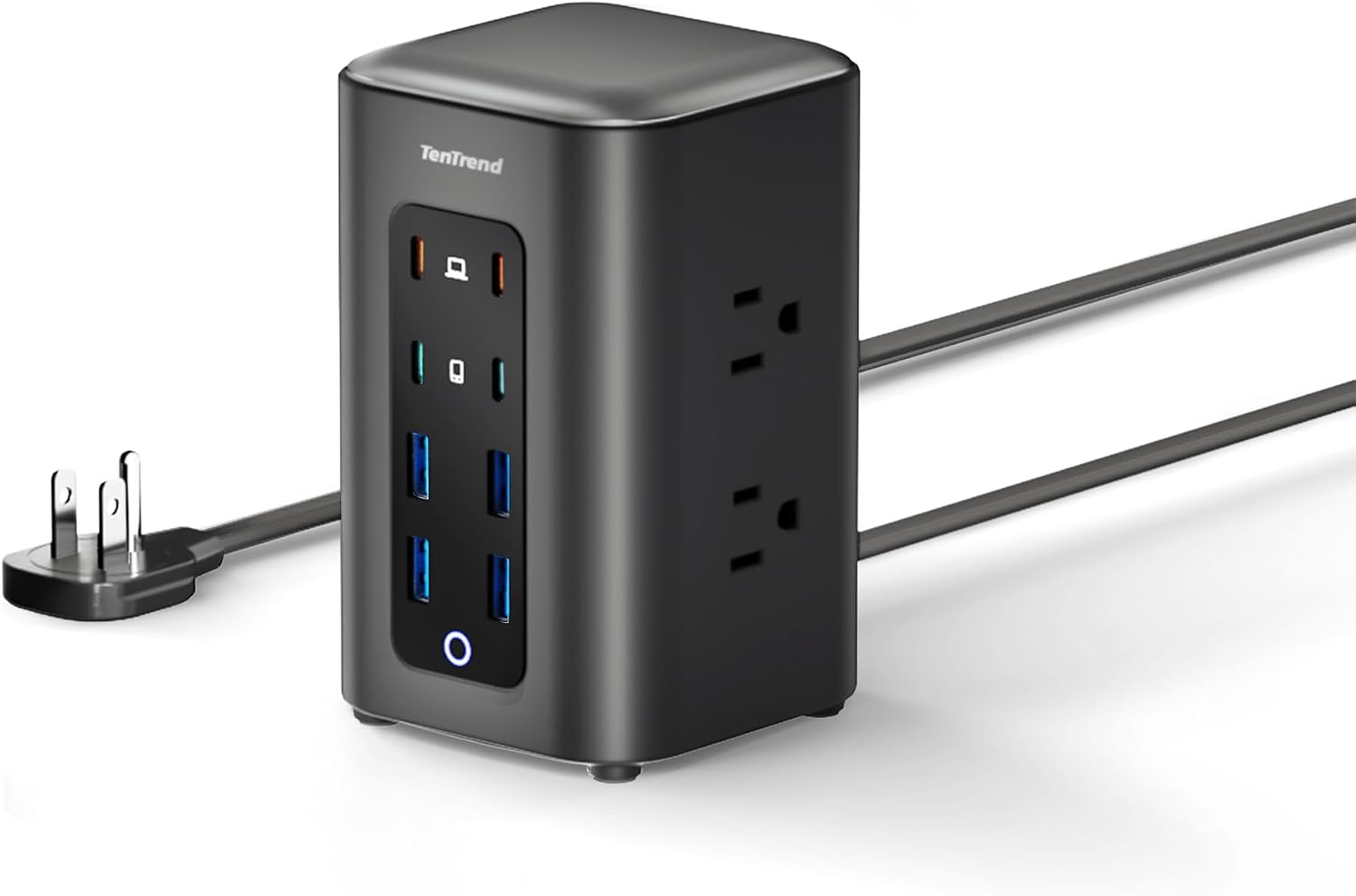
4. TenTrend 230W Tower — Most Ports for the Money
Price: $29.99 | Amazon rating: 4.5 from 375 ratings | Role: Most ports, lowest price | Key spec: 6 AC outlets + 8 USB (65/20/15 W tiers), flat plug
Fourteen devices at once for $29.99, on a 3.15-inch square footprint, standing 5.12 inches tall. Six AC outlets rated 1,250 W sit around the column and eight USB ports run up one face, and the smartest decision on the whole product is that those eight are colour-coded by speed: orange USB-C at 65 W for laptops, green USB-C at 20 W for phones, blue USB-A at 15 W for everything small. Eight identical-looking ports at three speeds would have been unusable.
The 0.31-inch flat plug matters more than it sounds, because it lets the desk sit against the wall and leaves the neighbouring socket free. What you give up is protection and headroom: no joule rating, 65 W rather than 100 W on the fast ports, and a top-heavy column once six thick plugs radiate from it. Six visible outlets is also an invitation, and a 1,500 W heater exceeds the whole unit’s rating on its own.
Best for: Ordinary desk electronics in quantity, at the lowest price, on a desk with a spare back corner.
Skip if: You want surge protection with a number attached, a 100 W laptop port, or a low centre of gravity.
Read the full TenTrend 230W Power Strip Tower review →
Where to Buy — TenTrend 230W Power Strip Tower
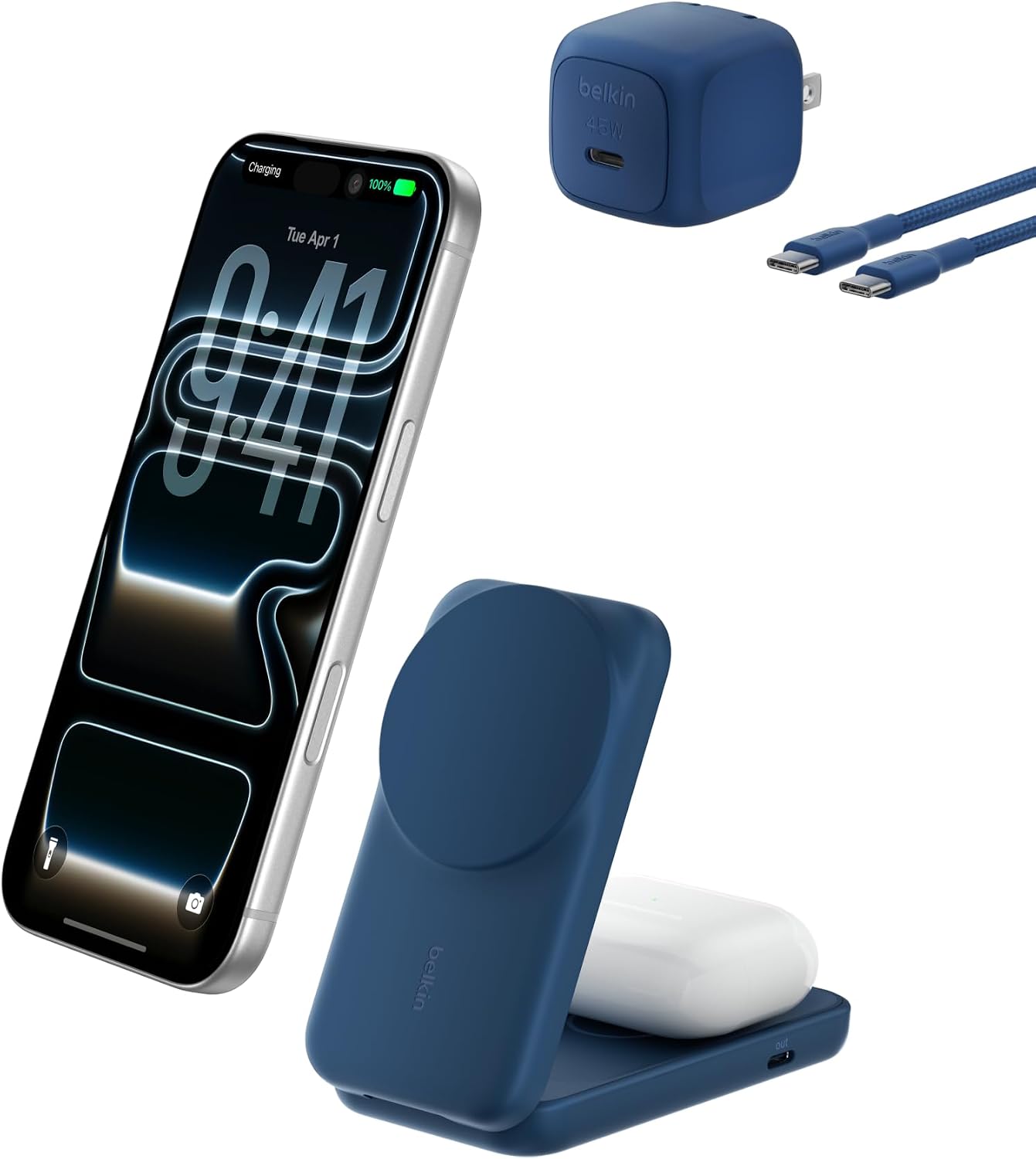
5. Belkin UltraCharge 2-in-1 — Best Wireless Option
Price: $53.99 | Amazon rating: 4.2 from 440 ratings | Role: Best wireless | Key spec: 25 W Qi2.2 magnetic + 5 W AirPods pad, folds flat
The only entry here that argues the cable is the thing to remove rather than organise. A foldable magnetic stand holds a phone at up to 65° in portrait or landscape and charges it at up to 25 W over Qi2.2 — the listing claims 0–50% in 29 minutes — with a 5 W pad beside it for AirPods, StandBy support so the phone becomes a clock while it charges, and named thermal management in the form of SmartProtect and ChillBoost passive cooling. A 45 W supply and a 5 ft cable are in the box.
Then the small print, which is why it scores lowest. In the listing’s own words, “fast charging is supported only on iOS 26 and newer, not iOS 18” — a software condition on the headline number. The built-in USB-C port is 5 W, a trickle for a watch rather than a charge for a tablet. It serves two devices, no AC appliances and no laptop, and its 4.2 average from 440 ratings is the softest here. It is an addition to a desk charging station setup, never the whole of one.
Best for: A recent iPhone on iOS 26 or later, AirPods, a case under 3 mm, and a wish to see the phone rather than lose it.
Skip if: You are on older iOS, use a thick or wallet case, or need to charge a laptop or a third device.
Read the full Belkin UltraCharge 2-in-1 Qi2.2 review →
Where to Buy — Belkin UltraCharge 2-in-1 Qi2.2
Desk Charging Station — Buyer’s Guide
Watts Are a Budget, Not a Promise
Almost every disappointment with a desk charging station comes from reading the headline wattage as a per-port figure. It is a total. A 100 W station gives one device 100 W when nothing else is plugged in, and splits it once a second device arrives. The number that actually matters is the maximum a single USB-C port can deliver, and in this group that runs from 5 W on the Belkin’s wired port to 100 W on the Anker retractable.
For context, the USB Implementers Forum’s Power Delivery specification now reaches “up to 240W of power over full featured USB Type-C® cable and connector”. No desk needs that. A desk needs 65 W for a thin laptop or 100 W for a large one, from a port you can identify, and it is the only wattage figure on a desk charging station worth comparing.
Surge Protection Only Counts When It Has a Number
This is the desk charging station specification most often missing, and the easiest to check: look for joules. A joule rating is how much energy the protective components can absorb across their lifetime before they quietly stop protecting anything. Only two products in this comparison publish one — 300 J on the retractable Anker and 1,500 J on the clamp model. The other three name over-current, over-voltage and short-circuit protection, which is worth having and is not a surge suppressor.
The practical rule: if the desk holds a monitor and a machine you would be upset to replace, buy the joules. If it holds a phone and a lamp, do not pay for them.
Decide Where the Ports Should Arrive
This is the question that separates the four wired shapes, and it is why the best desk charging station for one desk is the wrong one for another. A vertical block puts the ports at the socket — tidy if the socket is reachable, useless if it is behind a cabinet. A tower puts them on the desk on a 5 ft cord. A clamp puts them on the desk edge at hand height and never moves again. Retractable cables put the cable ends where you want them and hide the rest.
Measure before ordering if a clamp appeals. The Anker fits desk edges 0.6–1.8 in (15–45 mm) thick and rules out curved edges, slopes over 45° and desks with no lip. A bullnose-edged chipboard top is the common failure.
Know What a Power Strip Is Not For
Every product here is, in regulatory language, a relocatable power tap, and the rules are short. OSHA’s interpretation expects “UL-listed RPTs to be directly connected to a permanently installed branch circuit receptacle” and states that “they are not to be series-connected to other RPTs or connected to extension cords”. On load it is blunter still: “Power strips are not designed for high power loads such as space heaters, refrigerators and microwave ovens, which can easily exceed the recommended ampere ratings”.
The U.S. Fire Administration puts the same advice domestically — “Do not overload power strips” and “Never use an extension cord with a major appliance” — against a backdrop of “an estimated 24,200 residential building electrical fires” in 2021 causing “an estimated 295 deaths, 900 injuries and over $1.2 billion in property loss”. Desk electronics do not drive that figure; ignoring the rating on a desk charging station is how a desk joins it.
US vs UK: Plugs, Fuses and What Crosses the Atlantic
There is one difference that matters here and it is not the voltage. It is that a British plug contains a fuse and an American one does not. The Plugs and Sockets etc. (Safety) Regulations 1994 build British domestic wiring around “the British Standard Specification for 13 amp fused plugs and switched and unswitched socket-outlets BS 1363”, with the cartridge fuse itself specified separately under BS 1362 as a “general purpose fuse link for domestic and similar purposes (primarily for use in plugs)”. Every British plug therefore carries its own overcurrent protection, sized to the appliance behind it.
That exists because of the ring main: British houses commonly wire sockets in a loop protected at 30–32 A, far above what a charger’s flex could survive, so the protection has to sit in the plug. American branch circuits are radial and protected at 15 or 20 A, close enough to a flex’s rating that a fuse in the plug was never needed. The practical consequence: a US-market strip on a travel adaptor loses that fuse entirely, which is why a UK buyer should buy a BS 1363 desk charging station rather than adapt an American one.
Two smaller differences follow. American units are 120 V/60 Hz and British ones 230 V/50 Hz, so AC wattage ratings do not transfer — the 1,250 W ceiling here is a 125 V figure. And the vocabulary diverges: Americans say power strip and outlet, the British say extension lead and socket, and multi-plug is the British word for what America calls a desk charging station. Marking differs too: OSHA cites UL 1363 for relocatable power taps, where a British equivalent carries BS or BS EN marking.
Desk Charging Station — Which One Should You Buy?
Under $40 — the value tier. The TenTrend 230W power strip tower at $29.99 is the most ports for the least money, and the TESSAN 9-in-1 GaN station at $38.99 is the better buy if your socket is accessible and you would rather have nine ports at the wall than fourteen on the desk. Neither has a joule-rated surge suppressor, so neither belongs in front of expensive equipment.
$40–$60 — the specialist tier. Only the Belkin UltraCharge 2-in-1 sits here at $53.99, and it is an either/or rather than a step up: it charges two devices beautifully and a laptop not at all. Buy it as a second object on a desk that already has a strip, and only if your phone runs iOS 26 or later.
$60–$80 — the buy-once tier. The Anker Nano 10-in-1 desk clamp at $69.99 is the pick if your desk edge fits it, and the Anker Nano 7-in-1 retractable at $79.99 is the pick if it does not. Both are Anker, both carry a published joule rating, and between them they cover every desk in this article.
If you are equipping a desk from scratch rather than fixing its power, our desk setup essentials guide covers what goes on the surface and our hybrid work essentials guide covers what travels between two of them. This article deliberately asks a different question from both: not what belongs on the desk, but how you power what is already there. No product and no source is shared between the three.
Desk Charging Station — Frequently Asked Questions
What is a desk charging station?
A single unit that turns one wall socket into several, usually mixing AC outlets with USB-A and USB-C ports so phones, laptops and accessories all charge from one place. This comparison covers four wired shapes — clamp-mounted, retractable-cable, vertical and tower — plus one wireless magnetic stand.
Is a desk charging station the same as a docking station?
No. A desk charging station moves power; a docking station moves data too, adding video outputs, Ethernet and USB peripherals. If you want one cable to drive two monitors, buy a dock.
Which desk charging station has retractable cables?
The Anker Nano 7-in-1. Two USB-C cables live inside the housing and extend to 2.3 ft (70 cm). It is the only entry here with cables built in rather than supplied loose.
Can I clamp a charging station to my desk?
If the edge suits it. The Anker Nano 10-in-1 fits straight edges 0.6–1.8 in (15–45 mm) thick and rules out curved edges, slopes over 45° and desks with no lip. Measure the lip before ordering.
How many devices can a desk charging station charge at once?
Between two and fourteen. The Belkin handles a phone and AirPods; the TenTrend tower handles fourteen across six AC outlets and eight USB ports. All share a total wattage, so more devices means each charges more slowly.
Which one is best for an iPhone?
For wireless charging with StandBy, the Belkin, provided the phone runs iOS 26 or newer — the listing states that fast charging is “supported only on iOS 26 and newer, not iOS 18”. For a cable, any of the four wired stations charges an iPhone at full speed, since an iPhone never draws near their limits.
Why has my charging station stopped fast-charging?
Three common causes: another device joined and the wattage is now shared; the cable is a charge-only or low-wattage lead; or, on a wireless pad, the case is thicker than the stated 3 mm limit. Try one device, a known-good cable and no case before assuming a fault.
Do I need surge protection on a desk charging station?
If a monitor or a desktop machine is plugged in, yes, and look for a joule figure rather than the words “surge protection”. Only two products here publish one: 300 J and 1,500 J. For a phone and a lamp it is not worth paying for.
Desk Charging Station — Final Thoughts
The useful thing to take from five of these side by side is that a desk charging station is not really a charging product. It is a furniture product. All five charge a phone perfectly well; what separates them is where the ports end up, and that is decided by your desk, your socket and your edge profile rather than by watts. The Anker Nano 10-in-1 desk clamp wins overall because hand height beats every other location, and it comes second in this article’s practical ranking the moment your desk edge is curved.
The two specifications worth being strict about are the single-port USB-C wattage and the joule rating, because both are routinely absent or misread and both decide whether the thing does its job. Everything else is convenience, and convenience is worth paying for exactly as much as it annoys you today. If that is “quite a lot”, the retractable Anker or the clamp is money well spent; if it is “not much”, the $29.99 tower does nine-tenths of the work.
Sources and Further Reading
- OSHA — Compliance requirements for relocatable power taps or “power strips”
- U.S. Fire Administration — Appliance and electrical fire safety
- USB-IF — USB Charger (USB Power Delivery)
- The Plugs and Sockets etc. (Safety) Regulations 1994, regulation 3
Affiliate disclosure: Blue Rays Technologies earns a commission from qualifying purchases made through the Amazon links on this page, at no additional cost to you. Commission never affects a score or a ranking. Prices, ratings and specifications were read from the live listings on 27 September 2026 and change frequently.