
CloudValley Webcam Cover Slide Review — Best Ultra-Thin Metal Laptop Camera Cover?
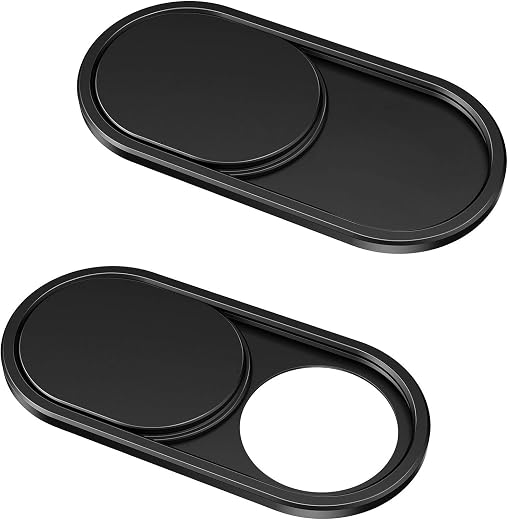
A small aluminium slider that does exactly one job properly at a price that makes deliberating pointless. At 0.6 mm it clears the lid gap on the overwhelming majority of laptops, the metal channel keeps its detents far longer than plastic does, and the indicator light stays visible so software activity is still detectable. The limits are the boundaries of the product rather than faults: it is adhesive-mounted, it does nothing about microphones, and very thin laptops should be measured first.
$6.99
CloudValley Webcam Cover Slide Review (2026) — Does 0.6 mm Really Close a Laptop?
The tape-over-the-camera habit is older than most laptops still in use, and it persists because it works. What it does not do is look like anything other than a person who has put tape on their laptop, and it leaves adhesive residue on the bezel that eventually collects dust into a grey smear around the lens.
A webcam cover slide is the tidy version of the same instinct: a thin frame that sticks to the bezel with a shutter you push across. CloudValley’s is aluminium rather than plastic, 0.023 inches thick, and comes two to a pack for around $7. With a 4.5 average from more than fifty-four thousand ratings it is the single most-reviewed product in this week’s batch, and thickness is the one specification that decides whether it works.
In short: the webcam cover slide earns 8.7/10 from the Blue Rays Technologies team. The rest of this review sets out exactly how that score was reached.
What is in this webcam cover slide review
Key Specifications
Published specifications for the webcam cover slide, taken from the manufacturer listing.
| Reviewed model | webcam cover slide |
| Brand | CloudValley |
| Model number | KZ-02 |
| Quantity | 2 covers per pack |
| Thickness | 0.023 inches (0.6 mm) |
| Material | Aluminium alloy |
| Colour | Black |
| Adhesive | 3M tape |
| Weight | 0.64 g each |
| Compatibility | MacBook, HP, Dell, Asus, Acer, Lenovo laptops, iPad, Surface Pro, Galaxy Tab, Fire HD |
| Indicator light | Not obstructed |
| Warranty | 1 year |
| Amazon rating | 4.5 / 5 from 54,785+ ratings |
Everything that follows is based on those published figures for the webcam cover slide, together with aggregated owner feedback from verified buyers.
Why 0.6 mm Decides Whether a Webcam Cover Slide Works
Every complaint anyone has ever had about a camera cover comes down to thickness. A laptop lid closes onto the palm rest with a clearance measured in fractions of a millimetre, and a cover thicker than that clearance does one of two things: it stops the lid closing flush, or it presses into the screen and leaves a permanent bright mark where the backlight has been compressed.
At 0.023 inches this sits at the thin end of what is manufactured. It is not the thinnest available — there are 0.02 inch plastic models — but it is thin enough for the overwhelming majority of laptops, and the aluminium construction means it achieves that thickness without becoming flimsy.
The one category to check before buying is very thin ultrabooks with near-zero bezel gaps, and any laptop where the camera sits in a notch. If your lid already closes with visible keyboard contact on the screen, measure before you stick anything to the bezel. That caution applies to every webcam cover slide on the market, not just this one.
Aluminium Versus Plastic, and the Shutter Feel
The material difference is not cosmetic. A plastic slider’s shutter runs in a plastic channel, and after a few hundred cycles the channel wears and the shutter either sticks or wanders open on its own. An aluminium slider keeps a defined detent at both ends for far longer, which is the difference between a cover you trust and one you check.
The shutter here has a positive stop at each end and enough friction that it does not creep. That matters because the whole security value of a physical cover is that it is unambiguous: you can see across a room whether it is open or shut, which is the one thing no software indicator can promise.
The trade is that metal is harder on a screen if the fit is wrong. A plastic cover pressed against glass by a closing lid is unpleasant; a metal one is worse. The thinness is what prevents this, but it means the measuring step is not optional.
Adhesive, Removal and Living With It
It attaches with 3M tape, aligned over the lens and pressed for about fifteen seconds. The instruction to press firmly is the one people skip and then complain about, because the adhesive needs contact time and pressure to bond to a bezel that has been touched by fingers.
Clean the bezel with an alcohol wipe first. Laptop bezels carry skin oil from years of the lid being opened, and adhesive that fails almost always failed on a surface that was not cleaned. That single step is the difference between a cover that lasts years and one that falls off in a bag.
Removal, when it comes, is a slow peel with a fingernail while warming the metal with a hairdryer on low. Residual 3M adhesive comes off with isopropyl alcohol on a cloth. It is a fifteen-minute job done carefully and a scratched bezel done impatiently.
Limitations and Compromises
No product is right for everyone, and these are the places where the webcam cover slide asks something back from the buyer.
It is still a sticker. However well made the slider is, it is held on by adhesive tape, and adhesive on a hinged surface that gets opened and closed thousands of times will eventually let go. Two per pack is a reasonable acknowledgement of that.
Very thin laptops remain a genuine risk. If your machine already closes with the keyboard touching the screen, adding 0.6 mm above the lens is the wrong side of a margin you do not have, and a pressure mark on a display is not repairable.
It covers the camera and does nothing about the microphone. A physical shutter is an honest solution to exactly one privacy problem, and anyone whose concern extends to audio needs a different answer entirely.
The listing carries a long list of specifications inherited from a camera-accessory template — sensor type, video resolution, memory card class — none of which describes a piece of aluminium with a sliding shutter. Ignore all of it; the only figures that matter are thickness, material and pack quantity.
Fitting, Cleaning and Removing It Safely
Getting the best out of the webcam cover slide over a long life comes down to a few simple habits.
Clean the bezel with an alcohol wipe and let it dry completely before fitting. Almost every reported adhesive failure traces back to skipping this, because bezels collect skin oil from being handled every day.
Align the aperture over the lens with the shutter open, then press firmly for a full fifteen seconds. Do not close the lid for an hour afterwards, so the adhesive has time to cure without being loaded.
Keep the shutter channel free of grit by wiping it with a dry cloth occasionally. Sand or crumbs in an aluminium channel are what turn a smooth slider into a stiff one.
To remove it, warm the metal gently with a hairdryer on its low setting, peel slowly with a fingernail rather than a blade, and lift the remaining adhesive with isopropyl alcohol on a cloth.
Who Should Buy It?
The webcam cover slide suits some households far better than others. It is a clear buy if you recognise yourself here:
- You currently use tape and want something that looks deliberate instead
- You want a physical, visible guarantee rather than a software indicator light
- You have a standard laptop rather than an ultra-thin machine with no bezel gap
- You want two covers so a tablet or second laptop is covered as well
- You prefer aluminium over plastic for a part that slides thousands of times
The webcam cover slide is the wrong purchase if any of the following apply:
- Your laptop lid already closes with the keyboard touching the screen
- Your camera sits in a notch or under the display glass rather than on a bezel
- You are also worried about microphone access, which no shutter addresses
- You dislike anything adhesive on a machine you intend to resell
The Verdict
For $7 this does exactly what it claims with no meaningful compromise. The aluminium construction gives a shutter that keeps its detents far longer than plastic, 0.6 mm clears the lid gap on the overwhelming majority of laptops, and the indicator light stays visible so you can still tell when software has the camera open. Two per pack means a tablet gets covered too.
It cannot escape being an adhesive accessory, and it does nothing about microphones, and neither of those is a fault so much as the boundary of the product. A 4.5 average across more than fifty-four thousand ratings is the largest evidence base in this catalogue and it points the same way: this is a small thing that works.
Review score for the webcam cover slide: 8.7/10. Strong on thickness, materials and price; the compromise is adhesive mounting, no microphone protection and a fit that very thin laptops should measure first. Blue Rays Technologies researches independently and earns a commission from qualifying purchases, which never affects the score.
If you want to see the current price, the full options and the latest buyer feedback, it is listed as the CloudValley Metal Laptop Camera Cover Slide, 2 pack on Amazon. For the wider set of basic protections that a camera cover is only one small part of, the national guidance is CISA’s Secure Our World campaign.
Frequently Asked Questions
The questions buyers ask most often about the webcam cover slide, answered plainly.
Will a webcam cover slide stop my laptop closing?
At 0.023 inches, not on most laptops. The clearance between a closed lid and the palm rest is usually more than that. The exceptions are very thin ultrabooks and machines whose lids already close with visible keyboard contact on the screen — measure those before fitting anything.
Does it block the camera indicator light?
No. The cover sits over the lens aperture and leaves the indicator LED visible, so you can still see when an application has activated the camera even while the shutter is closed.
How do I remove it without damaging the bezel?
Warm the metal with a hairdryer on low, then peel slowly with a fingernail rather than anything sharp. Remove the adhesive residue with isopropyl alcohol on a soft cloth. Done patiently it leaves no mark.
Does it protect against microphone eavesdropping?
No, and no physical camera cover does. A shutter solves exactly one problem: the camera. If audio access is also a concern, that requires operating-system permission controls or a hardware microphone switch, which is a different product entirely.
Related Reviews
If the webcam cover slide is not quite the right fit, these Blue Rays Technologies reviews cover the nearest alternatives.
- Logitech C920x review — the external camera this covers instead
- Logitech Brio 101 review — a budget webcam with its own privacy shutter
- Swivel Laptop Stand review — the other desk upgrade from this week
Last updated: 29 August 2026. Pricing and availability for the webcam cover slide change frequently; check the retailer listing for the current figure.
User Reviews
Be the first to review “CloudValley Webcam Cover Slide Review — Best Ultra-Thin Metal Laptop Camera Cover?”
Related Products

$6.99

There are no reviews yet.