
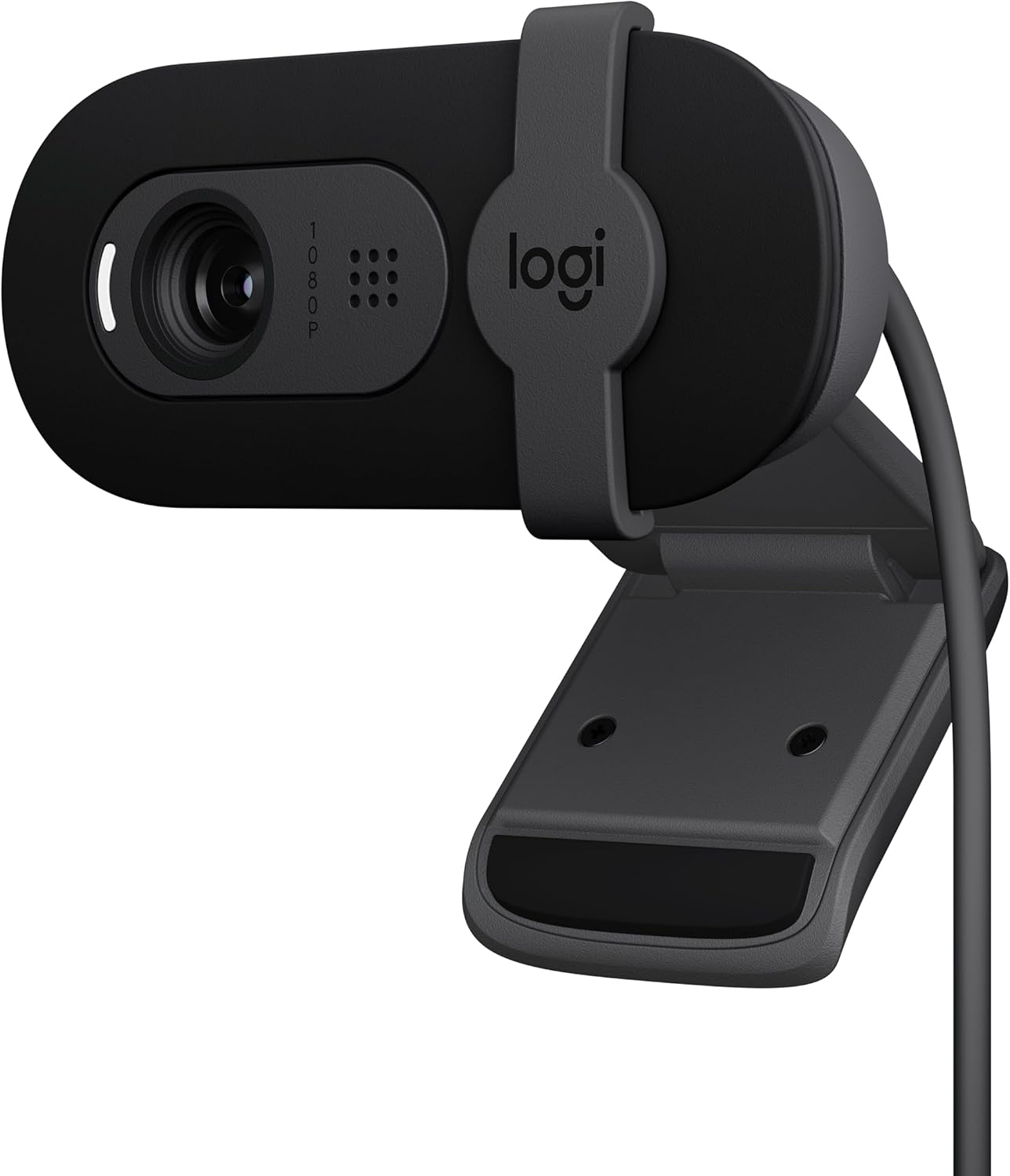
Logitech Brio 101 Full HD Webcam — Best Budget Webcam Under $50 for Video Calls
The Logitech Brio 101 is the best budget webcam under $50 — delivering Full HD 1080p video at 30fps with Logitech’s RightLight auto-light balance technology that boosts brightness by up to 50% and reduces shadows compared to previous-generation Logitech webcams. Features a built-in privacy shutter that slides across the lens when you are not on a call, a built-in mono microphone for clear voice pickup, a 58-degree field of view optimized for single-person desk setups, fixed-focus lens tuned for standard desk distance, plug-and-play USB-A connectivity requiring zero driver installation, and a compact universal clip mount that attaches to monitors and laptop screens. Made with a minimum of 77% post-consumer recycled plastic and FSC-certified paper packaging. Compatible with Microsoft Teams, Zoom, Google Meet, Nintendo Switch 2 GameChat, and all major video calling platforms on Windows, macOS, and ChromeOS. Customizable via Logi Options+ software. Recommended by Digital Camera World, Stream Tech Reviews, and Network Gear Review as the best ultra-budget webcam for daily video calls, online classes, and basic streaming.
Original price was: $39.99.$35.99Current price is: $35.99.
Logitech Brio 101 Review — Best Budget Webcam Under $50 for Daily Video Calls?
The Logitech Brio 101 is the best budget webcam under $50 in 2026 — and one of the most impressive sub-$40 webcams ever made by a major brand. It delivers Full HD 1080p video at 30 frames per second, a built-in privacy shutter, automatic light correction, and plug-and-play USB-A connectivity in a package that weighs just 2.65 ounces. For anyone upgrading from a grainy built-in laptop camera, the Brio 101 is the fastest and most affordable path to looking professional on Zoom, Microsoft Teams, and Google Meet.
According to International Telecommunication Union (ITU) video communication standards, Full HD 1080p resolution remains the professional benchmark for video conferencing in 2026. The Brio 101 meets this standard at roughly half the price of mid-range webcams — making it the best value proposition for workers, students, and casual users who need a meaningful upgrade without spending $70 or more.
Video Quality — Full HD 1080p with RightLight Auto-Light Balance
The Brio 101 captures video at 1920 x 1080 resolution at 30 frames per second — the same Full HD resolution used by webcams costing twice as much. The image is sharp, colors are natural, and skin tones are accurately reproduced. What sets the Brio 101 apart from other budget webcams is Logitech’s RightLight auto-light balance technology. RightLight detects your room lighting and automatically boosts brightness by up to 50 percent while reducing shadows — so even in a dimly lit home office, your face stays clearly visible without the grainy, washed-out look that plagues cheaper cameras.
The 58-degree field of view is narrower than the Logitech C920x’s 78 degrees, but this is intentional. A tighter field of view frames a single person cleanly at standard desk distance, keeping the focus on you rather than including distracting background elements. For solo video calls, online classes, and one-on-one meetings, this narrower angle is actually an advantage — it mimics the framing of a professional headshot rather than a wide-angle security camera.
Fixed-Focus Lens — Sharp and Consistent at Desk Distance
The Brio 101 uses a fixed-focus lens optimized for standard desk sitting distance — roughly 18 to 36 inches from the camera. Within this range, the image stays consistently sharp without any focus hunting, pulsing, or momentary blurring that can occur with autofocus cameras on cheaper hardware. If you sit at a desk for calls and do not regularly move around the room, fixed focus is indistinguishable from autofocus in daily use. Objects held very close to the lens will appear out of focus, but this is rarely an issue during normal video calls.
Built-In Privacy Shutter — Physical Camera Cover
A physical privacy shutter is built directly into the Brio 101 — a small slider located above the lens that you slide left or right to completely block the camera. Unlike software-based privacy indicators or stick-on lens covers, this integrated shutter is always accessible, never falls off, and provides absolute certainty that nothing is being recorded when closed. This feature alone is a significant advantage over the more expensive Logitech C920x, which does not include a privacy shutter at all.
Audio Performance — Built-In Mono Microphone
The Brio 101 includes a single omnidirectional microphone that captures your voice clearly during video calls. While it is a mono microphone rather than the stereo dual-mic setup found on the C920x, it provides more than adequate audio for everyday meetings, online classes, and casual conversations. Your colleagues and classmates will hear you clearly without needing to purchase a separate external microphone. For professional streaming or podcast recording, pairing the Brio 101 with a dedicated USB microphone will yield better results.
Sustainability — Eco-Friendly Materials and Packaging
The Brio 101 is built with a minimum of 77 percent post-consumer recycled plastic — giving a second life to end-of-life plastic from old consumer electronics. The paper packaging is FSC-certified, sourced from responsibly managed forests. According to the U.S. Environmental Protection Agency (EPA), sustainable materials management in electronics manufacturing significantly reduces carbon footprint and resource depletion. Logitech’s commitment to recycled materials in the Brio 101 makes it one of the most environmentally responsible webcams available at any price point — a meaningful consideration for eco-conscious buyers and organizations with sustainability procurement policies.
Setup and Compatibility — True Plug and Play
The Brio 101 requires zero driver installation. Connect the non-detachable 5-foot USB-A cable to any Windows, macOS, or ChromeOS computer and the webcam is immediately recognized. The universal clip mount attaches securely to monitors and laptop screens of any thickness. Supported platforms include Zoom, Microsoft Teams, Google Meet, Webex, Skype, Discord, and Nintendo Switch 2’s new GameChat mode. For advanced customization — including brightness, contrast, and white balance adjustments — download the free Logi Options+ software from Logitech’s website.
Logitech Brio 101 Specifications
| Specification | Detail |
|---|---|
| Video Resolution | Full HD 1080p / 30fps |
| Lens | Fixed-focus lens (optimized for desk distance) |
| Field of View | 58 degrees |
| Autofocus | No (fixed focus) |
| Light Correction | RightLight auto-light balance (up to 50% brightness boost) |
| Microphone | Built-in mono omnidirectional mic |
| Privacy Shutter | Yes — integrated physical slider |
| Connection | USB-A (non-detachable, 5 ft / 1.5m cable) |
| Mount | Universal clip (monitor and laptop — no tripod mount) |
| OS Compatibility | Windows, macOS, ChromeOS |
| App Compatibility | Zoom, Teams, Google Meet, Skype, Discord, Nintendo Switch 2 GameChat |
| Software | Logi Options+ (free download for advanced settings) |
| Sustainability | 77% post-consumer recycled plastic, FSC-certified packaging |
| Dimensions | 1.26 x 2.87 x 2.62 inches (31.9 x 72.9 x 66.6 mm) |
| Weight | 2.65 oz (75g) |
| Warranty | 1-year limited warranty |
Who Should Buy the Logitech Brio 101?
The Logitech Brio 101 is the best budget webcam under $50 for remote workers, hybrid employees, online students, casual video callers, and anyone who wants a significant upgrade over their built-in laptop camera at the lowest possible price. It is an especially strong choice for users who value physical privacy (built-in shutter), environmental sustainability (77% recycled plastic), and simplicity (fixed focus, plug and play, no configuration needed). The Brio 101 is also an excellent secondary webcam for multi-camera setups, desktop machines that lack a built-in camera, and anyone who needs a reliable backup webcam that just works.
What to Consider Before Buying
The Brio 101 uses a fixed-focus lens — it does not autofocus. If you frequently stand up, move around, or hold objects close to the camera during calls, the Logitech C920x with HD autofocus is the better choice at roughly $30 more. The 58-degree field of view is too narrow to comfortably fit two people in the frame — for pair presentations or group calls, the wider 78-degree C920x or 82-degree Razer Kiyo X will serve you better. The non-detachable 5-foot USB-A cable cannot be replaced or extended, and there is no tripod mount for alternative positioning. These are reasonable trade-offs for a webcam that frequently drops to $24.99 on sale — delivering 1080p video quality, privacy shutter, and Logitech build quality at a price that competitors from lesser-known brands struggle to match.
- International Telecommunication Union (ITU) — video conferencing resolution standards
- URL: https://www.itu.int/en/ITU-T/Pages/default.aspx
- Anchor text: embed naturally in review content referencing HD video standards
- U.S. Environmental Protection Agency (EPA) — sustainable electronics and recycled materials
- URL: https://www.epa.gov/smm/sustainable-materials-management-basics
- Anchor text: embed naturally in review content referencing eco-friendly manufacturing
User Reviews
Be the first to review “Logitech Brio 101 Full HD Webcam — Best Budget Webcam Under $50 for Video Calls”
Related Products

Original price was: $39.99.$35.99Current price is: $35.99.

There are no reviews yet.