
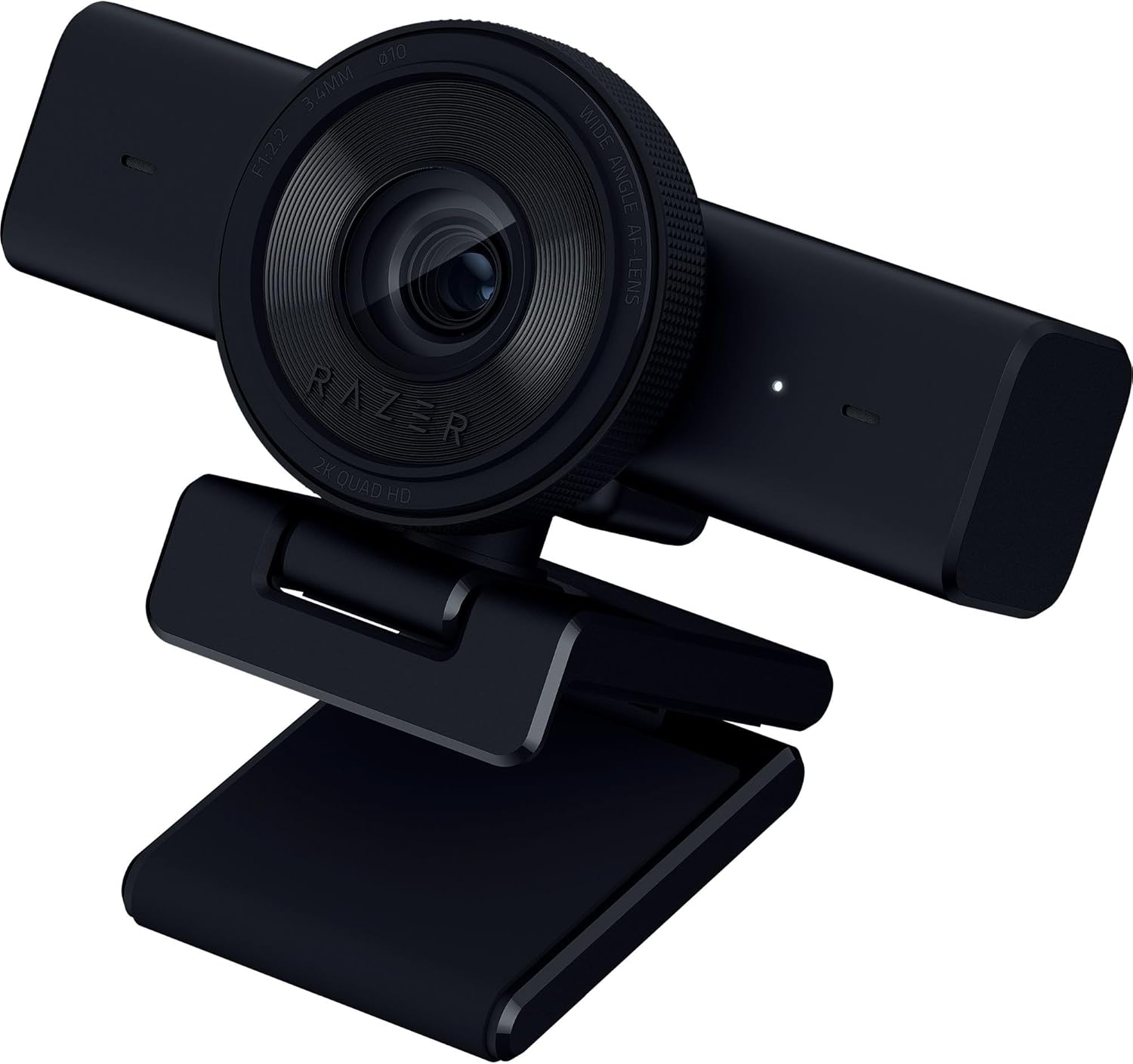
Razer Kiyo V2 X Streaming Webcam — Best 1440p Streaming Webcam Under $100
The Razer Kiyo V2 X is the best 1440p streaming webcam under $100 — delivering QHD 1440p video at 60 frames per second for ultra-smooth, high-resolution streaming and video calls. Features a 3.7 MP sensor with an 80-degree wide-angle field of view, fast and accurate autofocus with manual focus override via Razer Synapse, built-in omnidirectional stereo microphone capturing 16-bit/48kHz audio, integrated privacy shutter, and a compact L-shape mount with 1/4-inch tripod thread for flexible positioning. Weighs just 160 grams and connects via USB-A with a 1.5-meter non-detachable cable. Fully customizable through Razer Synapse software with brightness, contrast, sharpness, white balance, and built-in image presets. Available in Black, White, and Quartz. Compatible with OBS, XSplit, Streamlabs, Discord, Zoom, Microsoft Teams, and all major streaming and conferencing platforms. Reviewed by PC Gamer, How-To Geek, MMORPG.com, and Stream Tech Reviews as a capable mid-range streaming webcam for gamers and content creators who want higher-than-1080p resolution without stepping into the 4K price range.
Razer Kiyo V2 X Review — Best 1440p Streaming Webcam Under $100?
The Razer Kiyo V2 X is the best QHD streaming webcam under $100 in 2026 — and the most affordable way to stream at 1440p resolution with 60 frames per second. While most webcams in this price range cap out at 1080p, the Kiyo V2 X pushes past Full HD with a sharper, more detailed QHD image that makes your facecam visibly crisper on Twitch, YouTube, and Discord streams. For gamers and content creators who want to look better on camera without stepping into the $150+ 4K webcam tier, the Kiyo V2 X hits a compelling middle ground.
According to International Telecommunication Union (ITU) video quality benchmarks, QHD 1440p resolution delivers approximately 78 percent more pixels than standard 1080p — a meaningful visual upgrade that is immediately noticeable in side-by-side comparisons, especially when streaming gameplay footage where the facecam shares screen space with high-resolution game visuals.
Video Quality — QHD 1440p at 60 Frames Per Second
The Razer Kiyo V2 X captures video at 2560 x 1440 resolution at 60 frames per second — or 1080p at 60fps if you prefer lower bandwidth usage. The 3.7 MP sensor with f/2.2 aperture and 3.4mm focal length produces a sharp, detailed image with natural colors in well-lit environments. At 60fps, motion during streams appears buttery smooth — hand gestures, facial expressions, and quick movements look natural rather than choppy, which is a significant advantage over 30fps webcams for live content where viewer engagement depends on visual fluidity.
The 80-degree wide-angle field of view captures more of your setup, background, and streaming environment compared to narrower webcams like the Logitech Brio 101 (58 degrees). This wider angle is ideal for streamers who want to show off their gaming station, LED lighting, or room aesthetic as part of their brand. For tighter framing, you can crop the image within OBS or Razer Synapse to dial in the exact composition you want.
Autofocus — Fast Tracking with Manual Override
The Kiyo V2 X features both automatic and manual focus modes. In autofocus mode, the camera tracks your face and keeps it sharp during movement — useful if you lean forward, gesture, or shift positions during long streaming sessions. Autofocus response is generally quick, locking on within about one second after movement. For streamers who prefer absolute stability, switching to manual focus in Razer Synapse lets you lock the focus distance at your exact desk position, eliminating any focus hunting entirely. Note that Razer Synapse’s advanced settings — including manual focus — are currently available on Windows only. Mac users get plug-and-play video without software customization.
Built-In Stereo Microphone — Backup Audio for Streamers
The Kiyo V2 X includes a built-in omnidirectional stereo microphone capturing 16-bit/48kHz audio. For most streamers running a dedicated USB microphone or headset, this serves as reliable backup audio. For video calls, online meetings, and casual Discord conversations, the built-in mic provides clear voice pickup without requiring any external equipment. Audio quality is acceptable for conferencing but not broadcast-grade — serious streamers and podcasters should continue using a dedicated microphone for primary audio.
Streaming Integration — Razer Synapse and Platform Compatibility
The Kiyo V2 X is built for the streaming workflow. Razer Synapse software provides granular control over brightness, contrast, saturation, sharpness, white balance, and gain — plus built-in image presets that let you switch between optimized profiles for different streaming scenarios with a single click. The webcam works natively with OBS Studio, XSplit, Streamlabs, Discord, Zoom, Microsoft Teams, Google Meet, and every major streaming and conferencing platform.
Data from the Entertainment Software Association (ESA) shows that live game streaming continues to grow year over year, with millions of active streamers broadcasting daily across Twitch, YouTube, and Kick. The Kiyo V2 X positions itself as the entry point for streamers who want to upgrade from 1080p to QHD without the cost and complexity of 4K cameras or DSLR-based setups.
Privacy Shutter and Build Quality
An integrated privacy shutter slides across the lens to physically block the camera when not in use — no software workaround needed, no stick-on covers required. The compact body weighs just 160 grams and mounts via an L-shape clip that attaches to any monitor or laptop screen. A 1/4-inch tripod thread on the mount provides additional positioning flexibility for streamers using camera arms, tripods, or overhead rigs. The webcam is available in three colors — Black, White, and Quartz — allowing you to match your streaming setup aesthetic.
Razer Kiyo V2 X Specifications
| Specification | Detail |
|---|---|
| Video Resolution | QHD 1440p / 60fps or 1080p / 60fps |
| Sensor | 3.7 MP (1/3-inch sensor, f/2.2 aperture) |
| Field of View | 80 degrees (wide angle) |
| Focus | Autofocus + manual focus (via Razer Synapse on Windows) |
| Focal Length | 3.4 mm (25mm full-frame equivalent) |
| HDR | Not supported (available on Kiyo V2) |
| Microphone | Omnidirectional stereo mic (16-bit / 48kHz) |
| Privacy Shutter | Yes — integrated physical slider |
| Connection | USB-A (non-detachable, 1.5m / 57-inch cable, USB 2.0) |
| Mount | L-shape clip mount + 1/4-inch tripod thread |
| Software | Razer Synapse (Windows only for advanced settings) |
| Platform Compatibility | OBS, XSplit, Streamlabs, Discord, Zoom, Teams, Google Meet |
| Colors Available | Black, White, Quartz |
| Dimensions | 67 x 67.8 x 109 mm (2.6 x 2.7 x 4.3 inches) |
| Weight | 160g (5.6 oz) |
| Warranty | 2-year limited warranty |
Who Should Buy the Razer Kiyo V2 X?
The Razer Kiyo V2 X is the best streaming webcam under $100 for Twitch streamers, YouTube content creators, Discord community hosts, and gamers who want a meaningful resolution upgrade beyond 1080p without paying 4K prices. It is especially well-suited for streamers who already own a dedicated USB microphone and need a camera-first solution with Razer Synapse integration, manual focus control, and 60fps smoothness. The 1/4-inch tripod thread makes it compatible with camera arms and streaming rigs, giving it flexibility that clip-only webcams cannot match. If you already use Razer peripherals and Razer Synapse, the Kiyo V2 X integrates seamlessly into your existing ecosystem.
What to Consider Before Buying
The Kiyo V2 X uses a smaller 1/3-inch sensor with an f/2.2 aperture — which means low-light performance is noticeably weaker than the Logitech C920x or the Razer Kiyo Pro line. If you stream in a dimly lit room without dedicated lighting, you will see visible grain and noise in your video. Investing in a basic ring light or key light is strongly recommended alongside this webcam. The autofocus can be aggressive, readjusting frequently with small movements — streamers who find this distracting should switch to manual focus via Synapse. Advanced Synapse features are Windows-only, so Mac users lose access to manual focus, presets, and fine-tuning controls. At $99.99, the Kiyo V2 X also competes directly with budget 4K webcams that have appeared on the market in 2026 — so consider whether QHD resolution at 60fps or 4K resolution at 30fps better fits your content style before purchasing.


There are no reviews yet.