
Rioddas External CD/DVD Drive Review — Best USB 3.0 Optical Drive for Laptops?
$21.99
Rioddas External CD/DVD Drive Review (2026) — Who Still Needs an Optical Drive?
Laptops stopped shipping with disc drives more than a decade ago, and for most people that was no loss at all. Then a box comes down from the loft: family photographs burned to CD in 2007, a software licence on a disc, a parent’s music collection, wedding video DVDs, a games archive. Suddenly the missing drive is the only thing standing between you and a decade of data.
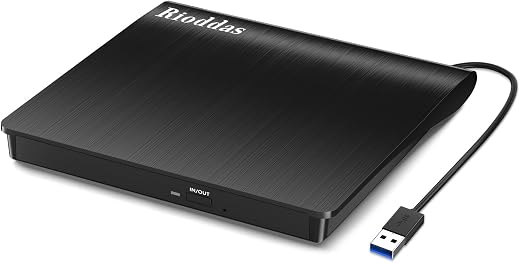
External optical drives are a small, cheap, unglamorous category, and this is its best-selling entry. The Rioddas external CD DVD drive is a USB 3.0 reader and writer with an embedded cable, a physical eject button and support for Windows, macOS and Linux. Its 4.3-star average from more than 40,000 Amazon ratings makes it one of the most reviewed computer accessories on the platform.
In short: the Rioddas external CD DVD drive earns 8.6/10 from the Blue Rays Technologies team. The rest of this review sets out exactly how that score was reached.
What is in this Rioddas external CD DVD drive review
Key Specifications
Published specifications for the Rioddas external CD DVD drive, taken from the manufacturer listing.
| Reviewed model | Rioddas external CD DVD drive |
| Brand | Rioddas |
| Interface | USB 3.0 Type-A, backwards compatible with USB 2.0 |
| Transfer rate | Up to 5 Gbps |
| Write speed | Max 24x CD / 8x DVD |
| Read speed | Max 24x CD / 8x DVD |
| Buffer | 2 MB |
| Formats | CD-ROM/R/RW, DVD-ROM/R±RW/R±DL, VCD |
| Operating systems | Windows 11/10/8.1/7/Vista/XP, macOS 10.16+, Linux |
| Power | Bus powered, no adapter needed |
| Cable | Embedded, stows in the body |
| Amazon rating | 4.3 / 5 from 40,600+ ratings |
Everything that follows is based on those published figures for the Rioddas external CD DVD drive, together with aggregated owner feedback from verified buyers.
Plug and Play: What Bus Powered Really Means
There is no driver disc, no software and no power brick. The drive draws everything it needs from the USB port, which is the single most important design decision here — a drive that needs a mains adapter is a drive that lives in a drawer. Plug it in, wait a few seconds for the operating system to detect it, and a disc icon appears.
The one caveat that generates most of the negative reviews concerns desktop PCs. Front-panel USB ports are often on a low-power internal header and cannot reliably drive an optical unit. Rioddas states plainly that on a desktop you should connect directly to a high-power port on the rear of the motherboard, and doing so resolves the overwhelming majority of detection problems. On a laptop, any port works.
Rioddas External CD DVD Drive Speed, Reliability and Burning
The USB 3.0 interface offers up to 5 Gbps, which is far more headroom than optical media can use — 24x CD and 8x DVD are the mechanical limits and no interface changes that. In practice, ripping a full audio CD takes a few minutes and burning a DVD takes ten to fifteen, exactly as it always did.
The build details that matter for reliability are the copper mesh shielding on the cable and the physical eject button. The button is more useful than it sounds: when a computer fails to recognise a drive with a disc inside, software eject is unavailable and the disc is trapped. A mechanical release means the Rioddas external CD DVD drive never holds your media hostage, which is a genuine advantage over cheaper units that rely entirely on software control.
Compatibility, and the Blu-ray Limit
Support spans Windows from XP to 11, macOS 10.16 and later including Apple Silicon machines, and mainstream Linux distributions. Reading and writing standard CD and DVD formats, including dual-layer DVD±R DL, is all handled without additional software beyond whatever burning tool your operating system already provides.
The hard limit is optical format: this is not a Blu-ray drive and will not read Blu-ray or 4K UHD discs. It is also incompatible with ChromeOS, smartphones, tablets, televisions, projectors and in-car systems, all of which lack the necessary drivers or power delivery. Anyone buying it to watch Blu-rays on a laptop needs a different and considerably more expensive device.
Limitations and Compromises
No product is perfect at this price. Here is where the Rioddas external CD DVD drive asks you to compromise.
No Blu-ray support is the most significant limitation, and the one that catches out buyers who skim the listing. CD and DVD only, in every format.
Second, the desktop front-port power issue is a real source of frustration even though the fix is simple. Third, the embedded cable is convenient but not replaceable — if it fails, the drive is finished. Fourth, optical drives are mechanical and moderately noisy under load, particularly when burning. Finally, this is a plastic-bodied budget device rather than a precision instrument; it is built to a price and works accordingly.
Setup, Connection and Care
Setup is genuinely nothing: unwrap the cable from the body, plug into a USB port and wait. On a desktop go to the rear ports first. On macOS, a blank disc prompts a Finder dialogue; on Windows, autoplay or File Explorer picks it up. If the drive does not appear, try a different port before assuming a fault — that resolves most cases.
Keep the tray closed when idle so dust stays off the laser lens, and never force the tray shut. Store the Rioddas external CD DVD drive flat with the cable wound into its channel rather than wrapped tightly around the body, which is what eventually breaks the internal conductors. A dry cupboard is fine; humidity and optical lenses do not agree.
Who Should Buy It?
The Rioddas external CD DVD drive is the right buy for the following people.
- Anyone digitising an old CD, DVD or photo archive
- Laptop and MacBook owners who occasionally need to read a disc
- People installing older software or drivers supplied on disc
- Musicians and DJs ripping a physical CD collection
- Anyone who needs to burn discs for a car stereo or older device
This is not for you if you need Blu-ray or 4K UHD playback, if you want to connect to a Chromebook, tablet or television, or if you need a heavy-duty drive for continuous professional duplication work. Those are all different product categories.
The Verdict
Review score: 8.6/10. This is exactly the right amount of product for the job. It is cheap, bus powered, needs no drivers, works across Windows, macOS and Linux, and has a mechanical eject button so your disc can never be trapped. Forty thousand ratings at 4.3 stars is about as much real-world validation as any accessory in this class can offer, and the Rioddas external CD DVD drive has earned it.
- True plug and play with no drivers or power adapter
- USB 3.0 with full backwards compatibility
- Physical eject button releases trapped discs
- Reads and writes every common CD and DVD format
- Works with Windows, macOS and Linux including Apple Silicon
The compromises are all format and build: no Blu-ray, a non-replaceable embedded cable, audible mechanical noise and plastic construction. For a device most people will use a handful of times a year to rescue an archive, those are the right corners to cut. If you need Blu-ray, buy a Blu-ray drive; for everything else on a disc, this is the sensible default.
This Rioddas external CD DVD drive verdict is assigned by the Blue Rays Technologies editorial team from published specifications, manufacturer documentation and aggregated owner feedback. We do not accept payment for a score. Prices and availability change often — check the retailer listing before you buy.
Frequently Asked Questions
Common questions buyers ask about the Rioddas external CD DVD drive, answered.
Does the Rioddas external CD DVD drive play Blu-ray discs?
No. It handles CD and DVD formats only, including dual-layer DVD±R DL, but has no Blu-ray or 4K UHD capability. Blu-ray requires a different laser assembly and a considerably more expensive drive.
Why is my desktop not detecting the drive?
Almost always a power issue with front-panel USB ports, which often run from a low-power internal header. Connect directly to a high-power USB port on the rear of the motherboard. On laptops, any port normally works; if not, try a second port before assuming a fault.
Does it work with a MacBook or Apple Silicon Mac?
Yes. It supports macOS 10.16 and later, including Apple Silicon machines, and is bus powered so no adapter is needed. A USB-C to USB-A adapter is required on machines with no Type-A port.
Can it burn discs as well as read them?
Yes — it reads and writes at up to 24x for CD and 8x for DVD, covering CD-R/RW and DVD±R/RW plus dual layer. Use whatever burning software your operating system provides; no bundled disc or driver is required.
The Rioddas external CD DVD drive sits at the low end of the accessory market and its price moves by only a few dollars. Check the current price and connector version on Amazon — a USB-C variant exists if your laptop has no Type-A port.
Related Reviews
If the Rioddas external CD DVD drive is not the right fit, these Blue Rays Technologies reviews cover the nearest alternatives.
- Amazon Kindle Paperwhite (2024) Review
- Logitech C920x HD Pro Webcam Review
- HOTO 12-in-1 Electric Screwdriver Review
Last updated August 2026. This Rioddas external CD DVD drive review is written and maintained by the Blue Rays Technologies editorial team.
User Reviews
Be the first to review “Rioddas External CD/DVD Drive Review — Best USB 3.0 Optical Drive for Laptops?”
Related Products

$21.99

There are no reviews yet.