
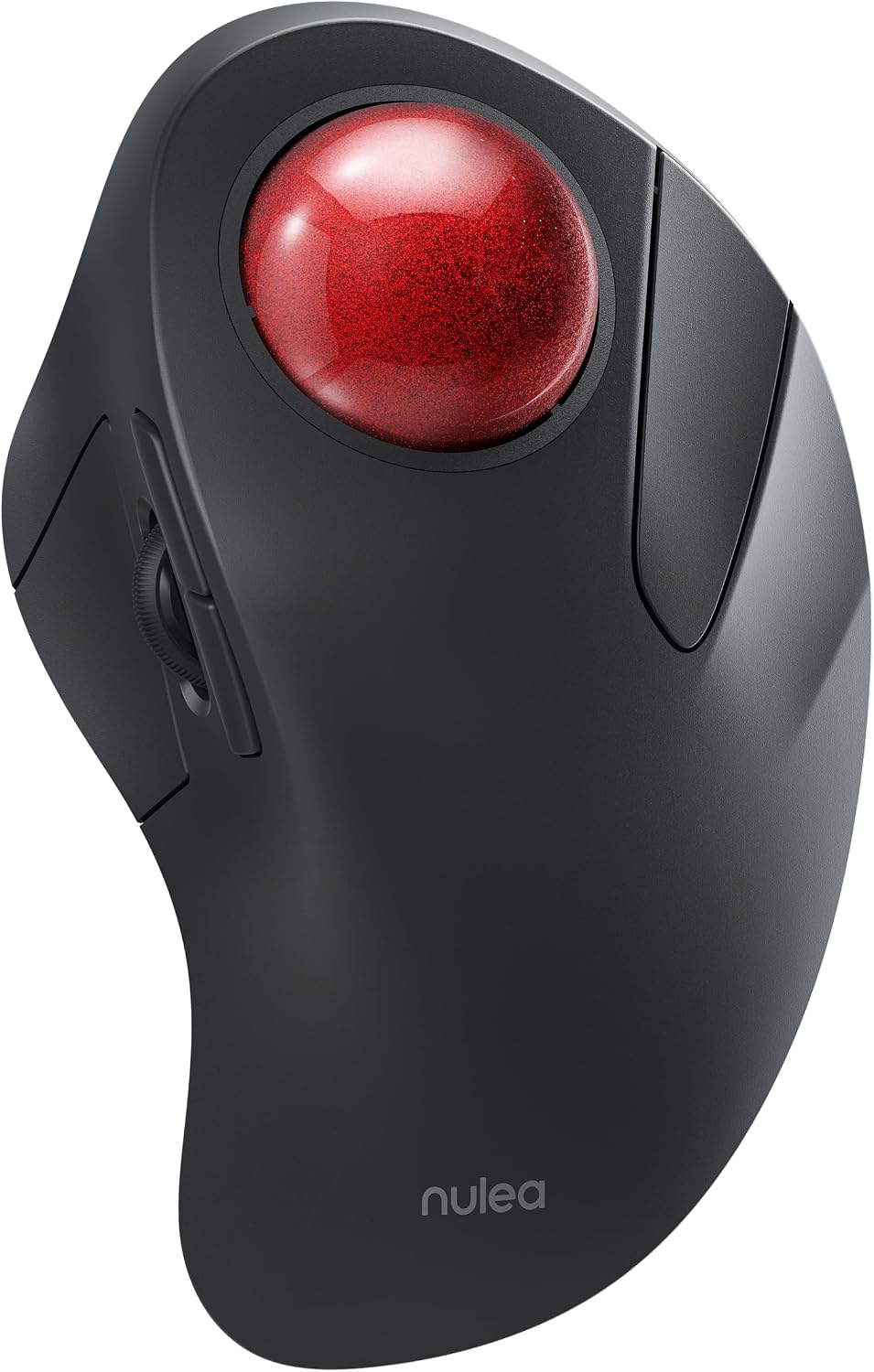
Nulea M505A Wireless Trackball Mouse — Best Index-Finger Trackball Mouse for a Still Forearm
A wireless trackball mouse with a 44 mm ball under the index finger, five DPI modes, three-device Bluetooth or receiver pairing and a rechargeable cell quoted at up to 60 days, which works on practically any surface and stops the arm travelling at all. The right pick for shoulder and upper-arm discomfort; the wrong one if the pain is in your fingers.
$42.99
Nulea M505A Review (2026): Does a 44 mm Index-Finger Trackball Mouse Beat a Vertical One?
Every other pick in this guide changes the angle of your hand. A trackball changes something more fundamental: it stops your arm moving at all.
The Nulea M505A is a wireless trackball mouse with a 44 mm ball under the index finger rather than the thumb, five DPI modes selected from a button underneath, a rechargeable cell the listing quotes at “up to 60 days on a single full charge”, and pairing for up to three devices over Bluetooth or the bundled USB receiver. It works, in the listing’s words, “on practically any surface” — including a sofa arm, which no mouse in this comparison can claim.
In short: the Nulea M505A earns 8.5/10 and is the pick for anyone whose ache is in the shoulder or upper arm rather than the wrist. The rest of this trackball mouse review explains what that trade actually costs you.
This review is research-based. We did not physically handle this product; the specifications, owner rating and price below were read from the live Amazon listing on the date shown. It forms part of our guide to the best ergonomic mouse and pad picks for 2026.
What is in this trackball mouse review
- Key Specifications
- Why a Trackball Mouse Moves the Problem Instead of Solving It
- Index Finger Versus Thumb, and Why 44 mm Matters
- The Claim the Listing Should Not Make
- Limitations and Compromises
- Setting Up This Trackball Mouse
- Who Should Buy This Trackball Mouse?
- The Verdict
- Trackball Mouse — Frequently Asked Questions
- Where to Buy
- Related Reviews
Key Specifications
| Reviewed model | trackball mouse — Nulea M505A, A-Red |
| Ball size and position (as listed) | 44 mm, index finger |
| Movement detection technology | Trackball |
| DPI modes (as listed) | 5, switched from a button on the base |
| Connectivity | Bluetooth or USB receiver, up to 3 devices |
| Battery (as listed) | Rechargeable, up to 60 days per full charge |
| Surface requirement (as listed) | Works on practically any surface |
| Compatibility (as listed) | PC, laptop, iPad, Mac, Windows, Android |
| Owner rating | 4.4 out of 5 from 2,162 ratings |
| Price at the time of writing | $42.99 |
Why a Trackball Mouse Moves the Problem Instead of Solving It
A conventional mouse asks the whole arm to travel. Every window drag, every trip to a menu at the top of a 27-inch screen, is a small movement of the shoulder repeated a few thousand times a day. A trackball mouse does not move. The device sits still and the cursor is driven by a ball under one finger, so the shoulder, elbow and forearm stop contributing to cursor travel entirely.
That is a genuinely different intervention from rotating the wrist, and it is why this trackball mouse belongs in a guide otherwise full of upright shells and foam pads. If your pain is in the deltoid, the upper arm or the outer elbow, no amount of wrist angle will help you, because the wrist was never the loaded joint.
The trade is equally real: the work is now concentrated in one finger. That is a much smaller muscle group doing a repetitive job, and anyone whose discomfort is already in the fingers or the base of the thumb should think hard before moving it there. It redistributes load; it does not remove it.
Index Finger Versus Thumb, and Why 44 mm Matters
Most trackballs sold today put a small ball under the thumb. The M505A puts a 44 mm ball under the index finger, which is the older and, for fine work, generally the more precise arrangement — the index finger has better positional control than the thumb, and a larger ball turns more smoothly and needs fewer re-grips for a long cursor journey.
The cost is that clicking and pointing now share a finger, so the hand is doing two jobs in the same digit. The listing puts the DPI button on the bottom of the device, which is a reasonable choice for something that rarely needs changing, though it does mean lifting the unit to switch sensitivity. Five DPI modes is more range than an office needs and no actual figures are published, which is a gap.
The practical upside nobody advertises: because it needs no surface to slide on, it works “on practically any surface”, and the listing specifically mentions “a cluttered desk or on a couch or bed”. If your desk is small, this is the only pick here that does not need clear space to the right of your keyboard.
The Claim the Listing Should Not Make
One sentence on this listing goes further than any other in this comparison: the ball “enhances cursor control and reduces arm stiffness, making it an effective solution for treating wrist pain”. Treating is a medical word, and no evidence, trial or standard is offered anywhere on the page to support it. Take it as a description of intent, not of outcome.
The same listing then quietly contradicts the marketing in a bullet headed “Kind Note”: “The special operation of the mouse may make you feel uncomfortable at first. Once you get command of using it, you will get its benefits and fall in love with it.” That is an unusually honest admission, and it is the single most useful thing on the page — a trackball mouse has the steepest learning curve of any product in this guide.
Both things can be true at once. The device plausibly reduces arm movement, which is worth having; it is not a treatment for anything, and the honest version of the claim is the one in the small print rather than the one in the headline.
Limitations and Compromises
The adaptation period is the real cost. Expect a week of slower work and a fortnight before precision returns to normal, which the listing concedes in its own words. If your job involves detailed pointing under time pressure, plan the switch for a quiet week.
Load moves to one finger. For anyone with existing finger, thumb-base or tendon trouble, that is the wrong direction, and a vertical shell or a wrist rest is the safer purchase.
No DPI figures, no dimensions and no weight are published, the colourway on this listing is “A-Red” rather than a plain finish, and the ball needs occasional cleaning — dust in the bearing seats is the standard failure mode of every ball-driven pointer ever made, and the listing does not mention it at all.
Setting Up This Trackball Mouse
Pairing follows the usual three-device pattern: hold the mode button to pair over Bluetooth, or plug the receiver in for an instant connection, then press the mode button to hop between machines. Charging is by cable and the listing claims up to 60 days per charge, which is the sort of interval you forget about entirely.
Position it where your old mouse sat but stop moving your arm — the temptation for the first few days is to shove the whole device around, which defeats the point. Rest the hand on it, let the index finger do the work, and use a lower DPI mode than feels natural at first; precision comes back faster that way.
Maintenance is a two-minute job every few weeks: pop the ball out, wipe it and the three support points with a dry cloth, and put it back. Skip that and the cursor starts to stutter, which people mistake for a fault.
Who Should Buy This Trackball Mouse?
Buy it if the ache is in your shoulder or upper arm, if your desk is too small or too cluttered for a mouse to roam, or if you work from a sofa as often as a desk. Buy it also if you have already tried a vertical mouse and found it made no difference — that usually means the wrist was not the problem.
Do not buy it if your discomfort is in the fingers or thumb, if you need fast, accurate pointing for games or detailed design work, or if you cannot afford two weeks of being slower than usual. And do not buy it because the listing says it treats wrist pain, because that is not a claim it has earned.
The Verdict
8.5/10. This is the most interesting product in the comparison and the one that addresses a problem the others cannot touch. A 44 mm index-finger ball, three-device pairing, a 60-day battery and true surface independence at $42.99 is a strong package, and the “Kind Note” bullet is the most honest sentence on any listing here.
It loses points for a therapeutic claim it does not support, for publishing no dimensions or DPI figures, and for a learning curve that will cost a working week. If your pain is in the wrist, buy a vertical shell from the ergonomic mouse and pad comparison instead. If it is further up the arm, this is the pick.
Trackball Mouse — Frequently Asked Questions
Is a trackball mouse better than a vertical mouse?
They solve different problems. A vertical mouse changes forearm rotation and helps wrist discomfort; a trackball mouse stops the arm travelling and helps shoulder and upper-arm discomfort. Choose by where it hurts, not by which is newer.
How long does it take to get used to a trackball mouse?
This listing’s own “Kind Note” says it “may make you feel uncomfortable at first”. In practice most people are functional within a few days and back to full speed in about two weeks. Keep your old mouse for that period.
Is an index-finger trackball better than a thumb one?
For precision, generally yes — the index finger has finer positional control and the 44 mm ball here needs fewer re-grips than a small thumb ball. The downside is that pointing and clicking now share the same finger.
Can you use a trackball mouse for gaming?
Not well. Ball-driven pointing is slower for rapid aiming than an optical sensor, and this listing quotes no gaming-grade DPI or polling figures. Treat it as a work device and keep a flat mouse for games.
Where to Buy
Check the current price of the Nulea M505A on Amazon.
Affiliate disclosure: Blue Rays Technologies is a participant in the Amazon Services LLC Associates Program. We earn from qualifying purchases made through the links on this page, at no extra cost to you.
Related Reviews
User Reviews
Be the first to review “Nulea M505A Wireless Trackball Mouse — Best Index-Finger Trackball Mouse for a Still Forearm”
Related Products

$42.99

There are no reviews yet.