
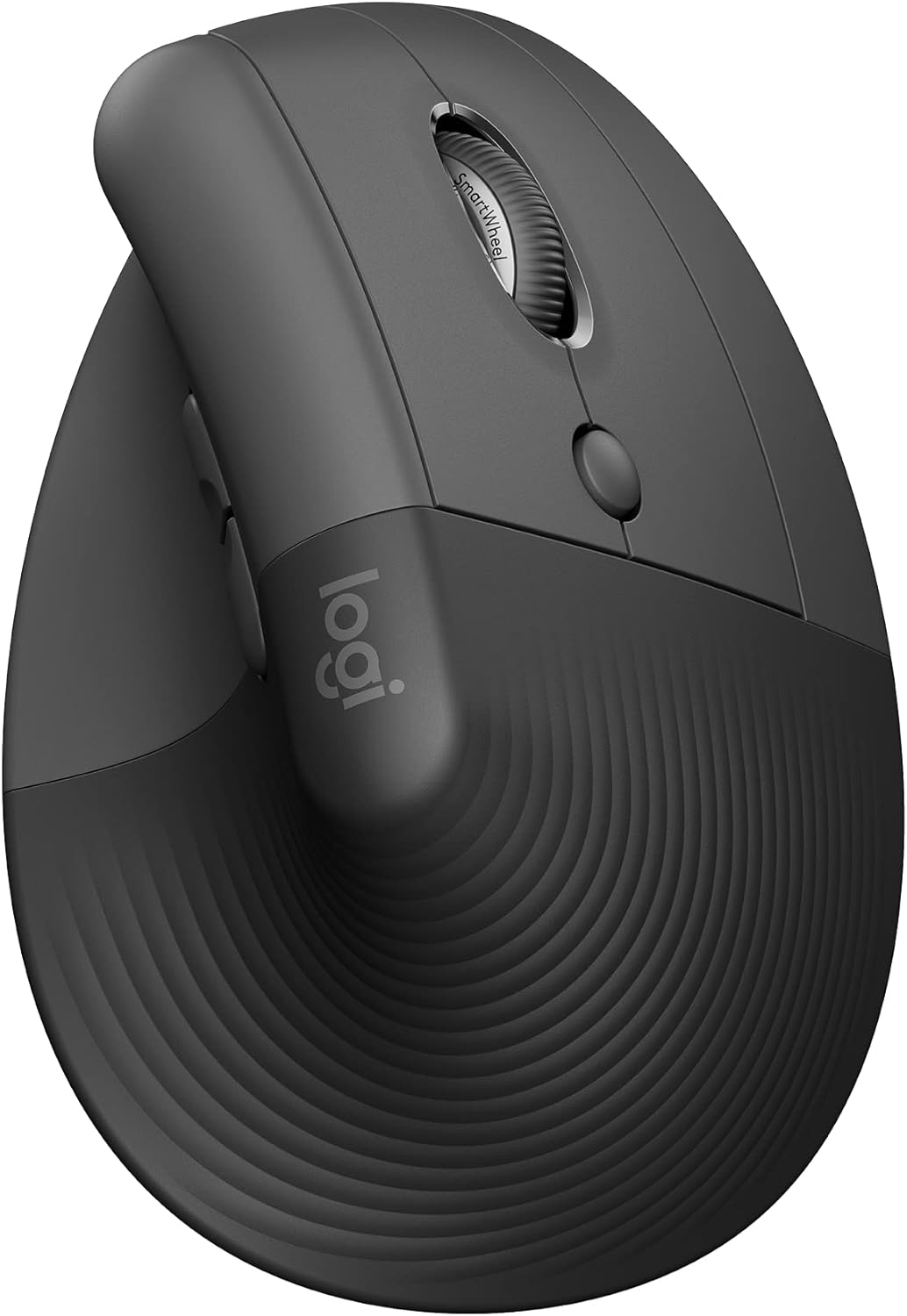
Logitech Lift Vertical Ergonomic Wireless Mouse — Best Vertical Ergonomic Mouse for Small to Medium Hands
Logitech’s smaller upright shell, quoted at 57 degrees and listed as a fit for small to medium right hands, connecting over Bluetooth Low Energy or Logi Bolt across Windows, macOS, iPadOS, Chrome OS and Linux, with whisper-quiet clicks, a SmartWheel, up to two years from a replaceable cell and 70% recycled plastic in the Graphite finish. The best-executed vertical ergonomic mouse here, and the most expensive.
$64.79
Logitech Lift Review (2026): Is a 57-Degree Vertical Ergonomic Mouse Worth $64.79?
Every mouse you have ever owned asked your forearm to lie palm-down, with the radius crossed over the ulna, for as many hours as you work. The Lift asks it to shake hands instead.
This vertical ergonomic mouse is Logitech’s smaller upright shell, quoted on its own listing at “57 degrees” and described as “a great fit for small to medium right hands”. It connects by Bluetooth Low Energy or the Logi Bolt receiver, claims up to two years of battery life from a single cell, and is the only mouse in this comparison whose listing says it was “designed, developed … and approved according to criteria set out by leading ergonomists”. At $64.79 it is also the most expensive pick here by a wide margin.
In short: the Logitech Lift earns 8.8/10 and is the best vertical ergonomic mouse here for most right-handed desk workers with average or smaller hands. The rest of this vertical ergonomic mouse review sets out exactly how that score was reached, and where the money goes.
This review is research-based. We did not physically handle this product; the specifications, owner rating and price below were read from the live Amazon listing on the date shown. It forms part of our guide to the best ergonomic mouse and pad picks for 2026.
What is in this vertical ergonomic mouse review
- Key Specifications
- What 57 Degrees Actually Changes
- A Vertical Ergonomic Mouse That Fits a Smaller Hand
- Connection, Clicks and the Two-Year Battery Claim
- Limitations and Compromises
- Setting Up This Vertical Ergonomic Mouse
- Who Should Buy This Vertical Ergonomic Mouse?
- The Verdict
- Vertical Ergonomic Mouse — Frequently Asked Questions
- Where to Buy
- Related Reviews
Key Specifications
| Reviewed model | vertical ergonomic mouse — Logitech Lift, Graphite |
| Shell angle (as listed) | 57 degrees |
| Hand fit (as listed) | Small to medium right hands |
| Connectivity | Bluetooth Low Energy or Logi Bolt USB receiver |
| Platforms (as listed) | Windows, macOS, iPadOS, Chrome OS, Linux |
| Battery life (as listed) | Up to two years |
| Scroll | SmartWheel; touch scroll listed as a special feature |
| Click noise (as listed) | Whisper-quiet clicks |
| Sensor | Optical |
| Recycled content (as listed) | Graphite 70% certified post-consumer recycled plastic |
| Ergonomist review (as listed) | Designed and approved to criteria set by leading ergonomists |
| Owner rating | 4.4 out of 5 from 13,960 ratings |
| Price at the time of writing | $64.79 |
What 57 Degrees Actually Changes
A flat mouse holds the forearm in near-complete pronation. The two bones of your forearm are crossed, the muscles that hold them there are loaded, and nothing about that changes for as long as your hand is on the mouse. Rotating the grip towards vertical uncrosses them. Logitech quotes the Lift at 57 degrees and says the shape “helps wrists feel like ‘ahhh’ at work, and promotes a more natural posture in the forearm”, which is marketing language wrapped around a real mechanical change.
Fifty-seven degrees matters because it is not ninety. A fully upright grip is a bigger change in posture, and it moves more of the work to the shoulder, which is why the steepest shell is not automatically the best one. The Lift sits at a compromise angle that most people adapt to within a few days rather than a few weeks, and that is the main practical argument for this vertical ergonomic mouse over a more aggressive one.
The listing also claims the product was “designed, developed … and approved according to criteria set out by leading ergonomists”. Read that carefully: it describes a design process, not a clinical outcome, and no named standard or certifying body is given. It is still more than any other listing in this comparison claims, and it is worth something — but it is not evidence that the mouse prevents injury.
A Vertical Ergonomic Mouse That Fits a Smaller Hand
The single most useful sentence on the whole listing is the one about hand size: “a great fit for small to medium right hands”. Most upright mice are built around a large palm, which leaves smaller hands gripping with the fingertips — exactly the clawed posture the purchase was meant to remove. The Lift is the smaller of Logitech’s two vertical shells and is the reason this vertical ergonomic mouse suits more people than the bigger, pricier alternative.
The listing describes “a softly textured grip and snug thumb rest”. The thumb rest is the part that decides comfort in practice: on an upright shell the thumb is load-bearing, and a shelf that is too shallow makes you pinch. There is no published shell length or weight on this listing, which is a genuine gap — if you have large hands you are buying on the word “medium” alone, and that is a poor basis for a $64.79 purchase.
It is also right-handed only in this colourway, as the model name and the listing’s own framing make clear. Left-handed buyers need a different model number, and nothing on this page tells you that; you have to know to look.
Connection, Clicks and the Two-Year Battery Claim
Connection is the quiet strength here. The listing offers “Bluetooth Low Energy or Logi Bolt USB” across “Windows, macOS, iPadOS, Chrome OS, or Linux”, which covers essentially every machine a desk worker owns, and Logi Bolt is the more secure of Logitech’s two receiver systems. If you move between a work laptop and a personal machine, this is the pick that will follow you.
The clicks are listed as “whisper-quiet”, and there is a SmartWheel for scrolling with touch scroll named in the specification table as a special feature. In a shared room or an open-plan office this matters more than any ergonomic claim, because a loud mouse is a mouse your colleagues learn to hate.
The battery claim is “up to two years”. Note the hedge and note the format: this vertical ergonomic mouse runs on a replaceable cell, not a rechargeable pack. That is an advantage over the rechargeable models in this guide — no cable, no charging evening, and a spare battery in a drawer means zero downtime — but it also means a consumable cost, and “up to” is doing real work in that sentence.
Limitations and Compromises
The price is the obvious one. At $64.79 the Lift costs more than twice the TECKNET vertical mouse in the same guide, and the underlying postural change — rotating the hand towards a handshake — is the same physical idea in both. What the extra money buys is software support, switch quality, build, the Logi Bolt option and the ergonomist-reviewed design process, not a different mechanism.
The listing publishes no shell dimensions, no weight and no DPI figure. For a product sold on fit, the absence of a length in millimetres is a real omission, and it is the reason hand size is the most common cause of disappointment with any vertical ergonomic mouse.
It is right-handed, and the customisable buttons need Logitech’s software to be worth anything — which is another download, another background process and, on a locked-down work machine, possibly not an option at all. Nothing on the listing mentions that dependency.
Setting Up This Vertical Ergonomic Mouse
Pairing is the usual Logitech routine: hold the channel button, pick the mouse in your Bluetooth list, or drop the Logi Bolt receiver into a port and it works without software. Customising the extra buttons and the SmartWheel behaviour means installing Logitech’s options app, which is worth doing once and then forgetting.
Adaptation is the part nobody warns you about. Moving to any upright shell costs you a few days of clumsiness, and cursor accuracy is noticeably worse for the first afternoon. Keep your old mouse in the drawer rather than the bin for a fortnight, and if the new grip still feels wrong after two weeks, the shape is wrong for your hand and no amount of persistence will fix that.
Maintenance is trivial: wipe the textured grip occasionally, and change the cell when the indicator says so. Because the recycled-plastic content is quoted at 70% for the Graphite finish, the shell picks up skin oils slightly more visibly than a gloss one, which is cosmetic rather than functional.
Who Should Buy This Vertical Ergonomic Mouse?
Buy it if you are right-handed, have average or smaller hands, work across more than one machine and want the version of this idea with the fewest rough edges. It is also the right pick if noise matters, because a quiet mouse in a shared room is worth paying for on its own.
Do not buy it if your hands are large — the bigger shell in the range exists for a reason — if you are left-handed, if your discomfort is in the shoulder rather than the wrist, or if you mainly want to stop your palm resting on a hard desk edge. That last problem is a wrist rest problem, and a $20 pad solves it better than a $64.79 mouse.
The Verdict
This is the best-executed vertical ergonomic mouse in the comparison and it earns 8.8/10. It gets the angle right rather than extreme, it is honest about hand size in a way almost no competitor is, it connects to everything, and it is quiet. The deductions are for the price, for publishing no dimensions on a product sold on fit, and for a right-hand-only shell.
If you have decided to change your mouse and you are not on a tight budget, this is the one to buy. If you have not yet decided whether the problem is your mouse at all, read the full ergonomic mouse and pad comparison first — for a good number of people the cheaper wrist rest is the fix and the mouse is optional.
Vertical Ergonomic Mouse — Frequently Asked Questions
Is the Logitech Lift good for large hands?
Its own listing says it is “a great fit for small to medium right hands”, so probably not. Logitech sells a larger upright model for bigger palms. Measure from your wrist crease to the tip of your middle finger before buying: much above 19 cm and this shell will feel cramped.
Does the Logitech Lift need software?
No for basic use — it pairs over Bluetooth or the Logi Bolt receiver and works immediately. Yes if you want to remap the extra buttons or change the SmartWheel behaviour, which needs Logitech’s options app installed.
Is it rechargeable?
No. The listing quotes “up to two years” of battery life from a replaceable cell rather than a built-in pack. That means no charging cable on the desk, and a consumable cost every couple of years.
Will a vertical ergonomic mouse cure wrist pain?
It changes forearm rotation, which many people find more comfortable, but it is not a treatment. The NHS lists weight, pregnancy, diabetes, arthritis and previous injury among the risk factors for carpal tunnel syndrome alongside repetitive gripping, and advises cutting the aggravating activity and seeing a doctor for numbness or night pain.
Where to Buy
Check the current price of the Logitech Lift on Amazon.
Affiliate disclosure: Blue Rays Technologies is a participant in the Amazon Services LLC Associates Program. We earn from qualifying purchases made through the links on this page, at no extra cost to you.
Related Reviews
User Reviews
Be the first to review “Logitech Lift Vertical Ergonomic Wireless Mouse — Best Vertical Ergonomic Mouse for Small to Medium Hands”
Related Products


$64.79

There are no reviews yet.