
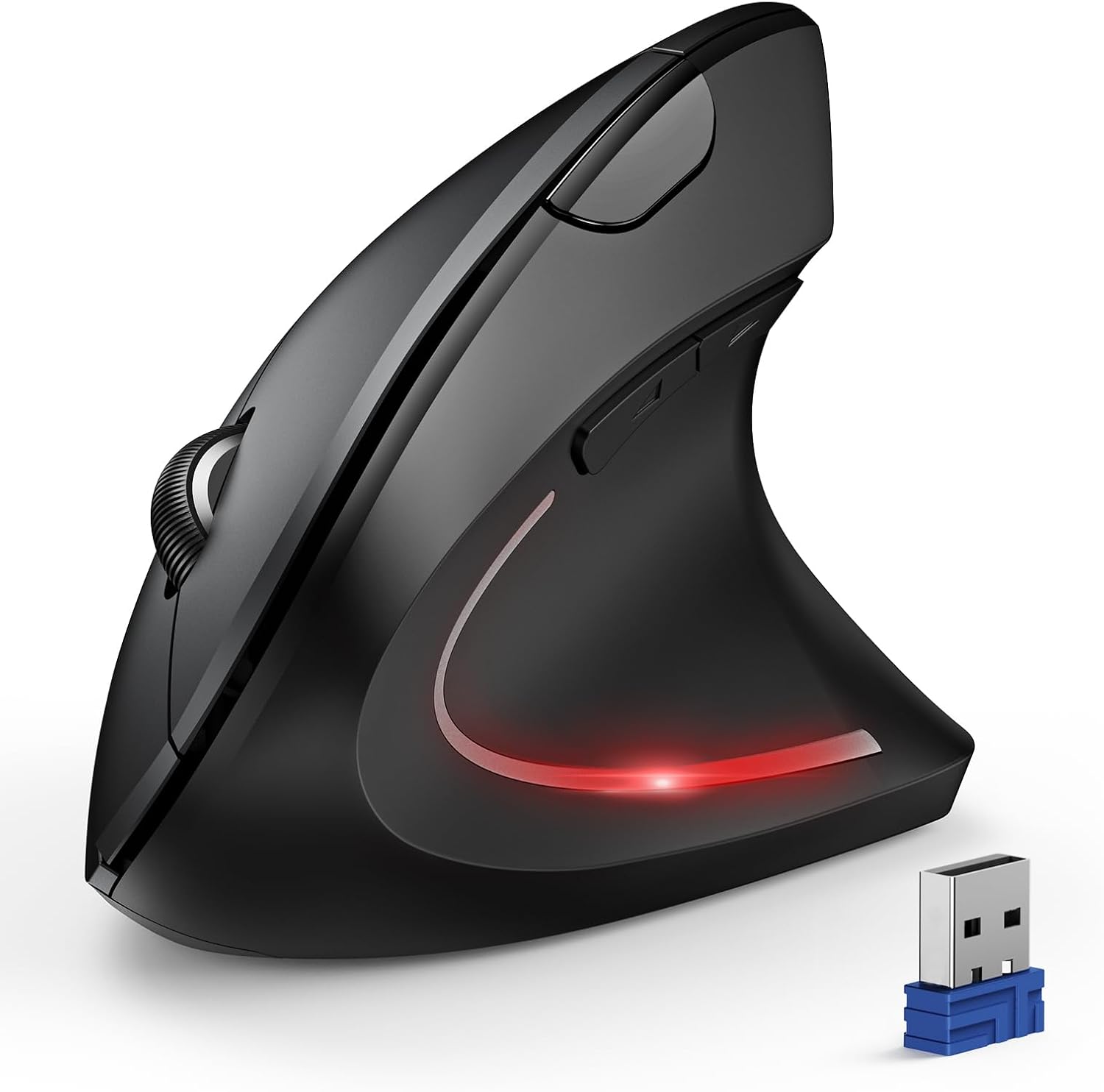
TECKNET Vertical Ergonomic Mouse — Best Budget Wireless Vertical Mouse With Three-Device Switching
A budget wireless vertical mouse with Bluetooth 5.0 and 3.0, a 2.4 GHz receiver stored in its own base, three-device switching, six DPI levels from 800 to 4800, near-silent main clicks and a 36-month registered warranty, running on two AAA cells that are not supplied. The same postural change as the premium shell for 42% of the money, with three caveats buried mid-bullet.
$26.99
TECKNET Vertical Mouse Review (2026): Is a $26.99 Wireless Vertical Mouse Enough?
The uncomfortable question about any $65 ergonomic mouse is whether the $27 one does the same job. This is the $27 one.
The TECKNET is a wireless vertical mouse with Bluetooth 5.0 and 3.0 plus a 2.4 GHz receiver stored in its own base, three-device switching, six DPI levels running from 800 to 4800, silent left and right clicks, and a 36-month warranty for registered buyers. It takes two AAA cells, which the listing states plainly are “not included”. At $26.99 with 12,831 owner ratings, it is the volume seller of this category rather than the prestige pick.
In short: the TECKNET earns 8.3/10 and is the best value in the guide: about 95% of the postural benefit of the premium shell for 42% of the price. The rest of this wireless vertical mouse review is about the 5%.
This review is research-based. We did not physically handle this product; the specifications, owner rating and price below were read from the live Amazon listing on the date shown. It forms part of our guide to the best ergonomic mouse and pad picks for 2026.
What is in this wireless vertical mouse review
- Key Specifications
- What You Actually Lose at $27
- A Wireless Vertical Mouse With Three Connection Modes
- “Silent” Is Only Half True, and 4800 DPI Is Marketing
- Limitations and Compromises
- Setting Up This Wireless Vertical Mouse
- Who Should Buy This Wireless Vertical Mouse?
- The Verdict
- Wireless Vertical Mouse — Frequently Asked Questions
- Where to Buy
- Related Reviews
Key Specifications
| Reviewed model | wireless vertical mouse — TECKNET, black |
| Connectivity | Bluetooth 5.0 and 3.0, plus 2.4 GHz USB-A receiver |
| Devices (as listed) | Three; two over Bluetooth simultaneously |
| Receiver storage (as listed) | Built into the base of the mouse |
| DPI levels (as listed) | 6 — 4800 / 3200 / 2400 / 1600 / 1200 / 800 |
| Click noise (as listed) | Left and right clicks silent; other buttons are not |
| Handedness (as listed) | Right-handed use only |
| Power (as listed) | 2 × AAA batteries, not included |
| Sleep (as listed) | Deep sleep after roughly 10–30 minutes idle |
| macOS caveat (as listed) | Side buttons not compatible with macOS |
| Warranty (as listed) | 36 months, registered only |
| Owner rating | 4.4 out of 5 from 12,831 ratings |
| Price at the time of writing | $26.99 |
What You Actually Lose at $27
The mechanism is identical to the expensive shell in this guide. The listing describes an “ergonomic design” that places “your palm at a near-vertical angle on the desktop, reducing pressure and pain on your wrist caused by prolonged inverted mouse usage”. That is the same physical change of forearm rotation that costs $64.79 one product up the page, and physics does not charge extra.
What you lose is around the edges. There is no ergonomist-reviewed design claim, no premium receiver protocol, no published shell dimensions, and the finish is plainer. You also lose the option of a left-handed model: the listing says the mouse is “designed for right-handed use only”, and unlike the premium range there is no mirrored version.
What you gain, besides $38, is a genuinely useful detail: the 2.4 GHz receiver lives “built into the bottom of the mouse”. Anyone who has lost a dongle in a laptop bag will recognise the value of that, and no premium model in this comparison offers it. For a wireless vertical mouse at this price, that is thoughtful design rather than cost-cutting.
A Wireless Vertical Mouse With Three Connection Modes
Three connection modes on a $27 wireless vertical mouse is unusually generous: Bluetooth 5.0, Bluetooth 3.0 and a 2.4 GHz receiver, with “Bluetooth mode can connect to two devices simultaneously”. In practice that means a work laptop, a personal machine and a tablet all reachable from one button press on the base.
Bluetooth 3.0 looks like an odd inclusion in 2026 and it is actually the most practical thing on the list, because it is the mode that still works with older office machines and with the stripped-down Bluetooth stacks on some thin clients. The 2.4 GHz mode is the one to use on a desktop, where reliability beats port economy.
Compatibility is quoted for “Windows, Mac, Chrome, and Linux laptops” with one caveat buried mid-bullet: “side buttons are not compatible with macOS”. If you are a Mac user buying this wireless vertical mouse for its back and forward buttons, that sentence is the whole review, and it is not in the specification table.
“Silent” Is Only Half True, and 4800 DPI Is Marketing
The listing headlines a “Silent Mouse” suitable for “quiet environments like libraries”, then qualifies it in the same bullet: “Only the left and right click buttons of the mouse are silent; other function buttons are not silent”. That is the pattern worth learning about product listings generally — the caveat is almost always mid-bullet and almost never in the table.
The 4800 DPI headline is similarly oversold. Six levels from 800 to 4800 is plenty of range, but for spreadsheet and browser work almost nobody exceeds 1600, and a higher ceiling on an office mouse is a number rather than a feature. It is not a fault; it is simply not a reason to buy.
Two genuine practical details do matter. The mouse “automatically enters deep sleep mode after approximately 10–30 minutes of inactivity”, which is how a AAA pair lasts, and it needs “2 AAA batteries, not included”. Budget a couple of dollars more than the sticker price, and note the listing’s own advice to use branded cells.
Limitations and Compromises
Batteries are not in the box, so the real cost is a little above $26.99 and there is a consumable every few months rather than a rechargeable cell. For some buyers that is a feature — no charging cable, and a spare pair means no downtime — but it should be a choice, not a surprise.
It is right-handed only, the side buttons do not work on macOS, and only two of its buttons are actually silent. None of those three limits appears in the specification table; all three are mid-bullet.
No shell dimensions, no weight and no hand-size guidance are published anywhere on the listing. For an upright mouse, where fit decides everything, that is the weakest part of the offer, and it is the reason to keep the return window in mind.
Setting Up This Wireless Vertical Mouse
Getting started takes a minute: pull the receiver out of the base for 2.4 GHz use, or hold the bottom button for three seconds to pair over Bluetooth, then short-press the same button to hop between the three saved connections. DPI changes are confirmed by a flashing light, with the number of flashes matching the level.
Insert decent AAA cells — the listing specifically recommends branded batteries “to ensure the mouse’s longevity” — and expect the low-battery warning as a blinking LED rather than a software alert. Waking it from deep sleep takes a click, which occasionally costs you the first click of the day.
Give any wireless vertical mouse a fortnight before judging it. The first afternoon will feel clumsy and your cursor accuracy will drop; that is adaptation, not a defect. Register the product if you want the 36-month warranty, because the listing makes clear it applies to registered buyers only.
Who Should Buy This Wireless Vertical Mouse?
Buy it if you want to find out whether an upright shell helps you without spending $65 to run the experiment, if you switch between several machines, if you work in a quiet shared room, or if you would rather change a battery than plug in a cable.
Do not buy it if you are left-handed, if you are on macOS and want working side buttons, or if you need to know the shell length before committing. If you already know an upright mouse suits you and you use one all day, the premium shell earns its extra money in build, software and support — but it earns it at the margin, not in the mechanism.
The Verdict
8.3/10, and the best value in this comparison. Three connection modes, six DPI levels, quiet main clicks, a receiver that cannot be lost and a three-year warranty for $26.99 is a lot of product, and 12,831 owner ratings at 4.4 out of 5 is a substantial body of feedback for a budget brand.
The deductions are for three caveats hidden mid-bullet rather than stated in the table, and for publishing no dimensions on a product sold on fit. If the honest question is whether the expensive vertical shell is worth double, the answer in the full ergonomic mouse and pad comparison is: only if you already know the shape suits you.
Wireless Vertical Mouse — Frequently Asked Questions
Does the TECKNET vertical mouse come with batteries?
No. The listing states it “requires 2 AAA batteries, not included”, and recommends branded cells. Add a couple of dollars to the price when comparing it with rechargeable models.
Is this wireless vertical mouse fully compatible with a Mac?
Mostly. The listing quotes Windows, Mac, Chrome and Linux, but adds mid-bullet that the “side buttons are not compatible with macOS”. Basic pointing, clicking and scrolling work; back and forward do not.
Is it really silent?
Only partly. The listing says the left and right clicks are near-silent but that “other function buttons are not silent”. In practice that is quiet enough for a shared room, as long as you are not hammering the side buttons.
Can a left-handed person use it?
No. The listing says it is “designed for right-handed use only”, and there is no mirrored version in this range. Left-handed buyers need a different product entirely.
Where to Buy
Check the current price of the TECKNET vertical mouse on Amazon.
Affiliate disclosure: Blue Rays Technologies is a participant in the Amazon Services LLC Associates Program. We earn from qualifying purchases made through the links on this page, at no extra cost to you.
Related Reviews
User Reviews
Be the first to review “TECKNET Vertical Ergonomic Mouse — Best Budget Wireless Vertical Mouse With Three-Device Switching”
Related Products


$26.99

There are no reviews yet.