Every list of home office essentials opens with the same four items: a desk, a chair, a monitor and a headset. Those are the expensive decisions, they are covered by every furniture retailer on the internet, and once you have made them you never think about them again. What nobody writes about is the second layer — the small, unglamorous tools you actually pick up during a working day, the ones that decide whether the room runs smoothly or quietly annoys you every morning.
This roundup is that second layer. Seven products, seven different jobs: the camera you appear on, a budget camera for a second desk, a label maker for the cable spaghetti, a cordless screwdriver for the assembling and re-arranging, a guillotine trimmer for paper, a USB optical drive for the discs that refuse to die, and a slim pen case for the days you work somewhere else. Nothing here duplicates anything else on the list, these are home office essentials in the practical sense rather than the decorative one, and the whole set comes to under $260.
Everything was judged on four things: whether it does a job you genuinely do every week, whether the specification stands up to being checked rather than quoted, whether it works on both sides of the Atlantic, and whether the price makes sense against what it replaces. That last point matters more than it sounds — several of these home office essentials cost less than an hour of the time they save. Prices and links go to Amazon.com; UK readers can search the same model names on Amazon.co.uk, and the US vs UK section covers the paper sizes, voltages, broadband rules and tax changes that genuinely differ between the two markets.
Home Office Essentials — Quick Comparison
All seven at a glance. Each product does a different job, so this is a table of roles rather than a ranking; scores are our own expert scores from the full reviews linked below.
| # | Product | Role | Key spec | Best for | Price | Score |
|---|---|---|---|---|---|---|
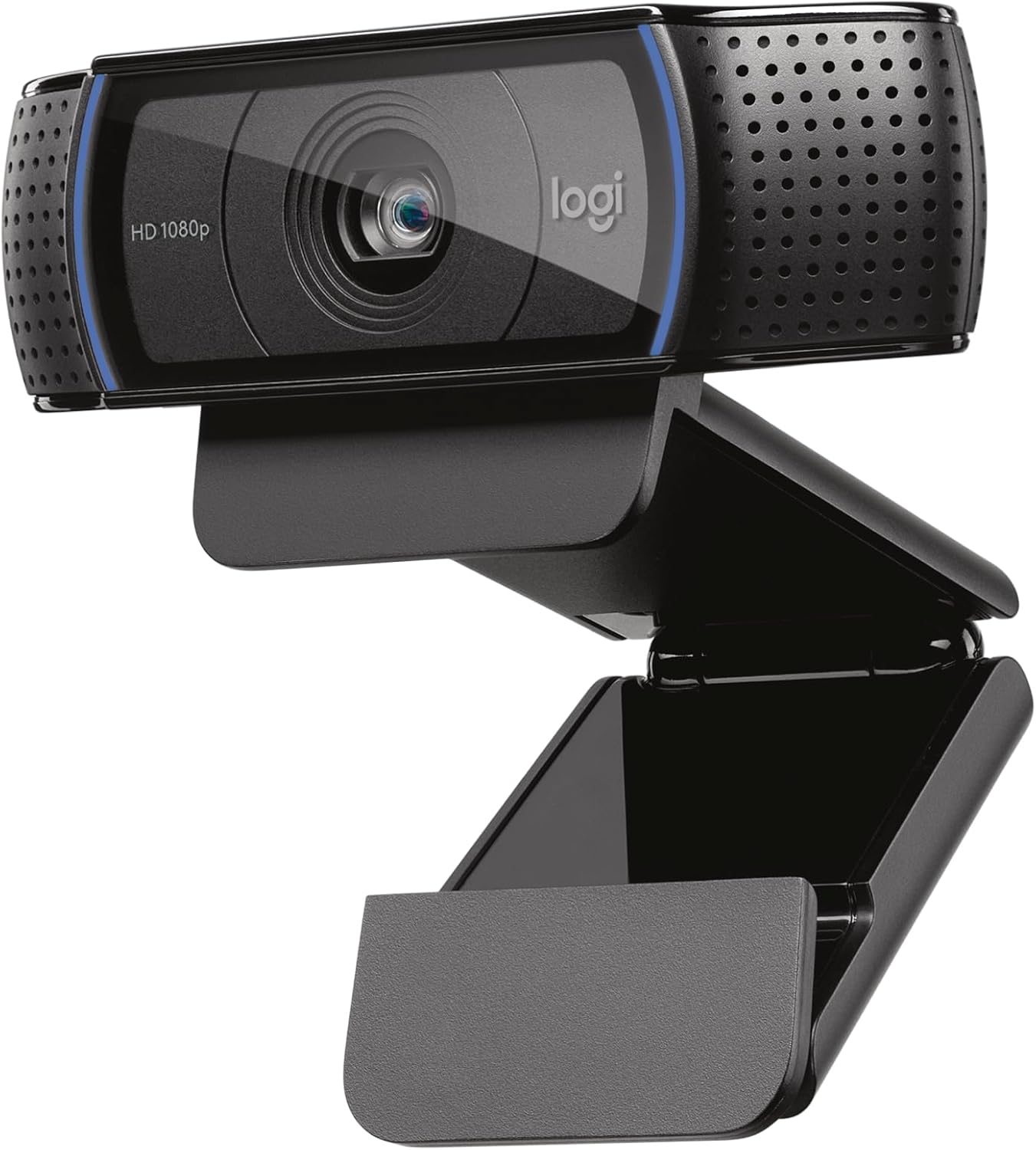
| 1 | Logitech C920x | The meetings camera | 1080p/30fps, 78° field of view, autofocus, dual mics | Anyone on calls every day | $59.99 | 9.0 |
| 2 | Logitech Brio 101 | The budget camera | 1080p/30fps, 58° field of view, privacy shutter, 2.65 oz | A tight budget or a second desk | $35.99 (list $39.99) | 8.5 |
| 3 | DYMO LetraTag 100H | Labelling and filing | Handheld, 12 mm LT tapes, 5 font sizes, 7 print styles, graphical display | Cable runs, files and storage boxes | $42.70 (list $44.99) | 8.5 |
| 4 | HOTO electric screwdriver | Assembly and cable management | 12 × S2 bits, max 4 N·m powered / 8 N·m manual, 1500 mAh, USB-C | Desks, monitor arms and flat-pack | $49.99 | 9.0 |
| 5 | Swingline ClassicCut Lite | Paper and document trimming | 12 in (305 mm) cut length, 10 sheets of 20 lb paper, dual inch/cm scale | Letter, A4 and photo trimming | $37.99 | 8.4 |
| 6 | Rioddas external CD/DVD drive | Legacy media and archiving | USB 3.0 up to 5 Gbps, bus-powered, +/-RW read and write | Old discs, software and backups | $21.99 | 8.6 |
| 7 | Raymay Fujii pen case | Portable stationery | 62 × 200 × 24 mm (2.4 × 7.9 × 0.9 in), 76 g, magnetic lid | Hot-desking and travel days | $11.76 | 8.5 |
The 7 Best Home Office Essentials in 2026
Seven products, seven jobs. Each entry gives the specification, three paragraphs of analysis, an honest reason to skip it, a link to our full review and where to buy it.
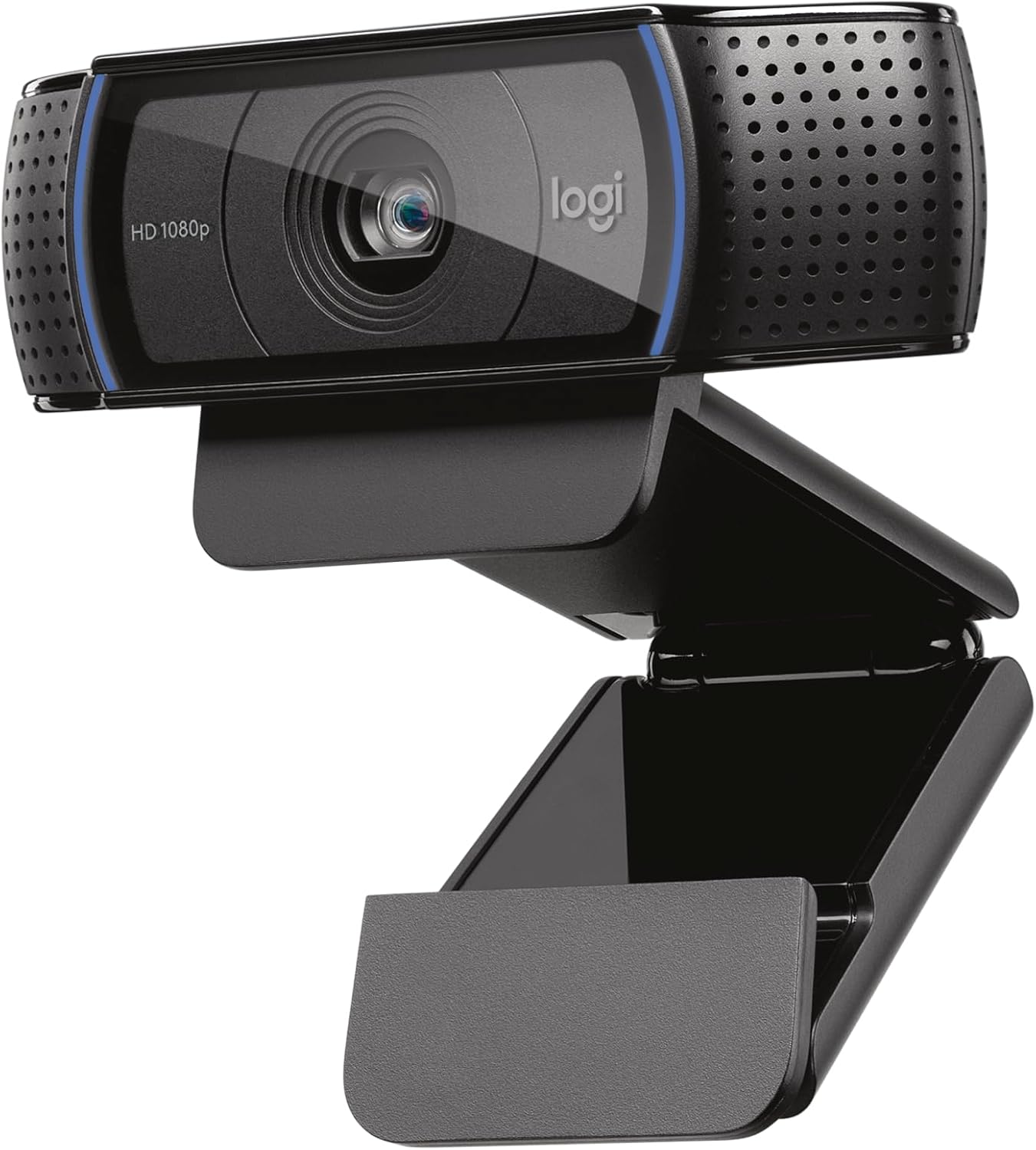
1. Logitech C920x HD Pro Webcam — Best Camera for Daily Video Calls
Price: $59.99 | Role: The meetings camera | Key spec: 1080p/30fps, 78° field of view, autofocus, dual mics
If you only buy one of these home office essentials, buy the camera. A built-in laptop webcam sits below your eyeline, uses a sensor the size of a grain of rice and gives everyone on the call a slightly grey, slightly upward view of you. The C920x replaces it with a five-element glass lens shooting Full HD 1080p at 30 frames per second, and the difference is visible on the first call — sharper edges, natural skin tones and a picture that does not smear when you move your hands.
The two features that matter most are the ones nobody demos. HD light correction reads the room and lifts the exposure, which is what saves you when there is a window behind your desk and the laptop camera would have rendered you as a silhouette. H.264 hardware encoding compresses the video on the camera rather than on your processor, so a long Teams call does not leave your fan screaming. Autofocus locks in under a second and holds while you lean in to read something.
Setup is a USB-A cable and nothing else. Zoom, Teams, Google Meet, OBS and FaceTime all recognise it without a driver, and the standard tripod thread on the base means you can lift it off the monitor onto a small stand if your screen sits too low. It is the least interesting of these home office essentials to buy and the one that changes how you are perceived at work the most.
Best for: You are on video calls most days and want to stop looking like a laptop camera. The single highest-impact upgrade on this list.
Skip if: You need 4K, 60fps, or an integrated privacy shutter — the C920x has none of the three, and the C920S adds the shutter for around $10 more.
Read the full Logitech C920x review →
Where to Buy — Logitech C920x
2. Logitech Brio 101 — Best Budget Camera for a Second Desk
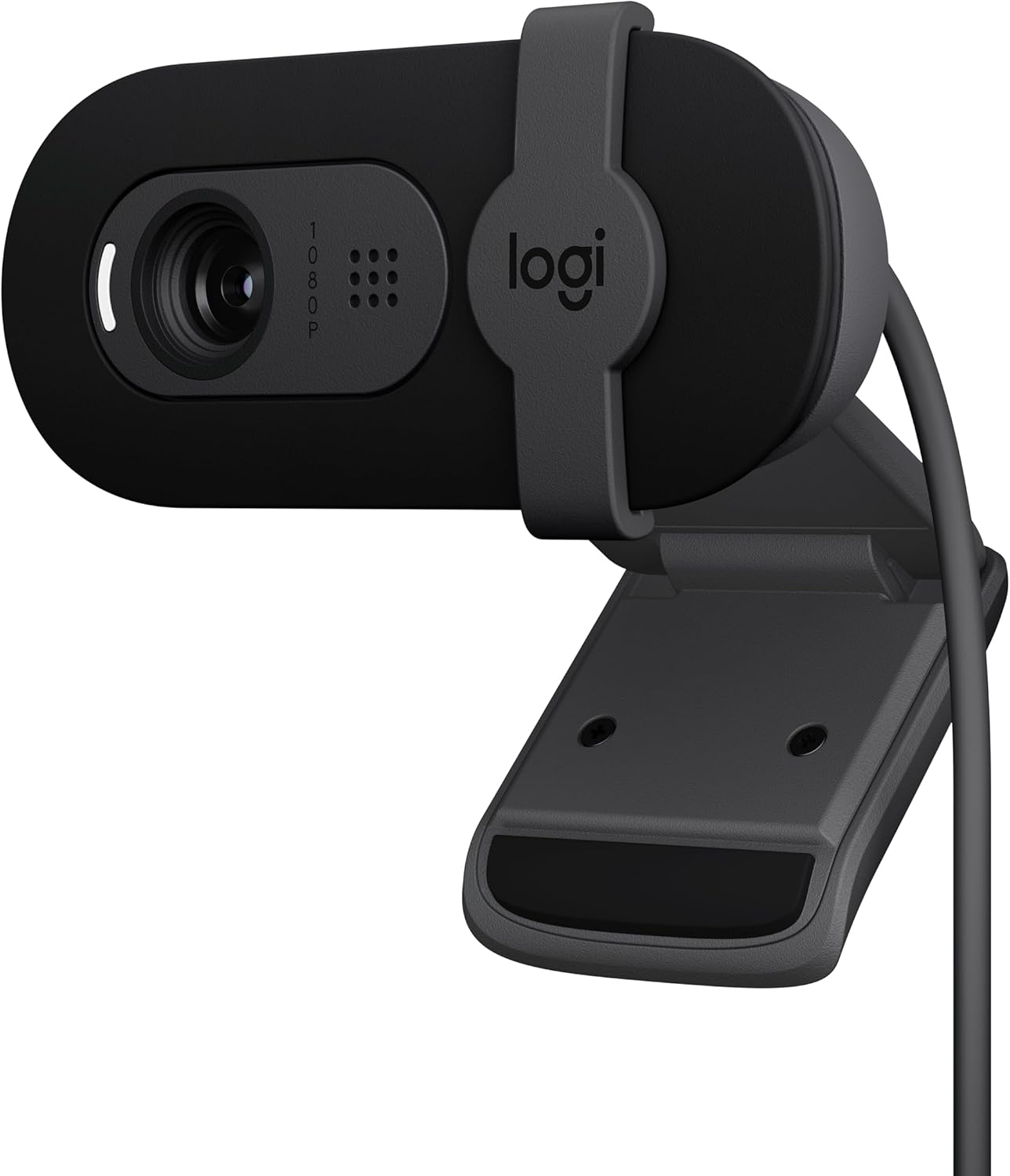
Price: $35.99 (list $39.99) | Role: The budget camera | Key spec: 1080p/30fps, 58° field of view, privacy shutter, 2.65 oz
The Brio 101 exists for the second room, the spare desk and the budget that has already been spent. It shoots the same Full HD 1080p at 30 frames per second as the C920x, adds RightLight auto light balance, and weighs 2.65 ounces — light enough that it does not tilt a thin laptop lid forward when you clip it on.
Two things are different, and both are deliberate rather than cheap. The field of view is 58 degrees instead of 78, which frames one person at desk distance like a headshot rather than showing the whole room behind you; if your background is a kitchen, that is a feature. The lens is fixed focus, optimised for roughly 18 to 36 inches, so there is no focus hunting — within that band it is as sharp as an autofocus camera and rather more consistent.
The one thing it has that the C920x does not is a physical privacy shutter, which for a shared household or a camera that lives on a family computer is worth more than a few degrees of viewing angle. For anyone upgrading from a built-in laptop camera on a strict budget, it is close to unbeatable — but it is a supporting pick among these home office essentials, not the main camera for a job that is 80% video calls.
Best for: Upgrading a laptop camera on a strict budget, kitting out a second desk, or anyone who wants a physical privacy shutter.
Skip if: You move around while you present, or you sit further than about three feet from the screen — fixed focus and a 58° view both work against you.
Read the full Logitech Brio 101 review →
Where to Buy — Logitech Brio 101
3. DYMO LetraTag 100H — Best Label Maker for Cables and Files
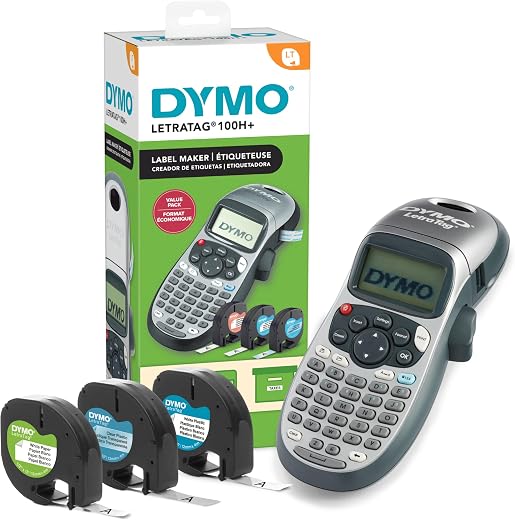
Price: $42.70 (list $44.99) | Amazon rating: 4.6 / 5 from 31,245 ratings | Role: Labelling and filing | Key spec: Handheld, 12 mm LT tapes, 5 font sizes, 7 print styles, graphical display
A label maker is the one item among these home office essentials that people put back on the shelf and then buy eighteen months later after wasting an afternoon tracing a power cable under a desk. The 100H is the handheld LetraTag: a graphical display that previews the label before it prints, five font sizes, seven print styles, eight box styles and an auto-off that stops the batteries draining in a drawer. The bundle ships with three LT tapes, so it works out of the box rather than after a second order.
Under a desk it does two jobs. Wrapped flag-style around a cable an inch from the plug, a label ends the guessing game about which brick belongs to the monitor and which to the laptop — and it means you can unplug something at 8:55 before a 9:00 call without a small panic. On a filing drawer or a storage box it does the boring, durable version of the same thing, and plastic LT tape survives handling far better than a strip of masking tape and a biro.
It is a handheld device with a rubber-membrane keyboard, not a desktop machine — long labels are slow to type and the keys are laid out alphabetically rather than QWERTY, which trips up fast typists for the first ten minutes. That is the trade for something that costs a fraction of a desktop labeller and lives in the drawer you actually open.
Best for: Anyone with more than four cables under the desk, a filing system, or a shared cupboard that needs to make sense to someone else.
Skip if: You need to print hundreds of labels, barcodes, or address labels from a computer — this is a handheld, keyboard-entry machine with no PC connection.
Read the full DYMO LetraTag 100H review →
Where to Buy — DYMO LetraTag 100H
4. HOTO 12-in-1 Electric Screwdriver — Best Tool for Desk Assembly
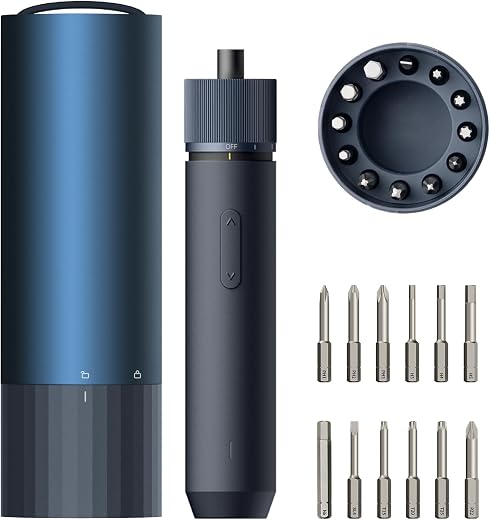
Price: $49.99 | Amazon rating: 4.7 / 5 from 3,737 ratings | Role: Assembly and cable management | Key spec: 12 × S2 bits, max 4 N·m powered / 8 N·m manual, 1500 mAh, USB-C
Home office essentials get assembled, and then re-assembled. Desks come flat-packed, monitor arms clamp on with a dozen turns of a bolt, keyboard trays and cable trays screw to the underside of a worktop, and the shelf you put up in year one comes down in year two. Doing that with the folded hex key in the box is how weekends disappear.
The HOTO is a 0.55-pound driver with twelve 50 mm S2 steel bits in a machined aluminium case, three torque settings topping out at 4 N·m powered and 8 N·m when you turn it by hand like a normal screwdriver, a 1500 mAh cell that charges over USB-C in under 150 minutes, and a ring of shadow-free LEDs around the chuck. That LED ring is the detail that matters underneath a desk, where you are working upside down in your own shadow with a phone torch in your teeth.
The powered mode does the eighty turns; your wrist does the final quarter-turn where feel matters and over-torquing splits chipboard. It holds a 4.7-star average across more than 3,700 ratings, which is unusually high for a tool at any price, and it is the item on this list most likely to get borrowed by the rest of the household.
Best for: Anyone assembling or regularly re-arranging a desk, monitor arms, shelving or flat-pack furniture — and it earns its place in a toolbox afterwards.
Skip if: Your next job involves masonry, wall plugs or long screws into hardwood. 4 N·m is a furniture and electronics tool, not a drill.
Read the full HOTO electric screwdriver review →
Where to Buy — HOTO electric screwdriver
5. Swingline ClassicCut Lite 9312 — Best Trimmer for Letter and A4
Price: $37.99 | Amazon rating: 4.6 / 5 from 19,826 ratings | Role: Paper and document trimming | Key spec: 12 in (305 mm) cut length, 10 sheets of 20 lb paper, dual inch/cm scale
The paperless office did not arrive. Certificates, contracts, shipping labels printed four to a sheet, business cards, photo prints and the small mountain of paperwork that comes with running anything from home all still need a straight edge. Scissors give you a wavy line; a guillotine trimmer gives you an edge that looks like it came from a print shop.
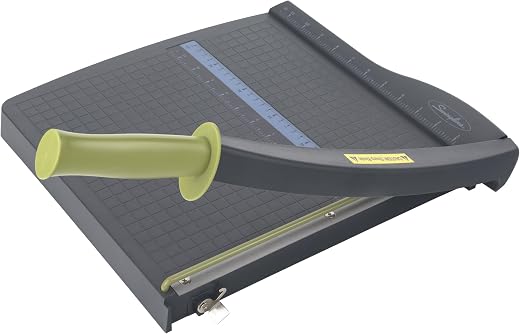
The ClassicCut Lite has a 12-inch cutting length and takes up to ten sheets of 20 lb paper in one pass. Twelve inches is the number that makes this a genuinely international pick: it is 305 mm, and the long edge of an A4 sheet is 297 mm, so it clears A4 with 8 mm to spare as comfortably as it clears the 11-inch long edge of US Letter. The ruler is printed in both inches and centimetres for the same reason.
Safety is handled by a guard rail that keeps fingers away from the blade in use and a latch hook that locks the arm down when it is not — which matters, because this is the one item among these home office essentials that is genuinely sharp and will live within reach of whoever else uses the room. The base is plastic rather than metal, so it is light enough to move and store upright, at the cost of the reassuring heft of an office-grade trimmer.
Best for: Anyone who prints and trims regularly — sellers, teachers, photographers, and anyone working across both Letter and A4 paper.
Skip if: You cut card, laminated sheets or stacks thicker than ten sheets, or you want a metal-based trimmer that stays put on a bench.
Read the full Swingline ClassicCut Lite review →
Where to Buy — Swingline ClassicCut Lite
6. Rioddas External CD/DVD Drive — Best Fix for Legacy Media
Price: $21.99 | Amazon rating: 4.3 / 5 from 40,656 ratings | Role: Legacy media and archiving | Key spec: USB 3.0 up to 5 Gbps, bus-powered, +/-RW read and write
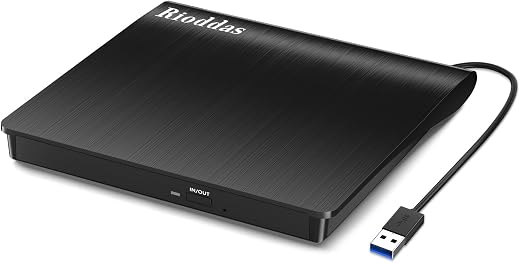
No laptop sold in the last decade has an optical drive, and yet the discs did not disappear. Accounting software from 2011 that a small business still runs, a training course, wedding photos a client burned to DVD, backup discs from an old machine, driver discs for a perfectly good printer, a parent’s CD collection waiting to be ripped — all of it is unreadable on a modern desk until this $22 box arrives.
It is bus-powered over USB 3.0 with no separate mains adapter, negotiates up to 5 Gbps, falls back to USB 2.0 without complaint, and reads and writes CD and DVD ±RW. Plug it in and Windows or macOS mounts it with no driver install. The one setup note worth knowing: on a desktop, use a port on the back of the motherboard rather than a front-panel or hub port, because an under-powered port is behind most of the one-star reviews any bus-powered optical drive collects.
The honest framing is that this is an archiving tool, not a daily one. You will use it hard for a weekend digitising a shelf, then twice a year — which is precisely why it belongs in a drawer of home office essentials rather than on the desk. At twenty-two dollars it costs less than recovering one disc’s worth of files any other way.
Best for: Anyone with a shelf of discs to digitise, legacy software to install, or a client who still sends work on a DVD.
Skip if: You have no discs and never will, or you need Blu-ray — this reads and writes CD and DVD only.
Read the full Rioddas external CD/DVD drive review →
Where to Buy — Rioddas external CD/DVD drive
7. Raymay Fujii Pen Case — Best Slim Kit for Hot-Desking
Price: $11.76 | Amazon rating: 4.6 / 5 from 324 ratings | Role: Portable stationery | Key spec: 62 × 200 × 24 mm (2.4 × 7.9 × 0.9 in), 76 g, magnetic lid
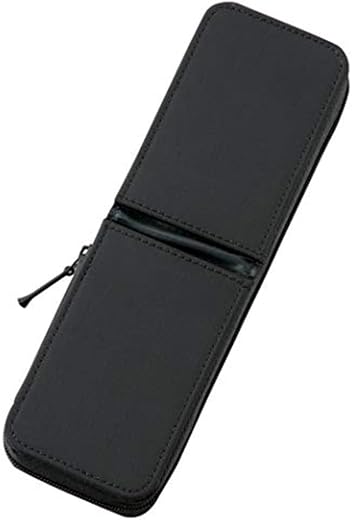
Hybrid work turned the pen drawer into a problem. Two days a week the pens live at home, three days they need to be in a bag, and loose pens in a rucksack end up lidless, leaking, or lost against the lining. The Raymay Fujii case is the smallest sensible answer: 62 × 200 × 24 mm and 76 grams, slim enough to slide down the side of a laptop sleeve rather than taking up a compartment.
The design detail that earns it a place is the lid. It hinges open from the top and holds shut on a magnet, so it opens one-handed on a train tray table and does not fight you like a zip when the case is full. Inside there is a small pocket for a USB stick or spare nibs and a protective wall that stops pen tips grinding against each other in transit. It won a Good Design Award in 2017, and the reason is visible the first time you use it.
Capacity is the limit: this holds a working set — three or four pens, a pencil, a highlighter, a small ruler — not a pencil case’s worth of art supplies. That is the point. Of all the home office essentials here it is the cheapest and the one most likely to be in your bag rather than on your desk.
Best for: Hybrid workers, students and anyone who moves between a home desk and an office and wants a slim, fixed kit that always comes with them.
Skip if: You want to carry a dozen pens, markers or drawing supplies — this is deliberately a slim case for a small working set.
Read the full Raymay Fujii pen case review →
Where to Buy — Raymay Fujii pen case
Home Office Essentials — Buyer’s Guide: What to Look For
Which Home Office Essentials Should You Buy First?
Buy in the order that other people notice. The camera is first, because it is the only item on this list that changes how colleagues perceive you, and it does so on every call from the day it arrives. The labeller and the screwdriver come next, because they fix the two problems that quietly cost you time every week — not knowing which cable is which, and putting off a job because the right tool is three drawers away. The trimmer, the optical drive and the pen case are situational: buy them when the situation arrives, not before.
The reverse order is the mistake. It is very easy to spend $300 on desk accessories that photograph well and still take a meeting on a laptop camera in front of a window.
Connectors, Power and What Plugs Into What
Check the connector before the specification sheet, because half of the frustration people report with new home office essentials is a port mismatch rather than a fault. Both cameras here are USB-A, which is fine on a desktop or a dock and needs a $10 adapter on a modern thin laptop that only has USB-C. The optical drive is USB 3.0 and bus-powered, meaning it draws its power from the port itself — that is convenient, but it also makes it fussy about weak front-panel ports and unpowered hubs.
Anything with a battery matters more. The screwdriver charges over USB-C from any phone charger, which is the modern answer and travels internationally without a second thought. Kit that ships with a fixed mains adapter is the kit to check twice if you ever move country — a 100–240 V charging brick needs only a plug-shape adapter, while a 120 V-only motor should never be plugged into a 230 V socket.
The Numbers That Actually Matter
Marketing specifications are chosen to sound large. The ones worth reading are the constraints. On a webcam, frame rate and field of view tell you more than megapixels: 1080p at 30fps is the working standard for video conferencing, and 58° versus 78° decides whether the call sees your face or your kitchen. On a trimmer, sheet capacity is quoted at a specific paper weight — ten sheets of 20 lb paper is not ten sheets of card. On a cordless screwdriver, torque in newton metres is the honest number: 4 N·m assembles furniture and will not drive anything into a wall.
Applied to home office essentials generally, the rule is simple: find the number that describes the limit rather than the capability, and check that your actual job sits inside it.
Buy for the Room You Have, Not the Desk You Want
Most desk-setup content is photographed in a room with a north-facing window, a bare wall and no other function. Real home offices are corners of bedrooms, ends of dining tables and converted landings, shared with a partner on their own calls and a household that walks through shot. That is why the narrower 58° camera can beat the wider 78° one, why a physical privacy shutter is worth real money in a shared room, and why a trimmer with a blade latch matters if a child ever uses the same desk.
Before adding to your list of home office essentials, sit at the desk and note three things: what is directly behind you on camera, who else uses the room, and what you have to unplug or move when the room becomes something else in the evening. Those three answers change the shortlist more than any review does.
Home Office Essentials That Earn Their Desk Space
Desk surface is the scarcest resource in a home office, and the test for any purchase is whether it deserves permanent residency. Only two items here do: the camera, which lives on the monitor, and — for people who print constantly — the trimmer. The labeller, the screwdriver, the optical drive and the pen case are drawer tools, used hard in bursts and then put away. Buying home office essentials with that distinction in mind is the difference between a working desk and a cluttered one.
It also changes what you should pay for. Drawer tools can be plain; a permanent item is worth spending on for size, quietness and the way it looks in the room you also live in.
US vs UK: What Changes When You Set Up a Home Office
American readers search for home office essentials; British readers are far more likely to search for working from home essentials or home working setup, and the official documents use the second vocabulary too — HSE guidance is written for “home workers” and HMRC’s rules are filed under “working from home”. The vocabulary gap is the smallest of the differences. Paper sizes, voltage, broadband guarantees, ergonomics law and tax relief all diverge, and two of them changed in 2026.
Paper: Letter vs A4 (and Why 12 Inches Matters)
The US uses ANSI sizes: Letter is 8.5 × 11 in and Legal is 8.5 × 14 in. The rest of the world, the UK included, uses ISO 216: A4 is 210 × 297 mm, or about 8.27 × 11.69 in. The ISO series has a √2 aspect ratio, which is why cutting an A3 sheet in half gives you two A4 sheets in exactly the same proportions — ANSI sizes do not behave that way.
Practically, this is the difference that catches out home office essentials bought across markets. A4 is narrower and taller than Letter, so a US template printed on A4 loses its margins, and an A4 document printed on Letter comes out with a stripe of white at the bottom.
This is exactly why the trimmer’s 12-inch cut length is worth checking rather than assuming. Twelve inches is 305 mm; A4’s long edge is 297 mm. It clears both standards, with 8 mm to spare on A4 — and the ruler is printed in inches and centimetres, which is the kind of small detail that decides whether a product is usable in both markets.
Power: 120 V Type A/B vs 230 V Type G
US mains is 120 V at 60 Hz through ungrounded Type A or grounded Type B plugs. UK mains is 230 V at 50 Hz through the fused Type G plug, and the fuse in the plug is a genuine safety difference rather than a quirk — it protects the flex, not just the appliance. Anything on this list that charges from USB is unaffected: a USB-C charger rated 100–240 V works in both countries with nothing more than a plug-shape adapter.
The trap is a cheap mains-powered device with a 120 V-only motor or heater bought on a US trip. A travel adapter changes the plug shape and nothing else, so plugging one into a UK socket puts nearly twice the intended voltage through it. When buying home office essentials that plug into the wall, read the input range printed on the brick before you read the price.
Broadband: FCC 100/20 vs the UK’s 10/1 Guarantee
Upload speed is the number that decides whether your new camera looks like a new camera. In March 2024 the FCC raised its fixed broadband benchmark from 25/3 Mbps to 100 Mbps down and 20 Mbps up, with a long-term goal of 1 Gbps/500 Mbps. The UK’s broadband universal service obligation, live since March 2020, guarantees far less: the right to request a “decent” connection of 10 Mbps down and 1 Mbps up, subject to a £3,400 per-premises cost cap.
That gap is why UK home workers on rural or older connections should check upload before spending on video quality. A 1080p call typically wants a few Mbps upstream and will happily saturate a 1 Mbps line, at which point the camera is not your bottleneck. Test the upload figure, not the headline download figure, before deciding which of these home office essentials to buy first.
Ergonomics: OSHA Guidance vs UK DSE Law
This is the sharpest legal difference of the lot. In the US, OSHA publishes a detailed Computer Workstations eTool with recommended clearances and monitor positions, but there is no specific federal ergonomics standard for a home desk — it is guidance, and home offices sit largely outside enforcement.
In the UK, the Health and Safety (Display Screen Equipment) Regulations 1992 are law and they follow the worker home. HSE is explicit that they apply to people working permanently at home and to hybrid workers, wherever DSE is used daily for continuous periods of an hour or more. Employers must carry out a DSE assessment for those workers — usually a trained self-assessment rather than a home visit — reduce the risks found so far as is reasonably practicable, provide training, plan breaks or changes of activity, and they cannot charge the worker for equipment the assessment identifies as necessary.
Eye Tests: A UK Entitlement With No US Equivalent
UK DSE users can ask their employer for a full eye and eyesight test by an optometrist or doctor, and the employer pays for it. If the test shows the worker needs a special prescription specifically for the screen viewing distance, the employer pays for those glasses too; if an ordinary prescription would do, the worker covers it. There is no equivalent federal entitlement in the US, where eye care sits with whatever the health plan offers — worth knowing before you spend on home office essentials to fix a problem that is really an eyesight one.
Tax: The IRS Rule vs a UK Change on 6 April 2026
American employees cannot deduct a home office at all — miscellaneous itemised deductions for employee business expenses were eliminated for tax years beginning after 2017. The self-employed still can, and the IRS simplified option is $5 per square foot of space used exclusively and regularly for business, capped at 300 sq ft, so a maximum of $1,500.
The UK has just moved in the same direction. Tax relief on non-reimbursed homeworking expenses — the familiar £6 a week flat rate claimed without receipts — was removed from 6 April 2026, affecting roughly 300,000 people at about £62 a year for basic-rate and £124 for higher-rate taxpayers. Employers can still reimburse eligible homeworking costs free of Income Tax and National Insurance, and the self-employed keep the separate simplified-expenses flat rates of £10, £18 or £26 a month for 25–50, 51–100 and 101+ hours worked at home per month. If you were budgeting home office essentials against a UK tax rebate, that assumption no longer holds for employees.
Vocabulary: Office Supplies vs Stationery
Search terms matter when the product is the same and the word is not. Americans buy office supplies; Britons buy stationery. A US trash can is a UK bin, a countertop is a worktop, a flashlight is a torch, Scotch tape is Sellotape, an eraser is a rubber, a cell phone is a mobile, a résumé is a CV, and a paper trimmer is more often listed as a guillotine on Amazon.co.uk. Searching a UK marketplace with US vocabulary returns a different, usually worse, set of results — which is the practical reason British readers so often cannot find the products an American home office article recommends.
Home Office Essentials — Which One Should You Buy?
Very few people should buy all seven home office essentials at once. These are the three sensible entry points, in the order the money is best spent.
Under $40: Fix the Biggest Problem First
If the budget stretches to one of these home office essentials, make it the camera. The Logitech Brio 101 at $35.99 delivers the same 1080p/30fps as cameras costing twice as much, adds a privacy shutter, and immediately fixes the worst thing about a laptop-camera call. If you already have a decent camera, the Rioddas external CD/DVD drive at $21.99 and the Raymay Fujii pen case at $11.76 are the two cheapest problems on this list to make permanently go away — and together they still cost less than the camera.
$40–$110: The Working Core
This is where most people should land. The Logitech C920x at $59.99 plus the DYMO LetraTag 100H at $42.70 is a little over $100 and covers the two things you interact with daily: how you appear on calls and whether the desk makes sense. Swap the labeller for the HOTO 12-in-1 electric screwdriver at $49.99 if your desk is still being built rather than merely being used.
Over $110: The Complete Set
All seven come to roughly $260, which is less than a single mid-range office chair and covers far more ground. If you run a business from the room — printing, shipping, filing, digitising — add the Swingline ClassicCut Lite at $37.99 to the working core first, then the screwdriver, then the second camera. That ordering follows how often you will touch each item, which is the only ranking of home office essentials that survives contact with an actual working week.
Setting Up Home Office Essentials Safely: Ergonomics, Screens and Sharp Edges
Kit is the easy half. The other half is where you put it — home office essentials only pay off in a workspace that is set up properly — and here there are real published numbers rather than opinions — most people have simply never seen them.
The part of that setup most people get wrong is the smallest: the two objects your mousing hand actually touches. If your wrist aches by the afternoon, a change of grip and a rest under the heel of the hand cost less than any other fix on this page — we compare five of them in our guide to the best ergonomic mouse and pad picks for 2026, including why Britain has required support for the hands in front of the keyboard since 1992 and the United States still has no federal rule at all.
Monitor and Camera Height: The Published Numbers
OSHA’s Computer Workstations eTool puts the preferred viewing distance at 20 to 40 inches (50 to 100 cm) from eye to screen, with the top of the monitor at or slightly below eye level and the centre of the screen normally 15 to 20 degrees below horizontal eye level. Tilt the screen no more than 10 to 20 degrees to sit perpendicular to your line of sight, and place it perpendicular to a window rather than facing or backing onto one.
Those numbers also solve the camera problem. A webcam clipped to a monitor set at the recommended height lands near your eyeline automatically, which is why the picture from a properly positioned screen looks so much better than a laptop camera on a desk — same sensor rules, entirely different angle.
Legroom: The Clearance Nobody Measures
The same OSHA guidance specifies clearance under the work surface: at least 20 in (52 cm) wide, 17 in (44 cm) deep at knee level and 24 in (60 cm) deep at foot level, with work surface height adjustable between 20 and 27 in (50 and 69 cm) near the user. A dining table is typically taller than that range, which no amount of home office essentials will fix on its own, which is the single most common ergonomic fault in improvised home offices — and the reason a laptop riser plus an external keyboard beats simply sitting higher.
Breaks Beat Equipment
UK DSE guidance is blunt about this: employers must plan work so there are breaks or changes of activity for DSE users, and training on posture and working practices is a duty, not a perk. No amount of home office essentials substitutes for standing up. Short, frequent changes of position beat one long break, and they cost nothing.
The Sharp and Powered Ones
Two items here need respect. The trimmer’s blade latch hook is not decoration — engage it every time, especially in a room shared with children, and keep the guard rail in place while cutting. The screwdriver’s honest failure mode is over-torquing: chipboard and thin metal strip easily, so drive with power and finish the last quarter-turn by hand. Both are safer than the improvised alternatives they replace, which are usually kitchen scissors and a hex key applied with a great deal of optimism.
Home Office Essentials — Frequently Asked Questions
1. What are the most important home office essentials to buy first?
A decent webcam, then whatever ends the daily friction in your particular room — usually cable labelling and a tool for assembling and re-arranging things. Desk, chair and monitor decisions come before all of it, but they are once-a-decade purchases; this list is the layer you touch every week.
2. Is a separate webcam still worth it if my laptop has one?
Yes, for two reasons that have nothing to do with resolution. It is one of the few home office essentials that improves something you cannot see yourself. A separate camera sits at monitor height rather than below your chin, and it has a larger lens and better light handling than anything that fits inside a laptop lid. On a 1080p external camera with light correction you look lit; on a laptop camera in the same room you look grey.
3. Do I need 4K for video calls?
No. Zoom, Teams and Google Meet compress heavily and 1080p at 30fps is the practical ceiling for a standard call. Upload bandwidth and lighting will limit your picture long before the sensor does — which is why the FCC’s 20 Mbps upload benchmark and the UK’s 1 Mbps universal service minimum matter more than a camera’s headline resolution.
4. Will these home office essentials work in the UK?
All seven work in both markets. The two cameras and the optical drive are USB-powered, so voltage is irrelevant. The screwdriver charges over USB-C. The trimmer’s 12-inch cut clears A4 as well as Letter and its ruler is dual-marked in inches and centimetres. The pen case is dimensioned in millimetres to begin with. Search the model names on Amazon.co.uk, where the trimmer is more likely to be listed as a guillotine.
5. Can I claim home office equipment on my taxes?
In the US, employees cannot — that deduction was eliminated for tax years beginning after 2017 — while the self-employed can use the simplified option of $5 per square foot up to 300 sq ft. In the UK, employee tax relief on non-reimbursed homeworking expenses was removed on 6 April 2026, though employers can still reimburse eligible costs tax-free and the self-employed keep the £10/£18/£26 monthly flat rates. Check with an accountant for your own circumstances; this is general information, not tax advice.
6. Does my employer have to pay for my home office setup?
In the UK, if a DSE assessment identifies equipment as necessary for a home worker, the employer cannot pass that cost to the worker, and DSE users can also request an employer-funded eye test. In the US there is no equivalent federal requirement, though some states impose expense-reimbursement rules — so it depends where you live and what your contract says.
7. Is a label maker really worth $40?
It is one of the home office essentials that justifies itself in a single moment: the first time you need to unplug one specific device five minutes before a call, and again every time someone else has to find something in your filing. If you have fewer than four cables under the desk and no shared storage, skip it — that is an honest answer rather than a sales one.
8. Do people still need a CD/DVD drive in 2026?
Not daily, but the discs outlived the drives. Old software, client deliverables, archived photos, driver discs and music collections all still exist, and at $21.99 a bus-powered USB 3.0 drive costs less than one data-recovery attempt. Use it hard for one weekend of digitising, then keep it in a drawer.
9. How much desk space do these home office essentials need?
Two items live on the desk permanently — the camera on the monitor and, for heavy printers, the trimmer. Everything else is a drawer tool. Keep OSHA’s clearance figures in mind while arranging it: 20 in wide and 17 in deep at knee level under the surface should stay clear regardless of what accumulates on top.
10. What is the cheapest useful home office upgrade?
Under $15, the pen case if you work in more than one place, or a roll of labels if you do not. Under $40, the Brio 101 camera. The pattern across every one of these home office essentials is the same: the cheap items remove a recurring annoyance, and the mid-priced ones change how your work looks to other people.
Home Office Essentials — Final Thoughts
The seven products here were chosen because each does a different job and because none of them is a desk, a chair or a monitor. That was deliberate — the point of a home office essentials list is to cover the gaps, not repeat the furniture guides. The big furniture decisions are made once, argued about endlessly online, and then forgotten; the small tools are the ones you reach for on a Tuesday morning, and they are almost never reviewed properly. A $42 label maker will not appear in anyone’s aspirational desk photo, and it will still save you more time this year than a second monitor.
If you take one thing away, make it the ordering. Camera first, because it is the only item other people experience. Then whichever of the drawer tools matches the friction in your own room — labels if the cables are a mess, the screwdriver if the desk is still being built, the trimmer if you print, the drive if you have a shelf of discs, the pen case if you work in two places. Buy home office essentials in that order and every purchase pays for itself before the next one arrives.
Sources and Further Reading
- HSE — Working with display screen equipment (DSE) at home
- HSE — Eye tests and glasses for DSE users
- OSHA — Computer Workstations eTool: Monitors
- OSHA — Computer Workstations eTool: Work Space clearances
- GOV.UK — Removal of tax relief on non-reimbursed homeworking expenses (from 6 April 2026)
- GOV.UK — Simplified expenses if you’re self-employed: working from home
- IRS — Simplified option for home office deduction
- FCC — Commission increases broadband speed benchmark to 100/20 Mbps (March 2024)
- House of Commons Library — The broadband Universal Service Obligation
- ANSI — Standard paper sizes: ISO and ANSI formats
Disclosure: Blue Rays Technologies is a participant in the Amazon Services LLC Associates Program. Product links in this article are affiliate links, and we may earn a commission on qualifying purchases at no additional cost to you. Prices and availability were correct at the time of writing and may change. This article is general information, not tax, legal or medical advice.