
Acer Nitro V 16S AI Gaming Laptop (Ryzen 7 260, RTX 5060, 32GB, 1TB) Review (2026): Worth It?
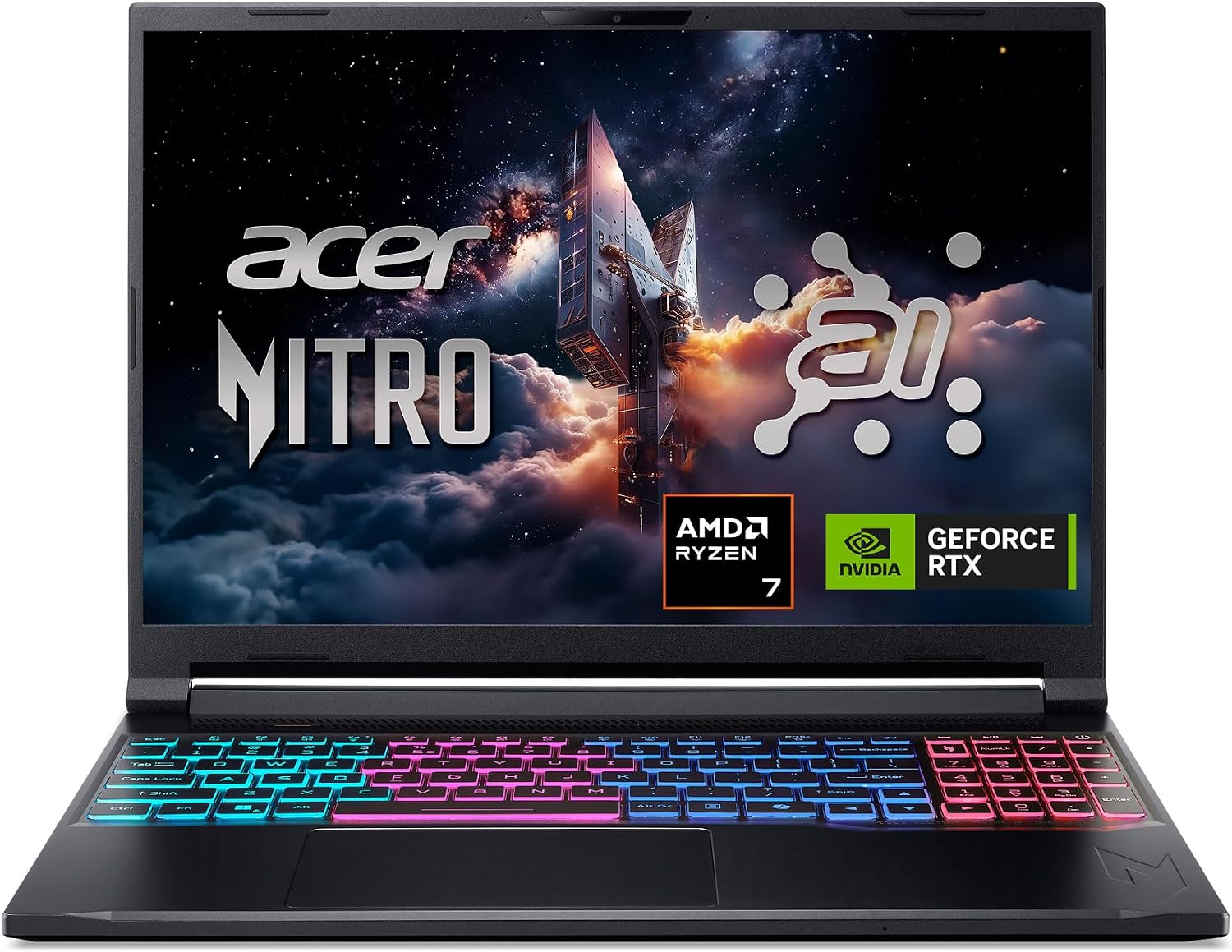
The Acer Nitro V 16S is a 16-inch gaming laptop with an AMD Ryzen 7 260, an NVIDIA GeForce RTX 5060 Laptop GPU, 32GB of DDR5 and a 1TB PCIe Gen 4 SSD, listed at $1,399.99 and rated 4.4 out of 5 from 349 owners. It scores 8.6 out of 10, the highest of any gaming machine in our Computing section, because its listing is unusually honest about what you can and cannot upgrade.
$1,399.99
Acer Nitro V 16S AI Review: An RTX 5060 Gaming Laptop That Publishes Its Upgrade Ceiling
The Acer Nitro V 16S is a 16-inch gaming laptop with an AMD Ryzen 7 260, an NVIDIA GeForce RTX 5060 Laptop GPU, 32GB of DDR5 and a 1TB PCIe Gen 4 SSD, listed at $1,399.99 and rated 4.4 out of 5 from 349 owners. It scores 8.6 out of 10, the highest of any gaming machine in our Computing section, because its listing is unusually honest about what you can and cannot upgrade.
This review is research-based. We did not physically test this product; specifications, ratings and prices are taken from the live Amazon listing on 9 October 2026. It is one of twelve laptops and desktop computers in our Computing section.
On this page
- Acer Nitro V 16S AI Review: An RTX 5060 Gaming Laptop That Publishes Its Upgrade Ceiling
- Key Specifications
- RTX 5060 Graphics In The Acer Nitro V 16S
- Memory, Storage And The Upgrade Ceiling
- The 180Hz Screen, Weight And Battery On The Acer Nitro V 16S
- Limitations
- Setting Up This Acer Nitro V 16S
- Who Should Buy This Acer Nitro V 16S?
- The Verdict
- Acer Nitro V 16S — Frequently Asked Questions
Key Specifications
Every figure below is copied from the live Amazon listing; where the listing contradicts itself, we say so under Limitations.
| Specification | Published value |
|---|---|
| Reviewed model | Acer Nitro V 16S |
| Product | Acer Nitro V 16S AI Gaming Laptop (Ryzen 7 260, RTX 5060, 32GB, 1TB) |
| Price at review | $1,399.99 |
| Owner rating | 4.4 out of 5 from 349 ratings |
| Processor | AMD Ryzen 7 260, 8 cores, 3.8 GHz base, up to 5.1 GHz, 24MB L3 |
| Graphics | NVIDIA GeForce RTX 5060 Laptop GPU, 8GB GDDR7 |
| Memory | 32GB DDR5-5600 (2 slots, maximum 32GB) |
| Storage | 1TB PCIe Gen 4 SSD (2 x M.2 slots, 1 free) |
| Display | 16-inch WUXGA 1920 x 1200 IPS, 180Hz, 100% sRGB |
| Battery | 65 watt-hours |
| Ports | 3 USB (incl. USB-C), HDMI, DisplayPort over USB-C |
| Wireless | Wi-Fi 6, Bluetooth |
| Keyboard | Backlit with numeric keypad |
| Weight | 4.6 pounds |
| Dimensions | 14.08 x 10.39 x 0.79 inches |
| Operating system | Windows 11 Home |
| Warranty | One-year International Travelers Limited Warranty |
| Model number | ANV16S-41-R2AJ |
| Expert Score | 8.6 out of 10 |
RTX 5060 Graphics In The Acer Nitro V 16S
The RTX 5060 Laptop GPU is NVIDIA’s Blackwell-generation mid-range part with 8GB of GDDR7, and Acer’s listing leans on DLSS 4 and Multi Frame Generation, which use AI to raise frame rates. That is a real feature, but it is also a marketing number: the listing quotes 572 AI TOPS for the GPU and 38 TOPS for the CPU, and neither tells a buyer how a particular game will run.
What a buyer can rely on is the class of hardware. An RTX 5060 paired with a 1920 x 1200 screen is a sensible match: the GPU is not being asked to drive a 1440p or 4K panel, so the 180Hz refresh rate is achievable in lighter and older titles without leaning entirely on frame generation.
The processor side is an eight-core Ryzen 7 260 with a 3.8 GHz base clock, a 5.1 GHz maximum and 24MB of L3 cache. For a gaming laptop that is ample: modern games lean on the GPU first, and eight fast cores leave headroom for streaming software, voice chat and a browser running alongside the game.
Memory, Storage And The Upgrade Ceiling
This is the most useful paragraph on the listing. It says the laptop ships with 32GB of DDR5-5600 across two slots and that 32GB is the maximum. It says the 1TB SSD sits in one of two M.2 slots and one slot is free. Most gaming laptop listings bury or omit this; Acer states it plainly.
In practice it means memory is already at its ceiling and needs no attention, and storage is the only upgrade path: add a second NVMe SSD when 1TB of game installs runs out. For a buyer that is the ideal arrangement, because memory upgrades on gaming laptops are where most first-time upgraders go wrong.
The 180Hz Screen, Weight And Battery On The Acer Nitro V 16S
The display is a 16-inch WUXGA IPS panel at 1920 x 1200 with a 180Hz refresh rate and 100% sRGB coverage. The 16:10 shape adds vertical space over the 15.6-inch 16:9 panels on the business laptops in our Computing section, and full sRGB coverage means the screen is usable for photo work as well as games.
At 4.6 pounds it is the heaviest laptop we cover, and the 65 watt-hour battery is the largest published capacity of any laptop here. Neither number is unusual for a gaming laptop, and the listing makes no battery-life claim at all, which is more honest than inventing one for a machine that will spend most of its gaming life plugged in.
Ports are three USB including USB-C, plus HDMI and DisplayPort over USB-C, so an external monitor can be driven from either connector. The listing does not include an Ethernet port, which competitive online players often prefer to Wi-Fi; a USB adapter fixes that for a few dollars. Acer also lists a protective sleeve in the box alongside the AC adapter and power cord.
Limitations
4.4 stars from 349 ratings is a reasonable record, but it is a smaller evidence base than the budget laptops here and it does not describe gaming performance. The listing publishes AI TOPS figures instead of anything a gamer can use, such as GPU power limits.
The 1920 x 1200 resolution is low for a 16-inch screen at $1,399.99. It suits the RTX 5060, but buyers expecting a sharper 1440p panel at this price will find it elsewhere. Wi-Fi 6 is a generation behind the MacBook Air M5’s Wi-Fi 7.
The warranty is one year, described as an International Travelers Limited Warranty. That covers travel, but one year is short on a $1,399.99 machine with a fan, a dedicated GPU and a hinge that will be opened thousands of times.
Setting Up This Acer Nitro V 16S
Setup starts with Windows 11 Home and a round of updates, then the NVIDIA driver and Acer’s own control software for fan and performance modes. Plug in the charger for gaming: gaming laptops limit GPU power on battery.
If you plan to add storage, the listing confirms one free M.2 slot, so buy a PCIe Gen 4 NVMe SSD and install it before your game library is spread across a crowded 1TB drive. Leave memory alone; it is already at the 32GB maximum.
Who Should Buy This Acer Nitro V 16S?
Buy it if you want a gaming laptop that will run current games well at 1920 x 1200, you value 32GB of memory and a free M.2 slot, and you want a listing that tells you exactly where the upgrade ceiling is. It is also a capable machine for students who game and do creative work.
Skip it if portability matters: at 4.6 pounds it is nearly twice the weight of the MacBook Air M5. Skip it if you want a sharper screen at this price, or if you would rather put the money into a desktop: the RTX 5060 Ti gaming PC in our Computing section costs $100 more and has a faster GPU.
The Verdict
Scored 8.6. Acer pairs an RTX 5060 with a Ryzen 7 260, 32GB of DDR5, a 1TB Gen 4 SSD and a 180Hz 16:10 screen, and its listing publishes the slot counts and memory maximum that most gaming laptops hide. That is what earns it our best value badge for gaming.
It is held back by a 1920 x 1200 panel at $1,399.99, a one-year warranty, Wi-Fi 6, 4.6 pounds and performance claims expressed in AI TOPS rather than anything a gamer can use. Worth buying for most people who want one laptop for games and work.
Acer Nitro V 16S — Frequently Asked Questions
Can you upgrade the RAM in the Acer Nitro V 16S?
The listing states 32GB of DDR5 installed across two slots with a 32GB maximum, so memory is already at its ceiling and cannot usefully be upgraded.
Can I add a second SSD?
Yes. The listing says there are two M.2 slots and one is available, so a second PCIe Gen 4 NVMe drive can be added alongside the 1TB SSD.
What refresh rate is the screen?
180Hz on a 16-inch 1920 x 1200 IPS panel with 100% sRGB coverage, according to the listing.
Is the RTX 5060 good for gaming?
It is NVIDIA’s current mid-range laptop GPU with 8GB of GDDR7 and DLSS 4 support. At this laptop’s 1920 x 1200 resolution it is a well-matched pairing for current games.
Affiliate disclosure: we earn a commission on qualifying purchases made through the Amazon links on this page, at no extra cost to you. Links go to Amazon.com; UK readers can search the same model on Amazon.co.uk.
Related reviews
User Reviews
Be the first to review “Acer Nitro V 16S AI Gaming Laptop (Ryzen 7 260, RTX 5060, 32GB, 1TB) Review (2026): Worth It?”
Related Products

$1,399.99

There are no reviews yet.