
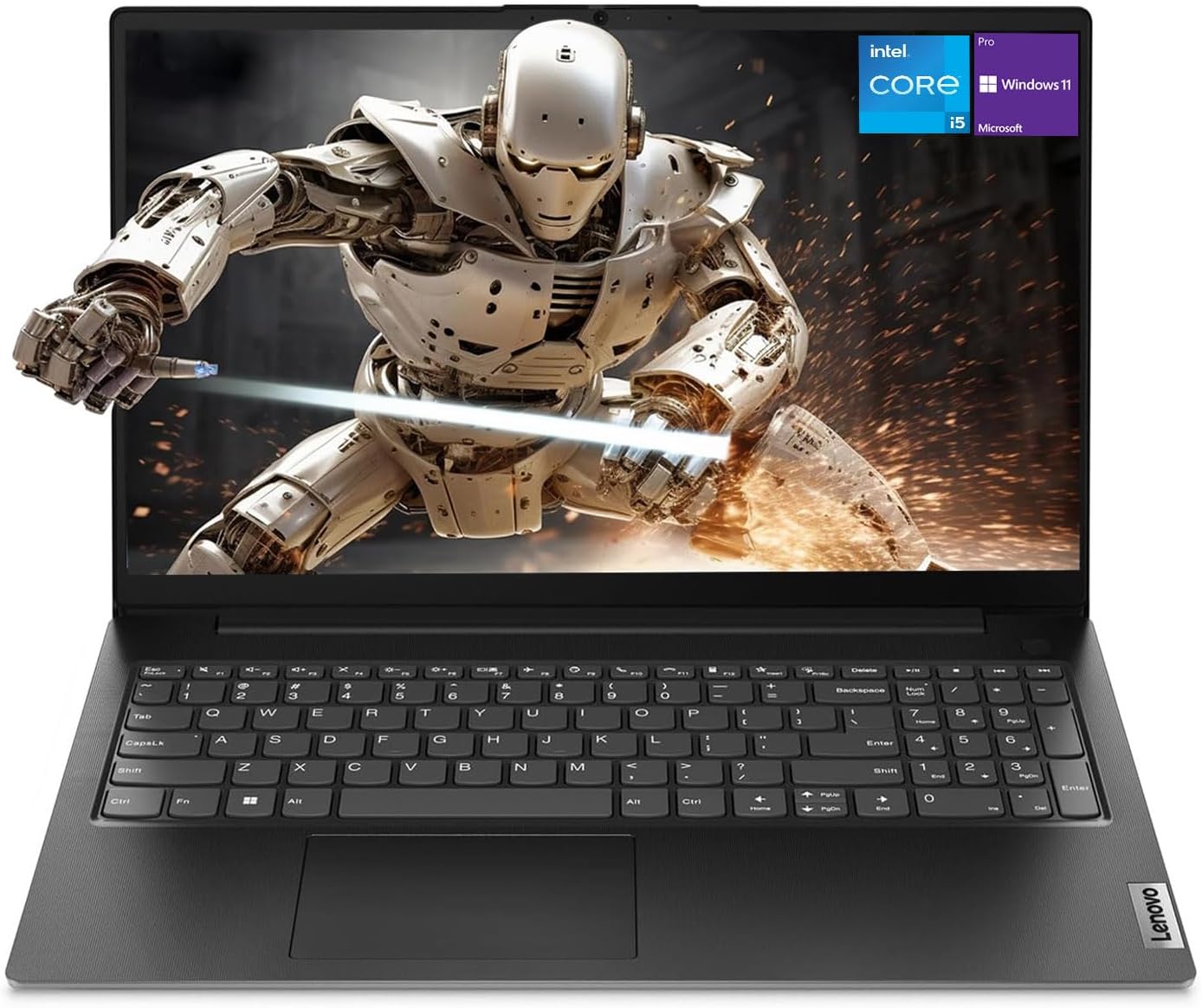
Lenovo V15 Gen 4 Business Laptop (Core i5-13420H, 16GB, 512GB, Windows 11 Pro) Review (2026): Worth It?
The Lenovo V15 Gen 4 is a 15.6-inch business laptop with an Intel Core i5-13420H, 16GB of RAM, a 512GB SSD and Windows 11 Pro, listed at $706.00 and rated 4.3 out of 5 from 201 owners. It scores 8.1 out of 10: the processor and the ports are right for office work, and the listing disagrees with itself about the memory and storage you are buying.
$706.00
Lenovo V15 Gen 4 Review: Ethernet, HDMI And Windows 11 Pro, With A Listing That Contradicts Itself
The Lenovo V15 Gen 4 is a 15.6-inch business laptop with an Intel Core i5-13420H, 16GB of RAM, a 512GB SSD and Windows 11 Pro, listed at $706.00 and rated 4.3 out of 5 from 201 owners. It scores 8.1 out of 10: the processor and the ports are right for office work, and the listing disagrees with itself about the memory and storage you are buying.
This review is research-based. We did not physically test this product; specifications, ratings and prices are taken from the live Amazon listing on 9 October 2026. It is one of twelve laptops and desktop computers in our Computing section.
On this page
- Lenovo V15 Gen 4 Review: Ethernet, HDMI And Windows 11 Pro, With A Listing That Contradicts Itself
- Key Specifications
- The Core i5-13420H In The Lenovo V15 Gen 4
- Ports: Why A Business Buyer Picks The Lenovo V15 Gen 4
- Windows 11 Pro And Memory Headroom
- Limitations
- Setting Up This Lenovo V15 Gen 4
- Who Should Buy This Lenovo V15 Gen 4?
- The Verdict
- Lenovo V15 Gen 4 — Frequently Asked Questions
Key Specifications
Every figure below is copied from the live Amazon listing; where the listing contradicts itself, we say so under Limitations.
| Specification | Published value |
|---|---|
| Reviewed model | Lenovo V15 Gen 4 |
| Product | Lenovo V15 Gen 4 Business Laptop (Core i5-13420H, 16GB, 512GB, Windows 11 Pro) |
| Price at review | $706.00 |
| Owner rating | 4.3 out of 5 from 201 ratings |
| Processor | Intel Core i5-13420H, 8 cores, 12 threads, 12MB cache, up to 4.6 GHz |
| Graphics | Intel UHD Graphics (integrated) |
| Memory | 16GB DDR4 (title and spec table); maximum 40GB |
| Storage | 512GB PCIe SSD (title and spec table) |
| Display | 15.6-inch FHD 1920 x 1080 |
| Ports | USB 3.0 Type-A, USB 2.0 Type-A, USB Type-C, HDMI, RJ45 Ethernet, audio jack |
| Wireless | Wi-Fi 802.11ac, Bluetooth |
| Keyboard | Numeric keypad |
| Battery | 26 watt-hours |
| Weight | 3.6 pounds |
| Dimensions | 14.13 x 9.29 x 0.78 inches |
| Operating system | Windows 11 Pro |
| Warranty | 1 year manufacturer |
| Model | Lenovo V15 G4 IRU |
| Expert Score | 8.1 out of 10 |
The Core i5-13420H In The Lenovo V15 Gen 4
The Core i5-13420H is an H-series chip with eight cores and twelve threads, boosting to 4.6 GHz with 12MB of cache. H-series parts are designed for higher sustained power than the U-series chips in most thin business laptops, and Lenovo’s title claims it beats the Core i7-1355U, a common U-series part. That is a comparison of chip classes, not a measured result on this laptop, but the class difference is real.
For spreadsheets, browser-heavy work, video calls and light photo editing it is more processor than an office laptop strictly needs, which is the point: it will stay usable for longer. Graphics are Intel UHD, so this is not a machine for games or GPU-accelerated video work.
The H suffix matters to buyers more than the i5 badge does. Laptops sharing the i5 name can carry very different chips, so read the full model number on every listing: 13420H here, against the N150 in the HP 14 laptop and the Core i3-14100 in the Dell Pro desktop tower in our Computing section.
Ports: Why A Business Buyer Picks The Lenovo V15 Gen 4
The port list is the strongest argument for this laptop. USB 3.0 Type-A, USB 2.0 Type-A, USB Type-C, full-size HDMI, an RJ45 Ethernet port and a headphone jack mean that a projector, a wired network, a USB stick and a mouse can all be connected without a single adapter.
Ethernet in particular is rare at this size now, and none of the consumer laptops in our Computing section have it. In an office with wired networking or a hotel with unreliable Wi-Fi, it matters more than any processor benchmark. The numeric keypad serves the same buyer: someone entering numbers all day.
Windows 11 Pro And Memory Headroom
Windows 11 Pro adds BitLocker drive encryption, Remote Desktop hosting and the management tools a small business uses to control company laptops. On a laptop that may hold client files, BitLocker alone justifies the Pro edition, and buying it preinstalled avoids an upgrade fee.
The specification table lists a 40GB memory maximum with one slot available, which suggests 16GB can be expanded later. Treat that as indicative rather than certain, for the reason explained under Limitations.
The webcam is listed without a resolution. For a business laptop that will spend much of its life on video calls that is a gap worth noting, and an external USB webcam is the usual fix if the built-in camera disappoints.
Limitations
The listing contradicts itself. The title and the specification table say 16GB of RAM and a 512GB SSD, but the first description bullet says “4GB high-bandwidth RAM” and a “128GB PCIe NVMe M.2 Solid State Drive”. It also lists the optical storage device as BD-R on a laptop with no optical drive. We have used the title and table figures throughout, because they match the configuration in the product name, but confirm the configuration on the order page before paying.
The battery is 26 watt-hours, the joint smallest of any laptop in our Computing section, and the listing makes no runtime claim. Expect this to be a laptop that lives near a socket. Wi-Fi is 802.11ac, two generations behind the newest machines here.
Graphics are integrated Intel UHD rather than the Iris Xe found on some Core i5 laptops, so external display and creative performance is basic. The listing also names no display brightness or panel type beyond LCD, so how the screen looks outdoors or near a window is unknown from the listing alone.
Setting Up This Lenovo V15 Gen 4
Setup should start with checking the installed memory and storage in Windows Settings, given the listing’s contradiction. Then turn on BitLocker, which Windows 11 Pro includes, before any work files are copied across.
Plug into Ethernet for the first round of Windows and Lenovo Vantage updates; it is faster and more reliable than the 802.11ac Wi-Fi. If you need more memory later, the listing indicates one free slot and a 40GB maximum.
Keep the power adapter with the laptop when travelling. A 26Wh battery leaves little margin for a day of meetings away from a desk, and the listing makes no claim about USB-C charging, so do not assume a phone charger will do.
Who Should Buy This Lenovo V15 Gen 4?
Buy it if you work in an office, a school or a small business, you need Ethernet, HDMI and a numeric keypad without adapters, and you want Windows 11 Pro for BitLocker and Remote Desktop. The Core i5-13420H gives it more headroom than most laptops at $706.00.
For a small business buying several identical machines, the Pro licence matters at scale: it lets the laptops join a work domain or Microsoft Entra ID and be managed centrally, which Windows 11 Home does not allow. That alone can justify the price difference against consumer laptops with similar processors.
Skip it if you work away from a desk for long periods: the 26Wh battery is small. Skip it for gaming, where the Acer Nitro V 16S is the laptop to look at. And if Windows 11 Pro does not matter to you, the Lenovo IdeaPad Slim 3 in our Computing section adds a touchscreen for less.
The Verdict
Scored 8.1. This is the most practical office laptop in our Computing section: an H-series Core i5, 16GB of RAM, a 512GB SSD, Windows 11 Pro, Ethernet, HDMI, three USB ports and a numeric keypad for $706.00.
It loses points for a listing that contradicts itself on memory and storage, a 26Wh battery, older Wi-Fi, basic integrated graphics and an evidence base of 201 ratings. Worth buying if the ports are what you need, after confirming the configuration on the order page.
Lenovo V15 Gen 4 — Frequently Asked Questions
Does this laptop have an Ethernet port?
Yes. The listing includes an RJ45 port alongside HDMI, USB-A, USB-C and an audio jack, which is unusual on current 15.6-inch laptops.
How much RAM does this laptop have?
The title and specification table say 16GB of DDR4 with a 40GB maximum, but one description bullet says 4GB. Check the configuration on the order page before buying.
Is Windows 11 Pro worth it over Home?
For business use, usually yes: Pro adds BitLocker encryption, Remote Desktop hosting and device management tools that small businesses rely on.
Is the battery good?
The listing gives a 26 watt-hour battery and no runtime claim, the smallest capacity among the laptops we cover, so plan on charging during a working day.
Affiliate disclosure: we earn a commission on qualifying purchases made through the Amazon links on this page, at no extra cost to you. Links go to Amazon.com; UK readers can search the same model on Amazon.co.uk.
Related reviews
User Reviews
Be the first to review “Lenovo V15 Gen 4 Business Laptop (Core i5-13420H, 16GB, 512GB, Windows 11 Pro) Review (2026): Worth It?”
Related Products

$706.00

There are no reviews yet.