
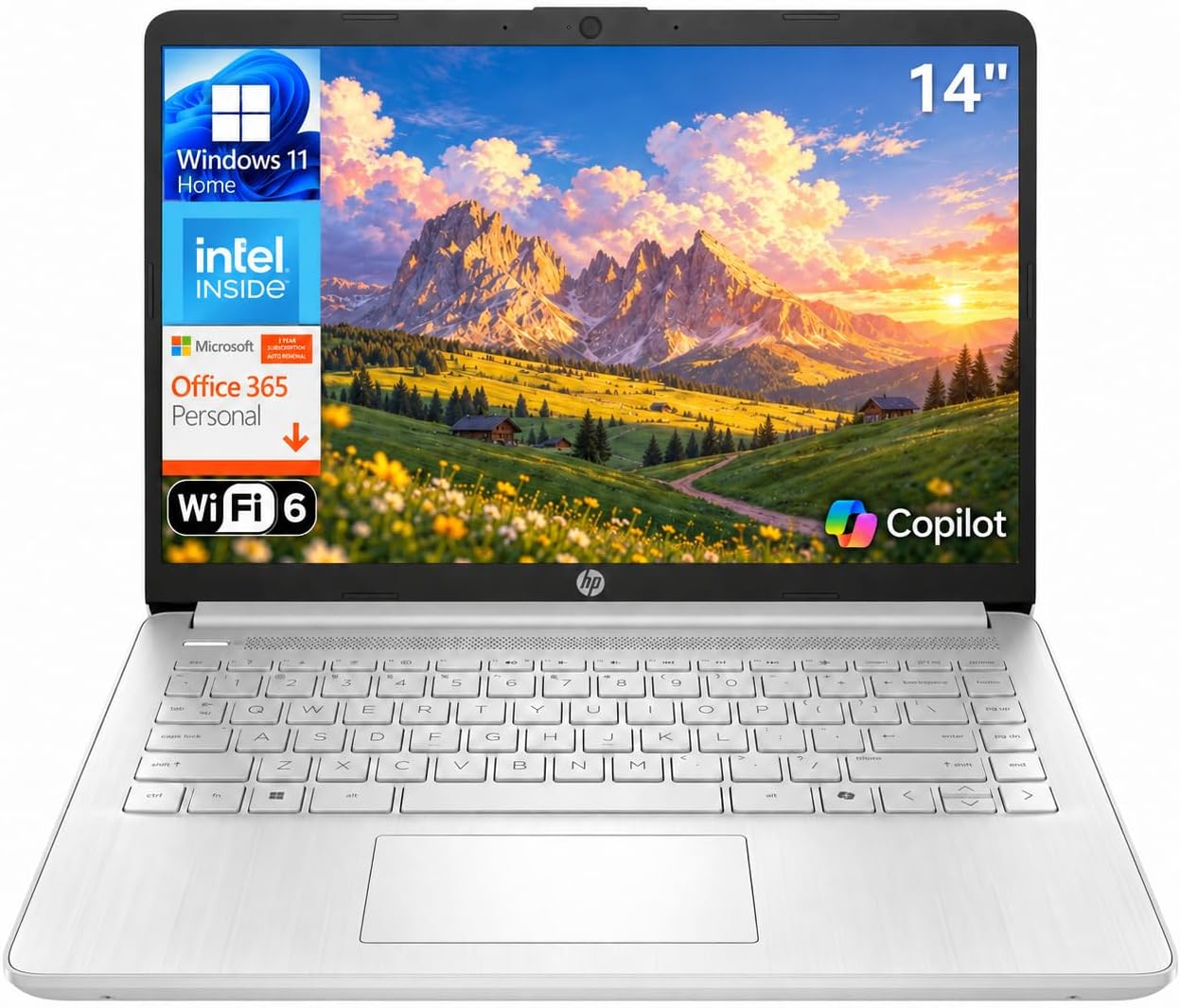
HP 14 Laptop (Intel N150, 4GB, 128GB UFS, Microsoft 365) Review (2026): Worth It?
The HP 14 laptop reviewed here has an Intel N150 processor, 4GB of LPDDR5 memory, 128GB of UFS storage, Windows 11 Home and a year of Microsoft 365 Personal, listed at $329.99 and rated 4.4 out of 5 from 405 owners. It scores 7.4 out of 10: it is the cheapest Windows laptop in our Computing section and it is light, but its listing contradicts itself on the screen, the storage and the keyboard.
$329.99
HP Laptop 14 (Intel N150) Review: A Light Windows Laptop With Microsoft 365, And A Listing That Disagrees With Itself
The HP 14 laptop reviewed here has an Intel N150 processor, 4GB of LPDDR5 memory, 128GB of UFS storage, Windows 11 Home and a year of Microsoft 365 Personal, listed at $329.99 and rated 4.4 out of 5 from 405 owners. It scores 7.4 out of 10: it is the cheapest Windows laptop in our Computing section and it is light, but its listing contradicts itself on the screen, the storage and the keyboard.
This review is research-based. We did not physically test this product; specifications, ratings and prices are taken from the live Amazon listing on 9 October 2026. It is one of twelve laptops and desktop computers in our Computing section.
On this page
- HP Laptop 14 (Intel N150) Review: A Light Windows Laptop With Microsoft 365, And A Listing That Disagrees With Itself
- Key Specifications
- The Intel N150 In The HP 14 Laptop
- Storage, Microsoft 365 And The Copilot Key On The HP 14 Laptop
- Weight, Ports And Wireless
- Limitations
- Setting Up This HP 14 laptop
- Who Should Buy This HP 14 laptop?
- The Verdict
- HP 14 laptop — Frequently Asked Questions
Key Specifications
Every HP 14 laptop figure below is copied from the live Amazon listing; where the listing contradicts itself, we say so under Limitations.
| Specification | Published value |
|---|---|
| Reviewed model | HP 14 laptop |
| Product | HP 14 Laptop (Intel N150, 4GB, 128GB UFS, Microsoft 365) |
| Price at review | $329.99 |
| Owner rating | 4.4 out of 5 from 405 ratings |
| Processor | Intel N150, 4 cores, 4 threads, up to 3.6 GHz, 6MB L3 |
| Graphics | Intel Graphics (integrated) |
| Memory | 4GB LPDDR5-4800 |
| Storage | 128GB UFS, plus SD card reader |
| Display | 14-inch micro-edge anti-glare; description: HD 1366 x 768, 250 nits, 62.5% sRGB; table: 1920 x 1080 |
| Ports | USB Type-C (10Gbps, DisplayPort 1.2), 2 x USB Type-A (5Gbps), HDMI 1.4b, audio jack, AC smart pin |
| Wireless | Wi-Fi 6 (2×2), Bluetooth 5.4 |
| Software | Windows 11 Home, 1-year Microsoft 365 Personal, Copilot key |
| Weight | 3.24 pounds |
| Dimensions | 12.76 x 8.86 x 0.71 inches |
| Model | HP Laptop 14, 2026 |
| Expert Score | 7.4 out of 10 |
The Intel N150 In The HP 14 Laptop
The Intel N150 is a four-core, four-thread processor that boosts to 3.6 GHz with 6MB of cache. It is designed for low cost and low power, and HP’s own description sets the expectation honestly: web browsing, document editing, streaming and light multitasking. It is not a processor for photo editing, games or heavy spreadsheets.
Paired with 4GB of LPDDR5, it is the most modest Windows machine in our Computing section. Windows 11 uses a good share of 4GB on its own, so a browser with a handful of tabs, an office app and a video call is about the realistic limit. The listing gives an 8GB memory maximum, but LPDDR5 on a laptop like this is normally soldered, so treat 4GB as what you will always have.
For the same money a buyer can choose a Chromebook instead: the HP Chromebook 14 in our Computing section costs about $130 less and ChromeOS is lighter on memory. The case for this laptop is that it runs full Windows software.
Storage, Microsoft 365 And The Copilot Key On The HP 14 Laptop
Storage is 128GB of UFS, a fast flash type used in phones and budget laptops, with an SD card reader for expansion. 128GB fills quickly once Windows updates and Office are installed, which is why HP bundles one year of Microsoft 365 Personal with its 1TB of OneDrive cloud storage. After the first year that subscription has to be paid for, or the files need to move.
The dedicated Copilot key opens Microsoft’s assistant directly, and HP lists AI Noise Reduction for video calls, which filters background noise from the microphone. Both are useful for students and home workers, and both run largely in the cloud rather than on this processor.
Weight, Ports And Wireless
At 3.24 pounds and 0.71 inches thick it is the lightest Windows laptop we cover, second only to the MacBook Air M5 overall. The port selection is good for the price: a 10Gbps USB-C port with DisplayPort output, two 5Gbps USB-A ports, HDMI 1.4b and a headphone jack.
Wi-Fi 6 in a 2×2 configuration and Bluetooth 5.4 are current standards, a generation ahead of the Dell 15 and the Lenovo V15 Gen 4. For a student moving between home, library and classroom networks that matters more than the processor.
The bezels are thin, with HP quoting a 79% screen-to-body ratio, which is how a 14-inch screen fits in a body 12.76 inches wide. HP also describes a natural silver top cover and a vertically brushed keyboard deck: details that matter less than the screen, but signs of some care in a $329.99 product.
Limitations
The listing contradicts itself on the screen. The description says 14-inch HD at 1366 x 768, 250 nits and 62.5% sRGB; the specification table says 1920 x 1080. We have quoted the description’s figures because they are more detailed and match the price. A 1366 x 768 panel at 250 nits is dim and soft by 2026 standards.
There are more contradictions. The table gives memory storage capacity as 512GB beside 128GB of UFS storage, lists the model series as Pavilion, and describes the keyboard as full-size with a numeric keypad, a layout HP’s 14-inch laptops do not normally have. The colour is platinum white in one field and silver in two others. Bluetooth is 5.4 in the description and 5.3 in the table.
The listing also shows a former price of $849.00 against the $329.99 asking price. That reference figure is higher than the price of the Lenovo V15 Gen 4 with an i5, 16GB and 512GB, so do not read the discount as meaningful. The warranty field simply reads “1”.
Setting Up This HP 14 laptop
Setup starts with signing in to Windows 11 Home, which normally requires a Microsoft account and an internet connection, then activating the included Microsoft 365 Personal subscription so OneDrive can take documents off the 128GB drive.
Remove pre-installed apps you will not use, keep Windows Update current, and save photos and downloads to an SD card or OneDrive. Set a reminder for eleven months after purchase so the Microsoft 365 renewal is a decision rather than a surprise.
Who Should Buy This HP 14 laptop?
Buy it if you need a light, inexpensive Windows laptop for schoolwork, email, browsing and video calls, and the year of Microsoft 365 is useful to you. At $329.99 and 3.24 pounds it is an easy laptop to carry every day.
Skip it if you want to keep it for several years or run anything heavier than an office suite: 4GB of memory and 128GB of storage will be the limit. Skip it if screen quality matters, because the most detailed figures in the listing describe a dim 1366 x 768 panel. A Chromebook at around $200 will feel quicker on the same jobs if you do not need Windows.
Parents buying for a child should note that Windows 11 Home needs more upkeep than ChromeOS: updates are larger, and keeping enough free space on 128GB of storage for them to install is a regular job rather than a one-off.
The Verdict
Scored 7.4. HP’s 14-inch laptop is the cheapest Windows laptop in our Computing section and the lightest after the MacBook Air M5, with Wi-Fi 6, Bluetooth 5.4, a 10Gbps USB-C port, HDMI, a card reader and a year of Microsoft 365, at $329.99 with 4.4 stars from 405 owners.
It scores lowest of the laptops we cover because 4GB of memory and 128GB of storage are tight for Windows 11, and because its listing contradicts itself on the screen resolution, the storage, the keyboard, the colour and the model series. Fine for light use if you buy it with low expectations.
HP 14 laptop — Frequently Asked Questions
Is 4GB of RAM enough for the HP 14 laptop?
For browsing, email, documents and video calls one at a time, yes. For many browser tabs, large spreadsheets or photo editing, 4GB on Windows 11 is tight, and the memory is unlikely to be upgradeable.
What resolution is the screen?
The description says HD 1366 x 768 at 250 nits; the specification table says 1920 x 1080. The description is more detailed, so expect the HD panel unless the seller confirms otherwise.
Does it come with Microsoft Office?
It includes a one-year Microsoft 365 Personal subscription, which covers Word, Excel and PowerPoint plus 1TB of OneDrive storage, and then needs renewing.
Is this laptop good for students?
For note-taking, research and video classes, yes: it is light at 3.24 pounds, has Wi-Fi 6 and includes Microsoft 365 for a year. For heavier coursework, look for 8GB or more of memory.
Affiliate disclosure: we earn a commission on qualifying purchases made through the Amazon links on this page, at no extra cost to you. Links go to Amazon.com; UK readers can search the same model on Amazon.co.uk.
Related reviews
User Reviews
Be the first to review “HP 14 Laptop (Intel N150, 4GB, 128GB UFS, Microsoft 365) Review (2026): Worth It?”
Related Products

$329.99

There are no reviews yet.