
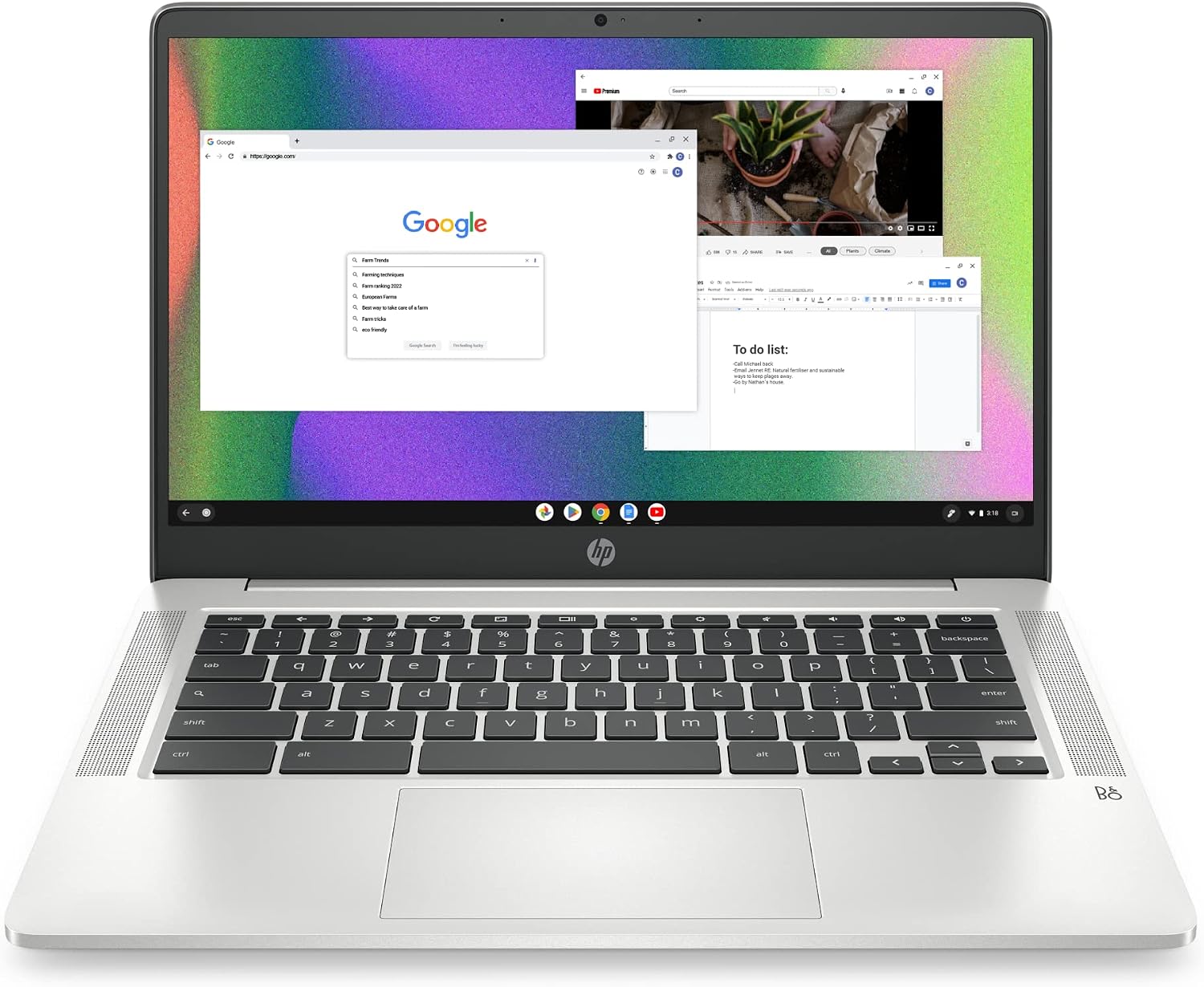
HP Chromebook 14 (14a-na0226nr, Celeron N4120, 4GB, 64GB) Review (2026): Worth It?
The HP Chromebook 14 reviewed here is the 14a-na0226nr, a 14-inch ChromeOS laptop with an Intel Celeron N4120, 4GB of RAM and 64GB of eMMC storage, listed at $201.14 and rated 4.3 out of 5 from 3,108 owners. It scores 7.9 out of 10: modest hardware, the cheapest price in our Computing section and by far the largest body of owner ratings behind it.
$201.14
HP 14a Chromebook (Celeron N4120) Review: The Most-Rated Computer We Cover, And Why The Rating Matters More Than The Specs
The HP Chromebook 14 reviewed here is the 14a-na0226nr, a 14-inch ChromeOS laptop with an Intel Celeron N4120, 4GB of RAM and 64GB of eMMC storage, listed at $201.14 and rated 4.3 out of 5 from 3,108 owners. It scores 7.9 out of 10: modest hardware, the cheapest price in our Computing section and by far the largest body of owner ratings behind it.
This review is research-based. We did not physically test this product; specifications, ratings and prices are taken from the live Amazon listing on 9 October 2026. It is one of twelve laptops and desktop computers in our Computing section.
On this page
- HP 14a Chromebook (Celeron N4120) Review: The Most-Rated Computer We Cover, And Why The Rating Matters More Than The Specs
- Key Specifications
- Why 3,108 Ratings Matter For The HP Chromebook 14
- Performance, Storage And ChromeOS On The HP Chromebook 14
- Battery, Fast Charge And Build
- Limitations
- Setting Up This HP Chromebook 14
- Who Should Buy This HP Chromebook 14?
- The Verdict
- HP Chromebook 14 — Frequently Asked Questions
Key Specifications
Every HP Chromebook 14 figure below is copied from the live Amazon listing; where the listing contradicts itself, we say so under Limitations.
| Specification | Published value |
|---|---|
| Reviewed model | HP Chromebook 14 |
| Product | HP Chromebook 14 (14a-na0226nr, Celeron N4120, 4GB, 64GB) |
| Price at review | $201.14 |
| Owner rating | 4.3 out of 5 from 3,108 ratings |
| Processor | Intel Celeron N4120, quad-core |
| Graphics | Intel UHD Graphics 600 |
| Memory | 4GB DDR4-2933 |
| Storage | 64GB eMMC |
| Display | 14-inch HD 1366 x 768, micro-edge, anti-glare |
| Battery | Up to 14 hours (HP’s claim); 47 watt-hours; HP Fast Charge 0-50% in about 45 minutes |
| Wireless | Description: 802.11ac (2×2) Wi-Fi and Bluetooth; table: Wi-Fi 6 and Bluetooth 5.3 |
| Ports | USB 3.0 Type-A, USB 3.0 Type-C, headphone jack (table also lists HDMI) |
| Keyboard and touchpad | Full size, multi-touch touchpad with four-finger gestures |
| Weight | 3.2 pounds |
| Dimensions | 12.82 x 8.6 x 0.7 inches |
| Certifications | ENERGY STAR, EPEAT Silver |
| Operating system | ChromeOS |
| Warranty | 1-year limited hardware; 90 days software and setup support |
| Model | 14a-na0226nr (2022) |
| Expert Score | 7.9 out of 10 |
Why 3,108 Ratings Matter For The HP Chromebook 14
Every other computer in our Computing section has fewer than 1,500 ratings on its listing. This one has 3,108, at an average of 4.3. On a budget laptop that is worth more than any line on the specification sheet, because the failure modes of cheap laptops are hinges, keyboards, batteries and chargers, and a large rating base is the best available evidence that those hold up for most owners.
A 4.3 average across more than three thousand owners also tells a buyer what kind of laptop this is. Owners who bought it for browsing, schoolwork and streaming mostly rate it well; the lower ratings on budget Chromebooks typically come from buyers who expected more speed than a Celeron can give.
It is also a 2022 model. That longevity on sale is part of why the rating count is so high, and it is also the reason to check how long the laptop will keep receiving ChromeOS updates, which is covered below.
Performance, Storage And ChromeOS On The HP Chromebook 14
The Celeron N4120 is a quad-core budget chip with Intel UHD Graphics 600, paired with 4GB of RAM and 64GB of eMMC storage. On Windows those figures would be a problem. ChromeOS is a lighter operating system built around the Chrome browser, Android apps from the Google Play Store and cloud storage, so the same hardware goes further.
64GB of eMMC is small, and ChromeOS expects files to live in Google Drive. For a student whose school runs on Google Classroom and Docs that is an advantage rather than a compromise: the laptop holds very little that would be lost if it broke. HP describes the chip as 4K-ready for streaming, and the specification table’s “4K” resolution entry refers to that playback ability, not the 1366 x 768 screen.
Battery, Fast Charge And Build
HP claims up to 14 hours of battery life from a 47 watt-hour battery, and HP Fast Charge from 0 to 50% in about 45 minutes. Both are manufacturer claims, but 47Wh is a large battery for a low-power Celeron laptop, and it is the same capacity as the Lenovo touchscreen Chromebook in our Computing section.
At 3.2 pounds and 0.7 inches thick it is easy to carry between rooms and classes. The listing notes ENERGY STAR certification and EPEAT Silver registration, and a full-size keyboard with a multi-touch touchpad that supports four-finger gestures.
HP’s description is careful with its footnotes: the battery, fast-charge, 4K and Wi-Fi claims each carry a numbered reference, which signals manufacturer figures under stated conditions. Read them as the best case rather than a typical day.
Limitations
The screen is 14-inch HD at 1366 x 768. That is soft and the listing gives no brightness figure. It is the weakest screen among the laptops here and the Lenovo touchscreen Chromebook offers Full HD and touch for about $20 more.
The listing contradicts itself on wireless: the description says 802.11ac with Bluetooth, and the specification table says Wi-Fi 6 and Bluetooth 5.3. The table also lists a capacitive touchscreen and an HDMI port that the description never mentions, and gives the processor a 3.8 GHz maximum, which is not a figure Intel publishes for the Celeron N4120. Assume a non-touch screen, Wi-Fi 5 and USB-C for video output unless the seller confirms otherwise.
Every Chromebook stops receiving ChromeOS updates on a fixed date set by Google. This is a 2022 model, so check its update expiration date on Google’s Chromebook Auto Update policy page before buying, and weigh how many years of updates remain against the $201.14 price.
Setting Up This HP Chromebook 14
Setup is a Google account sign-in, after which ChromeOS restores bookmarks, extensions and Drive files automatically. Enable the Google Play Store in settings if you need Android apps, and check for system updates before installing anything else.
Keep files in Google Drive rather than the 64GB of local storage, and use a USB-C charger from HP or a reputable brand to get the advertised fast charge. Find the update expiration date under Settings, About ChromeOS, so you know how long the laptop will stay supported. If it is for a child, set it up with a supervised Google account through Family Link before handing it over.
Who Should Buy This HP Chromebook 14?
Buy it if you need an inexpensive, well-proven laptop for schoolwork, browsing, email and streaming, especially in a school or household that already uses Google accounts. At $201.14 with 3,108 ratings, it is the safest low-cost buy in our Computing section.
Skip it if you need Windows software, a sharp screen or a touchscreen, or if you will keep the laptop until long after its ChromeOS update date. The Lenovo touchscreen Chromebook has a Full HD touch display for a little more, and the HP 14 laptop runs Windows.
For a family buying for a younger child, the low price changes the calculation in a useful way. At $201.14 an accidental drop or a spilled drink is a replaceable mistake rather than an expensive one, and ChromeOS restores everything from the Google account onto a replacement in minutes.
The Verdict
Scored 7.9 and our best seller pick. It is the cheapest computer in our Computing section at $201.14, with a 47Wh battery, a claimed 14 hours of battery life, fast charging, 3.2 pounds, ENERGY STAR certification and a 4.3 rating from 3,108 owners, the largest evidence base we have.
It loses points for a soft 1366 x 768 screen, 4GB of RAM, 64GB of storage, a 2022 model’s limited remaining update life and a listing that contradicts itself on wireless, touch and ports. For basic use it is a sound, proven buy.
HP Chromebook 14 — Frequently Asked Questions
Is the HP Chromebook 14 good for school?
For Google Classroom, Docs, research and video classes, yes. ChromeOS runs well on its 4GB of RAM, and 3,108 owner ratings at 4.3 suggest it holds up for most buyers.
Can it run Windows programs?
No. It runs ChromeOS, the Chrome browser and Android apps from the Google Play Store. If you need Windows software, choose a Windows laptop.
How long will it get updates?
Every Chromebook has an Auto Update expiration date set by Google. This is a 2022 model, so check the date for the 14a-na0226nr before buying.
Does it have a touchscreen?
The description does not mention one and the screen is described as HD anti-glare. The specification table lists a capacitive touchscreen, so confirm with the seller if touch matters.
Affiliate disclosure: we earn a commission on qualifying purchases made through the Amazon links on this page, at no extra cost to you. Links go to Amazon.com; UK readers can search the same model on Amazon.co.uk.
Related reviews
User Reviews
Be the first to review “HP Chromebook 14 (14a-na0226nr, Celeron N4120, 4GB, 64GB) Review (2026): Worth It?”
Related Products

$201.14

There are no reviews yet.