
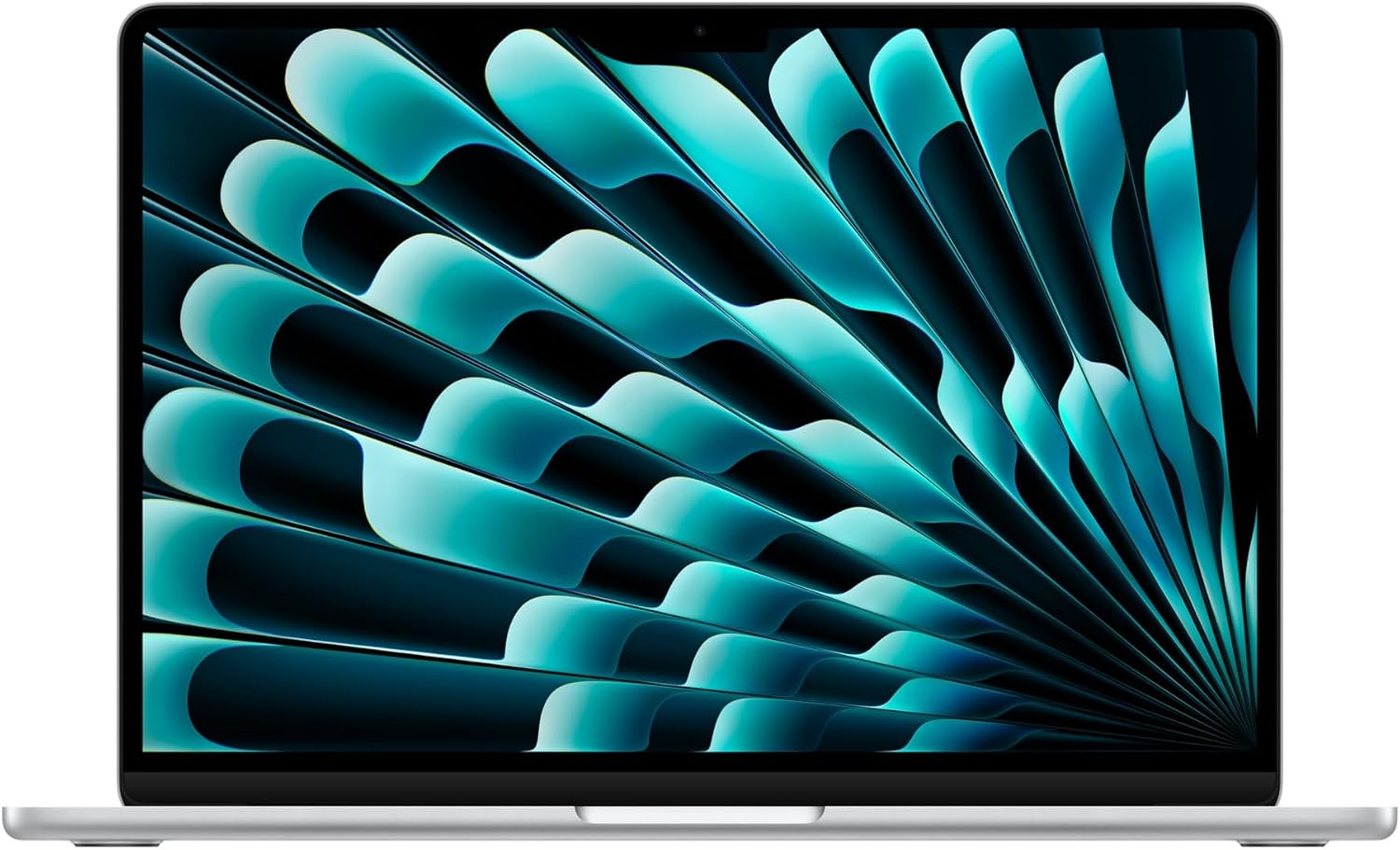
Apple MacBook Air 13-inch (M5, 2026, 16GB/512GB) Review (2026): Worth It?
The MacBook Air M5 is Apple’s 13.6-inch laptop with the M5 chip, 16GB of unified memory and a 512GB SSD, listed at $1,099.00 against a list price of $1,299.00 and rated 4.7 out of 5 from 1,176 owners. It is the highest-scoring laptop in our Computing section at 9.1 out of 10, and it gets there despite publishing fewer hard numbers than any other computer we cover.
$1,099.00
MacBook Air 13-inch with M5 Review: The Laptop With The Shortest Spec Sheet And The Fewest Compromises
The MacBook Air M5 is Apple’s 13.6-inch laptop with the M5 chip, 16GB of unified memory and a 512GB SSD, listed at $1,099.00 against a list price of $1,299.00 and rated 4.7 out of 5 from 1,176 owners. It is the highest-scoring laptop in our Computing section at 9.1 out of 10, and it gets there despite publishing fewer hard numbers than any other computer we cover.
This review is research-based. We did not physically test this product; specifications, ratings and prices are taken from the live Amazon listing on 9 October 2026. It is one of twelve laptops and desktop computers in our Computing section.
On this page
- MacBook Air 13-inch with M5 Review: The Laptop With The Shortest Spec Sheet And The Fewest Compromises
- Key Specifications
- What The M5 Chip Changes In The MacBook Air M5
- Battery Life, Weight And The Fanless Design
- Ports, Displays And Wireless On The MacBook Air M5
- Limitations
- Setting Up This MacBook Air M5
- Who Should Buy This MacBook Air M5?
- The Verdict
- MacBook Air M5 — Frequently Asked Questions
Key Specifications
Every MacBook Air M5 figure below is copied from the live Amazon listing; where the listing contradicts itself, we say so under Limitations.
| Specification | Published value |
|---|---|
| Reviewed model | MacBook Air M5 |
| Product | Apple MacBook Air 13-inch (M5, 2026, 16GB/512GB) |
| Price at review | $1,099.00 |
| Owner rating | 4.7 out of 5 from 1,176 ratings |
| Chip | Apple M5 (CPU, GPU with Neural Accelerators, Neural Engine) |
| Memory | 16GB unified memory |
| Storage | 512GB SSD |
| Display | 13.6-inch Liquid Retina, 1 billion colours |
| Battery | Up to 18 hours (Apple’s footnoted claim) |
| Ports | 2 x Thunderbolt 4, MagSafe charging, headphone jack |
| Wireless | Apple N1 chip: Wi-Fi 7, Bluetooth 6 |
| External displays | Up to two |
| Camera and audio | 12MP Center Stage camera, three-mic array, four speakers with Spatial Audio |
| Security | Touch ID |
| Weight | 2.71 pounds |
| Dimensions | 8.46 x 0.44 x 11.97 inches |
| Model number | MDH74LL/A |
| First available | March 4, 2026 |
| Expert Score | 9.1 out of 10 |
What The M5 Chip Changes In The MacBook Air M5
Apple’s listing describes the M5 as a faster CPU with unified memory, a Neural Engine and a next-generation GPU with Neural Accelerators, and it frames the whole machine around Apple Intelligence. What it does not publish is a core count, a clock speed or a GPU configuration. Every Windows laptop in our Computing section names its processor model and its maximum boost frequency; this one names a chip and a set of adjectives.
That matters less than it would on any other brand, because Apple silicon is not sold in a confusing ladder of part numbers inside one model. Every 13-inch model with this chip has the same processor, whichever colour or storage tier you pick. The practical buying decision is therefore memory and storage, not processor, and this listing settles both: 16GB of unified memory and 512GB of storage, which is the configuration most buyers should want.
Apple Intelligence, which the listing promotes for writing and organising, is pitched at the same jobs as Copilot on the HP and Lenovo laptops in our Computing section, so treat it as a platform feature rather than a reason to choose one laptop over another. The more practical point is the iPhone link: the listing highlights iPhone mirroring, starting work on one device and finishing on the other, and taking calls on the Mac. Those only matter if you already own an iPhone, and if you do they are the strongest reason to pick a Mac.
Battery Life, Weight And The Fanless Design
The headline claim is up to 18 hours of battery life, carried with an asterisk that points to Apple’s legal disclaimers. The listing gives no battery capacity in watt-hours, which every Windows laptop here does publish, so the figure cannot be compared like for like. What can be compared is weight: 2.71 pounds and 0.44 inches thick, the lightest and thinnest computer in our Computing section by a clear margin.
The MacBook Air has no fan, which is why it is silent under load and also why sustained heavy work is not what it is for. Apple’s own copy aims the machine at students and everyday work, and that is the honest framing. Video editors and developers who compile all day are the audience for the MacBook Pro, not this laptop.
Ports, Displays And Wireless On The MacBook Air M5
Two Thunderbolt 4 ports, MagSafe charging and a headphone jack is a short list next to the Lenovo V15 Gen 4’s RJ45 and HDMI, but MagSafe keeps both Thunderbolt ports free while charging. The listing says the MacBook Air M5 supports up to two external displays, which removes the single-monitor limit that held back earlier MacBook Air generations.
Wireless is handled by Apple’s N1 chip with Wi-Fi 7 and Bluetooth 6, the newest standards on any laptop in our Computing section. The 12MP Center Stage camera, three-mic array and four-speaker system are aimed at video calls, and Desk View can show a top-down view of the desk. For a student or remote worker those are the features used every day.
A full-size HDMI port, an SD card reader and Ethernet are all absent, so most desk users will end up buying a USB-C hub or dock. Budget for one when comparing prices, because $1,099.00 is not the whole cost of a two-monitor desk.
Limitations
The specification array on this listing contains seven entries, and six of them are dimensions, weight, manufacturer, model number, battery type and a date. There is no published brightness, no battery capacity, no CPU or GPU core count and no storage speed. A buyer comparing it with a Windows laptop on paper will find almost nothing to compare.
The 4.7 rating from 1,176 owners is pooled: at least three other colour listings of the same 13-inch model show exactly the same 4.7 from 1,176. That is normal for Apple on Amazon and it means the figure describes the model, not the specific silver unit linked here.
Storage cannot be upgraded after purchase and neither can memory. $1,099.00 is a discount from $1,299.00, but it is still the third most expensive computer in our Computing section, and two ports is the minimum a laptop can reasonably ship with.
Setting Up This MacBook Air M5
Setup is a matter of signing in with an Apple Account and letting macOS migrate data from an older Mac or an iPhone. Buy a USB-C hub at the same time if you use wired peripherals, because two Thunderbolt 4 ports run out quickly.
Charge through MagSafe where possible so both Thunderbolt ports stay free, turn on Touch ID during setup, and decide early whether to use iCloud for documents: with 512GB of internal storage that cannot be upgraded, deciding what lives locally saves trouble later.
Who Should Buy This MacBook Air M5?
Buy it if you want a laptop that is light, silent and long-lasting on battery, you already use an iPhone, and your work is documents, browsing, video calls, photo editing and light creative work. The 16GB and 512GB configuration is the one to have, and $1,099.00 is a fair price for it.
Skip it if you need Windows software, a numeric keypad, Ethernet or HDMI without an adapter, or a GPU for modern games: the Acer Nitro V 16S in our Computing section is the better machine for gaming. Skip it too if you want to compare hard numbers before buying, because this listing gives almost none.
The Verdict
Scored 9.1, the highest of any laptop in our Computing section. It combines the lowest weight, the thinnest body, the newest wireless standards, MagSafe, two external display support and a 4.7 rating from 1,176 owners, at a $200 discount on its list price.
It loses points for what the listing will not say: no battery capacity, no brightness, no core counts, a pooled rating, only two data ports and memory and storage that are fixed for life. None of those stop it being the best everyday laptop in this section, but all of them are worth knowing before paying $1,099.00.
MacBook Air M5 — Frequently Asked Questions
Is the MacBook Air M5 good for students?
Apple’s own listing is written for students, and the combination of 2.71 pounds, a claimed 18-hour battery and a 12MP camera for online classes supports it. 16GB of memory and 512GB of storage is enough for a degree’s worth of documents and media.
How many external monitors does it support?
The listing says up to two external displays, connected through the two Thunderbolt 4 ports. Earlier MacBook Air generations were limited to one, so this is a meaningful change for desk setups.
Can I upgrade the RAM or SSD later?
No. Memory and storage on the MacBook Air are fixed at purchase, which is why the 16GB and 512GB configuration reviewed here is the one worth choosing.
Does the MacBook Air M5 have a fan?
No. The MacBook Air is fanless, which makes it silent but means sustained heavy workloads will run slower than on a laptop with active cooling.
Affiliate disclosure: we earn a commission on qualifying purchases made through the Amazon links on this page, at no extra cost to you. Links go to Amazon.com; UK readers can search the same model on Amazon.co.uk.
Related reviews
User Reviews
Be the first to review “Apple MacBook Air 13-inch (M5, 2026, 16GB/512GB) Review (2026): Worth It?”
Related Products

$1,099.00

There are no reviews yet.