
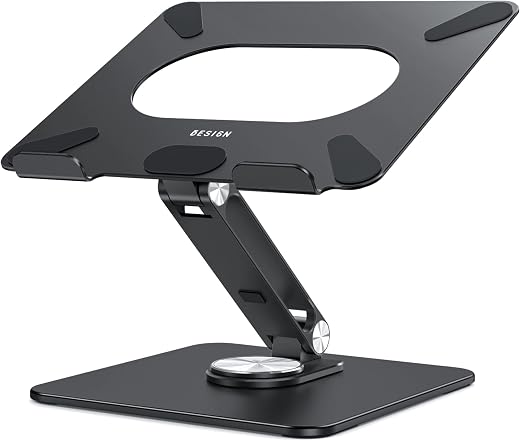
BESIGN LSX7 Swivel Laptop Stand Review — Best 360-Degree Aluminium Riser Under $25?
A stiff aluminium riser that does the fundamentals well and adds a rotating base that is either genuinely useful or entirely irrelevant depending on whether you ever show your screen to anyone. Tool-free height and angle adjustment means it actually gets adjusted, the 13-pound rating is far beyond what it will ever carry, and the open frame measurably helps cooling. Its limits are the category’s rather than the product’s: 15.6 inches maximum, and no posture benefit at all unless you add a separate keyboard.
$19.99
BESIGN LSX7 Swivel Laptop Stand Review (2026) — Is a Rotating Base Worth It?
Working from a laptop on a desk puts the screen roughly a foot below where your eyes want it, and the neck makes up the difference. OSHA’s own workstation guidance puts the top of a monitor at or just below eye level, which is a standard no laptop meets on its own, and the cumulative cost of ignoring that shows up as neck and shoulder ache rather than as a single bad day.
A riser fixes the height. What the BESIGN LSX7 adds is a base that turns through a full circle, so the screen can be swung to face a colleague without lifting the machine or unplugging anything. At around $20 in brushed aluminium, rated 4.6 from about six thousand buyers, the question is whether the rotation is a genuine feature or a specification-sheet flourish.
In short: the swivel laptop stand earns 8.3/10 from the Blue Rays Technologies team. The rest of this review sets out exactly how that score was reached.
What is in this swivel laptop stand review
Key Specifications
Published specifications for the swivel laptop stand, taken from the manufacturer listing.
| Reviewed model | swivel laptop stand |
| Brand | BESIGN |
| Model | LSX7 |
| Compatibility | 10″ to 15.6″ laptops |
| Base | 360-degree rotating |
| Adjustment | Height and angle, tool-free |
| Material | Brushed aluminium |
| Load rating | 13 lbs (6 kg) |
| Weight | 1.29 kg |
| Colour | Black |
| Foldable | Yes |
| Warranty | 12 months |
| Amazon rating | 4.6 / 5 from 6,005+ ratings |
Everything that follows is based on those published figures for the swivel laptop stand, together with aggregated owner feedback from verified buyers.
What the 360-Degree Base Adds to a Swivel Laptop Stand
Rotation sounds like a novelty until the first time someone leans over your desk to look at something. The alternative is lifting a live laptop with a charger, a dock cable and a mouse receiver attached, turning it, and turning it back, which is the small daily friction the base removes.
It matters more in shared and hot-desk environments than in a private office, and it matters most for anyone who shows work to other people: a designer, a teacher, anyone reviewing a document with a colleague. If you sit alone and never show your screen to anyone, this feature is genuinely worth nothing to you and a fixed riser at half the price is the honest recommendation.
The rotation is smooth and stays where it is put, which is the only thing that can really go wrong with it. A swivel that drifts under the weight of a laptop is worse than no swivel, because it means the screen is never quite square to you.
Height, Angle and Actually Meeting Ergonomic Guidance
Height and angle adjust independently and without tools, by pushing or pulling the arm. That is the right mechanism for something adjusted daily, because a stand that needs an Allen key gets set once and never touched again regardless of who is sitting at it.
The ergonomic target is straightforward: the top of the screen at or just below eye level, with the monitor centre 15 to 20 degrees below horizontal. A 15.6-inch laptop on a desk sits far below that; on this stand at its higher settings it is close. It will not reach the ideal for a tall user, and no laptop riser will, because raising the screen also raises the keyboard.
Which is the point everyone misses on first purchase: using a riser properly requires an external keyboard and mouse. Without them you have moved the screen to the right height and moved the keyboard to the wrong one. Budget for that alongside the stand or the ergonomic benefit is largely theoretical.
Build, Stability and Cooling
Brushed aluminium with a 13-pound load rating is over-specified for any laptop it fits, and that headroom is why it does not flex. Rubber pads on the holder arms grip the base of the machine and keep it from sliding, and they are soft enough not to mark an aluminium chassis.
The open frame is a real cooling benefit rather than a claimed one. A laptop resting flat on a desk breathes through whatever gap its feet provide; the same machine held in open air with clearance underneath runs measurably cooler under load, which on a thin laptop translates into less thermal throttling.
At 1.29 kg it is heavy enough to stay put and light enough to fold and carry, though it is not something you would take to a coffee shop daily. It folds flat enough for a desk drawer, which is the more realistic use.
Limitations and Compromises
No product is right for everyone, and these are the places where the swivel laptop stand asks something back from the buyer.
It is useless without an external keyboard and mouse if ergonomics is the goal. Raising the screen raises the keyboard with it, and typing at that height is worse for the wrists than typing on a desk. This is true of every laptop riser and it is the most common cause of disappointment.
The 15.6-inch upper limit rules out 16 and 17-inch machines, which is a meaningful exclusion given how many current laptops sit at 16 inches. Check the diagonal before ordering.
The rotating base adds a joint, and a joint is where wear happens. Nothing in the owner feedback suggests it fails early, but a fixed riser has fewer things that can loosen over five years.
For a tall user it still will not reach eye level. A 15.6-inch laptop screen raised on any desktop riser tops out below where a six-foot person’s eyes are, and the honest fix at that point is a monitor arm and a separate display.
Setting It Up and Keeping It Steady
Getting the best out of the swivel laptop stand over a long life comes down to a few simple habits.
Set the height with an external keyboard already in place, not before. Sit as you normally would, adjust until the top of the screen is at or just below eye level, and leave it there.
Wipe the rubber grips occasionally with a damp cloth. Dust on the pads is what turns a firm grip into a slow slide, and it is a ten-second job.
Do not use the rotation to move the stand across the desk. Turning the base with the laptop on it is what it is for; dragging the whole assembly by the screen is how a joint loosens.
Fold it flat rather than leaving it extended if it is going in a bag. The arm is aluminium and it is strong in the direction it is loaded, not in the direction a rucksack loads it.
Who Should Buy It?
The swivel laptop stand suits some households far better than others. It is a clear buy if you recognise yourself here:
- You work from a laptop for hours at a time and your neck notices
- You already have or will buy an external keyboard and mouse
- You regularly turn the screen to show something to someone else
- Your laptop is between 10 and 15.6 inches
- You want aluminium rather than plastic at around $20
The swivel laptop stand is the wrong purchase if any of the following apply:
- You will keep typing on the laptop’s own keyboard, which defeats the purpose
- Your laptop is 16 inches or larger
- You never show your screen to anyone, in which case a cheaper fixed riser is enough
- You are tall and need a genuine eye-level screen, which needs a separate monitor
The Verdict
This does the fundamental job well and adds one feature that is either genuinely useful or entirely irrelevant depending on how you work. The aluminium is stiff, the 13-pound rating is far beyond what any 15.6-inch laptop weighs, the tool-free height and angle adjustment gets used because it is easy, and the open frame measurably helps cooling. At $20 it is difficult to find a fault with the execution.
The score is limited by what a laptop riser can be rather than by anything BESIGN got wrong. It needs an external keyboard to deliver its ergonomic benefit, it stops at 15.6 inches, and it will not reach true eye level for a tall user. The 4.6 average across six thousand ratings suggests buyers who understood those limits are consistently satisfied.
Review score for the swivel laptop stand: 8.3/10. Strong on build, adjustment and the rotating base; the compromise is a 15.6-inch limit and a design that only helps posture if you add a separate keyboard. Blue Rays Technologies researches independently and earns a commission from qualifying purchases, which never affects the score.
If you want to see the current price, the full options and the latest buyer feedback, it is listed as the BESIGN LSX7 Laptop Stand with 360 Rotating Base on Amazon. The ergonomic targets referred to throughout this review come from the computer workstations eTool published by OSHA.
Frequently Asked Questions
The questions buyers ask most often about the swivel laptop stand, answered plainly.
Do I need an external keyboard with a swivel laptop stand?
Yes, if the reason you are buying it is posture. Raising the screen raises the built-in keyboard with it, so typing becomes worse rather than better. A separate keyboard and mouse are what turn a riser into an ergonomic improvement rather than a trade of neck strain for wrist strain.
Will it hold a 16-inch laptop?
It is rated for 10 to 15.6 inches. The 13-pound load rating is not the constraint — the holder arm spacing is. A 16-inch machine may physically balance on it but will not be gripped as designed, so check your laptop’s diagonal before ordering.
Does the rotating base stay where you put it?
Yes. The base has enough resistance that a laptop’s weight does not cause it to drift, which is the only thing that would make the rotation worse than useless. It turns when you turn it and stops when you stop.
Does it actually help laptop cooling?
It does, because the open frame leaves air on all sides of the underside rather than trapping it against a desk. On a thin laptop under sustained load that translates into less thermal throttling. It is not a cooling pad, and there is no fan, but the effect is real.
Related Reviews
If the swivel laptop stand is not quite the right fit, these Blue Rays Technologies reviews cover the nearest alternatives.
- Raymay Fujii Pen Case review — the other small desk upgrade
- Pomodoro Cube Timer review — the focus half of the desk setup
- Webcam Cover Slide review — privacy for the screen you have just raised
Last updated: 29 August 2026. Pricing and availability for the swivel laptop stand change frequently; check the retailer listing for the current figure.
User Reviews
Be the first to review “BESIGN LSX7 Swivel Laptop Stand Review — Best 360-Degree Aluminium Riser Under $25?”
Related Products


$19.99

There are no reviews yet.