
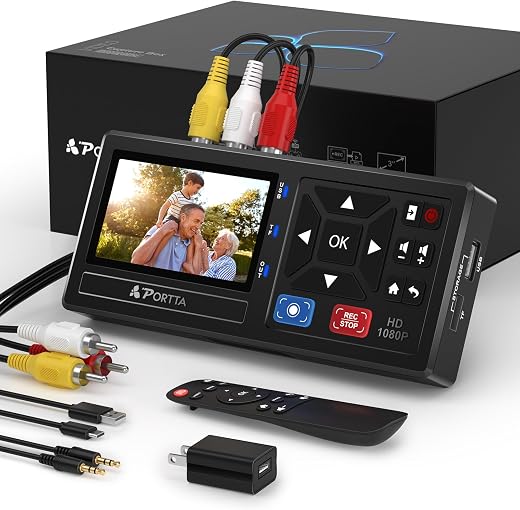
VHS to Digital Converter Review — Portta VD10 Standalone Recorder
Portta VHS to Digital Converter Review (2026) — Can You Digitise Tapes Without a PC?
Videotape has a shelf life and it is shorter than most people assume. Magnetic particles shed, the binder that holds them to the backing degrades — the failure archivists call sticky-shed — and a tape that has sat in a loft through twenty years of temperature swings may play once more, or may not. The tapes people most want are the ones recorded on domestic equipment, which is also the format that ages worst.
A VHS to digital converter is how you get the footage off before that happens. The Portta VD10 is a standalone box rather than a computer accessory: RCA and S-Video in, a three-inch preview screen and a speaker on the front, recording straight to a USB stick or SD card as MP4. It costs around $110, is frequently discounted from $169, and carries a 4.4-star average from nearly 2,000 ratings.
In short: the VHS to digital converter earns 8.2/10 from the Blue Rays Technologies team. The rest of this review sets out exactly how that score was reached.
What is in this VHS to digital converter review
- Key Specifications
- Standalone Versus a Capture Card: Why This VHS to Digital Converter Costs More
- Capture Quality and What 1080p Does and Does Not Mean
- The Practical Workflow for a Box of Tapes
- Limitations and Compromises
- Setup, Connections and Getting a Clean Recording
- Who Should Buy It?
- The Verdict
- Frequently Asked Questions
- Related Reviews
Key Specifications
Published specifications for the VHS to digital converter, taken from the manufacturer listing.
| Reviewed model | VHS to digital converter |
| Brand | Portta |
| Model | VD10 |
| Type | Standalone recorder — no PC, software or drivers |
| Inputs | AV / RCA (CVBS + L/R), S-Video, AUX |
| Output format | MP4 video, MP3 audio |
| Recording resolution | Up to 1080p at 30 Hz |
| Preview screen | 3.0 inch LCD with built-in speaker |
| Storage | USB drive or TF/SD card, no capacity limit stated |
| TV standards | NTSC-M/J 3.58, NTSC 4.43, PAL B/G/H/I/D and PAL/N |
| Compatible sources | VHS, VCR, Hi8, Mini DV, camcorders, DVD, DVR |
| Playback | Direct playback of recordings on the unit |
| Remote | Included |
| Supply voltage | 5 V |
| Warranty | 2 years |
| Amazon rating | 4.4 / 5 from 1,971 ratings |
Everything that follows is based on those published figures for the VHS to digital converter, together with aggregated owner feedback from verified buyers.
Standalone Versus a Capture Card: Why This VHS to Digital Converter Costs More
The cheap alternative is a fifteen-dollar USB capture dongle that plugs a VCR into a laptop, and it works — provided the laptop has a working USB port, the driver installs, the bundled capture software runs on a current operating system, and you are willing to sit at the machine for the length of every tape. That last condition is the one that quietly kills most projects.
A standalone box removes the computer from the chain. Press record, press play on the VCR, and walk away; the recording lands on the memory card as an MP4 file that any device can read. There is no driver to fail, no software abandoned in 2016, and no risk that a Windows update ends the project halfway through a box of tapes.
The three-inch preview screen is what makes it genuinely usable, because it lets you confirm you are recording the right input and that the signal is present without connecting a television. Anyone who has recorded forty minutes of blue screen before noticing will understand why that is worth having.
Capture Quality and What 1080p Does and Does Not Mean
A VHS tape holds roughly 240 lines of horizontal resolution. Recording it at 1080p does not add detail that was never there — it simply avoids adding a second generation of loss, which is the sensible goal. Do not expect a tape to look sharp afterwards; expect it to look exactly as good as it does on a television and to stay that way permanently.
The input that matters is S-Video if your source has it. S-Video keeps brightness and colour on separate wires where composite RCA combines them, and on VHS the difference is visible as reduced colour bleed and less dot crawl on hard edges. Most VCRs from the mid-nineties onward have an S-Video output on the back and most people never use it.
The unit handles both NTSC and PAL sources, which is not universal in this category and matters for anybody with tapes from both sides of the Atlantic. Recording as MP4 rather than a raw or proprietary format means the files play everywhere and edit easily, at the cost of a compression stage you cannot turn off.
The Practical Workflow for a Box of Tapes
The thing nobody mentions is that digitising is real time. A three-hour tape takes three hours, and a box of thirty tapes is a project measured in days, not evenings. The advantage of a standalone recorder is that those hours do not have to be spent sitting at a computer — start the tape, leave the room, come back.
Prepare the source first. Fast-forward and rewind a tape fully once before recording to redistribute tension and shed loose oxide, and clean the VCR heads if playback is snowy. A converter cannot recover what the deck does not read, and the deck is the part of this chain most likely to be the weak link.
File management is worth twenty minutes of thought before you start. Recording to a card and copying to a computer at the end of each session, with a naming convention and a second copy somewhere else, is the difference between an archive and a folder of clips called REC0001.
Limitations and Compromises
No product is without compromise, and the VHS to digital converter has a few worth knowing before you buy.
It does not play tapes. This is a recorder and capture box only, and you still need a working VCR or camcorder as the source — which is the expensive, hard-to-find half of the job in 2026. Buyers who assume the box is a player make up a noticeable share of the negative reviews.
At around $110 it is roughly seven times the price of a USB capture dongle. If you have a reliable computer, a spare afternoon and only a handful of tapes, the dongle is the rational choice and this is not.
And high-capacity USB drives can need their own power supply, as the manual notes. A large external hard drive hung off the USB port may not be reliably powered, so a memory card or a modest flash drive is the safer storage choice.
Setup, Connections and Getting a Clean Recording
Getting the best out of the VHS to digital converter over a long life comes down to a few simple habits.
Connect S-Video plus the red and white audio leads if your source offers it, and fall back to the yellow composite lead only if it does not. This one choice makes more difference to the finished file than any setting on the box.
Record a two-minute test from the middle of a tape before committing to a full run, and play it back on the unit. Checking level, colour and audio sync on a short clip costs two minutes; discovering a problem at the end of a three-hour recording costs three hours.
Copy files off the card at the end of every session and keep a second copy somewhere physically separate. The tapes are already a single point of failure, and a memory card left in the unit for a month simply moves that risk rather than removing it.
Who Should Buy It?
The VHS to digital converter suits some households far better than others. It is a clear buy if you recognise yourself here:
- You have a box of family tapes and a working VCR to play them on
- You would rather not tie up a computer for the length of every tape
- You want files that play anywhere without proprietary software
- You have both NTSC and PAL tapes to deal with
- You want to see a preview without connecting a television
The VHS to digital converter is the wrong purchase if any of the following apply:
- You do not have a working VCR or camcorder — this does not play tapes
- You only have three or four tapes, where a cheap USB dongle is enough
- You need broadcast-grade capture with time-base correction
- You expect digitising to improve the picture rather than preserve it
The Verdict
For the specific job of getting a large number of tapes off before they degrade, this is the right shape of tool. Removing the computer from the chain removes the failure modes that stall these projects, MP4 output means the files will still open in twenty years, and dual NTSC and PAL support covers a mixed collection that many competitors cannot.
It loses ground on price against a capture dongle, on the fact that you still have to source a working deck, and on the honest limits of what any converter can do with a 240-line source. Buy it for a box of tapes and it is good value; buy it for four tapes and it is not.
Review score for the VHS to digital converter: 8.2/10. The sensible tool for a real archive project, and overkill for a handful of tapes. Blue Rays Technologies researches independently and earns a commission from qualifying purchases, which never affects the score.
Current pricing and the bundle options are on the listing for the Portta VHS to Digital Converter at Amazon. For why the urgency is real rather than marketing, the Library of Congress guidance on caring for video recordings sets out how magnetic tape degrades and what storage conditions slow it down.
Frequently Asked Questions
The questions buyers ask most often about the VHS to digital converter, answered plainly.
Does a VHS to digital converter play the tapes as well?
No. This is a recorder and capture box, so you still need a working VCR, camcorder or deck as the source. That is the most common misunderstanding in this category and the source of most disappointed reviews.
Will digitising make old tapes look better?
No, and it should not try to. VHS holds roughly 240 lines of resolution; capturing at 1080p simply avoids adding further loss. The goal is a permanent copy that looks as good as the tape does now, not an improvement on it.
Should I use the yellow composite lead or S-Video?
S-Video, whenever the source offers it. It keeps brightness and colour signals separate, which visibly reduces colour bleed and dot crawl on VHS. Most VCRs from the mid-nineties on have the socket, and most owners have never used it.
Can it record to an external hard drive?
It records to USB drives and TF/SD cards, but the manual notes that high-capacity USB devices may need their own power supply. A memory card or a modest flash drive is the more reliable choice, with files copied to a computer after each session.
Related Reviews
If the VHS to digital converter is not quite the right fit, these Blue Rays Technologies reviews cover the nearest alternatives.
- Rioddas External CD/DVD Drive review — for the disc half of an archive
- KODAK Step Photo Printer review — getting images back onto paper
- Pomodoro Cube Timer review — from the same batch, for timing long sessions
Last updated: 28 August 2026. Pricing and availability for the VHS to digital converter change frequently; check the retailer listing for the current figure.


There are no reviews yet.