
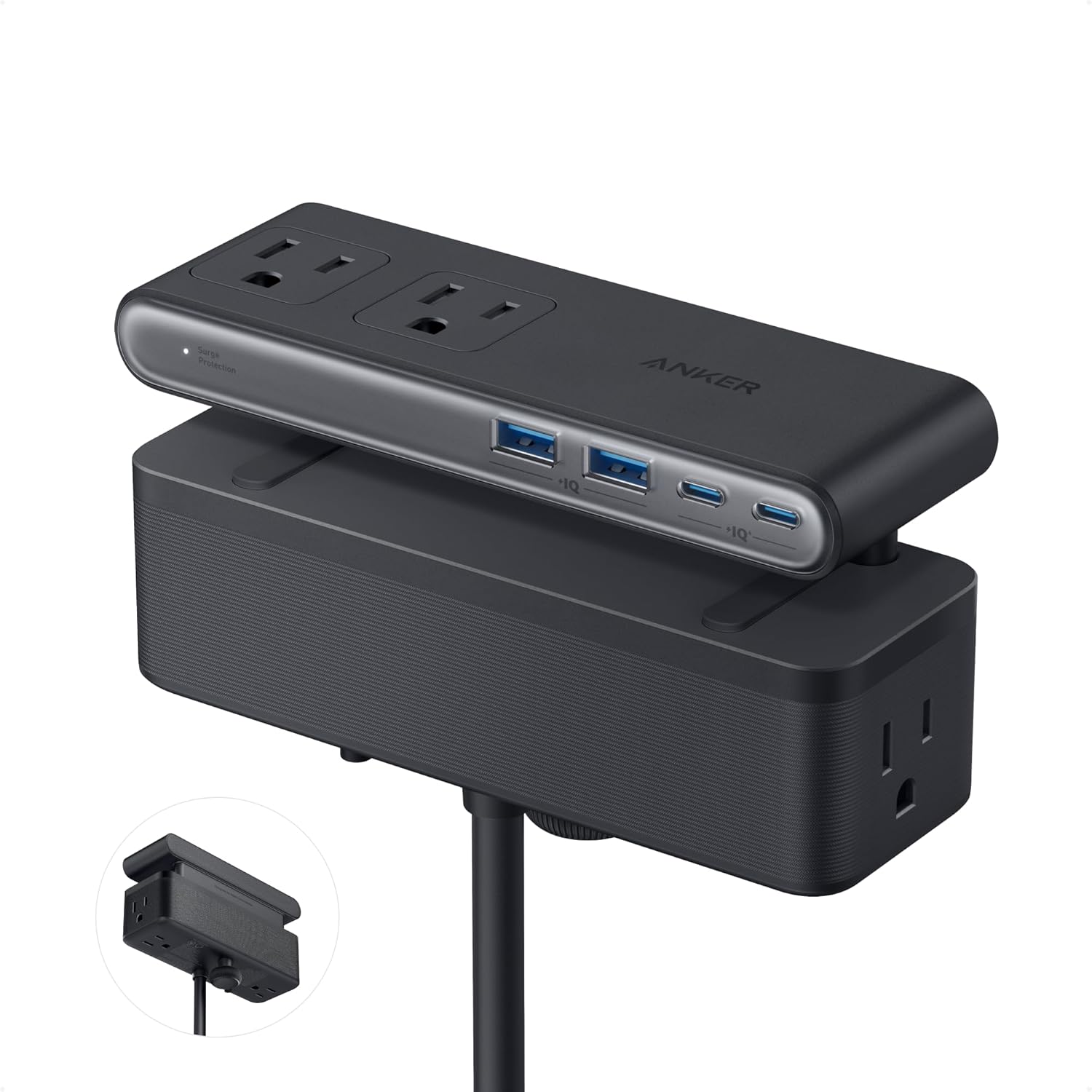
Anker Nano Power Strip 10-in-1 — Desk Clamp Power Strip with 70W USB-C and 1500J Surge Protection
A 10-in-1 desk clamp power strip: six AC outlets and four USB ports at desk height, 70W GaN USB-C and a 1,500J surge rating.
$69.99
Anker Nano 10-in-1 Review (2026) — Is a Desk Clamp Power Strip Worth $69.99?
Every desk charging problem eventually turns out to be a geometry problem. The socket is on the wall, the desk is in front of the wall, and the six inches between them is where cables go to become a nest.
A desk clamp power strip refuses the premise. Instead of living on the floor and sending cables up, it bolts to the edge of the desk and sends nothing anywhere: six AC outlets and four USB ports arrive at hand height, in two separated zones, and the only cable running to the floor is the 5 ft feed.
Anker’s 10-in-1 is the most expensive object in this comparison at $69.99 and the highest-rated on Amazon at 4.8 from 768 ratings. It is also the one with a hard compatibility question attached, and that question is answered by a tape measure rather than by a specification sheet.
In short: the desk clamp power strip earns 8.8/10 from the Blue Rays Technologies team. The rest of this desk clamp power strip review sets out exactly how that score was reached, and it is drawn from the published listing rather than from a bench. This review is research-based. We did not physically test this product; specifications, ratings and prices are taken from the live listing on the date shown. The full five-way comparison is in our best desk charging station guide.
What is in this desk clamp power strip review
- Key Specifications
- Why a Desk Clamp Power Strip Beats a Floor Strip
- Seventy Watts of GaN, and What It Will Not Do
- Fifteen Hundred Joules, and the Tape-Measure Test
- Limitations and Compromises
- Fitting It and Living With It
- Who Should Buy This Desk Clamp Power Strip?
- The Verdict
- Frequently Asked Questions
- Related Reviews
Key Specifications
Published specifications for the desk clamp power strip, taken from the manufacturer listing.
| Reviewed model | desk clamp power strip |
| Brand | Anker |
| Model | Nano Power Strip, 10-in-1, 70W, Clamp |
| Ports | 6 × AC outlet, 2 × USB-C, 2 × USB-A, split into top and bottom zones |
| Maximum USB-C output | 70 W, using GaN technology |
| USB port input range | 100–240 V~, 50/60 Hz, as stated in the listing |
| Surge protection | 1,500 J |
| Mounting | Adjustable desk clamp, one-hand operation |
| Fits desk edges | 0.6–1.8 in thick (15–45 mm) |
| Not compatible with | Curved edges, edges sloped over 45°, desks with no edge to clamp |
| Power cord | 5 ft (152 cm) |
| Listed voltage | 240 volts, as printed in the listing’s specification table |
| In the box | Power strip, welcome guide |
| Warranty | 24 months |
| Amazon rating | 4.8 from 768 ratings |
| Price at review | $69.99 |
Why a Desk Clamp Power Strip Beats a Floor Strip
The argument for a desk clamp power strip is that it removes reaching. A strip on the floor requires you to find it by feel, under a desk, with a plug in one hand. A strip clamped to the desk edge is visible, fixed and at the height of your forearm, and Anker’s listing makes one-hand operation an explicit design claim: the clamp “holds securely, allowing you to plug or unplug devices with one hand without shifting”.
The second argument is zoning. The ten ports are “split into top and bottom zones to reduce clutter”, which in practice means the six AC outlets and the four USB ports never compete for the same space. Anyone who has tried to fit a laptop brick next to a phone charger in a four-outlet strip knows exactly what problem that solves.
The third is honest and less flattering: a desk clamp power strip is a semi-permanent fitting. Once it is on, it stays on, and the desk it is on becomes the only desk it serves. That is fine for a home office and wrong for a shared or hot-desked space.
Seventy Watts of GaN, and What It Will Not Do
The USB-C ports top out at 70 W, delivered “using GaN technology”. Gallium nitride is the reason a 70 W supply fits inside a clamp-mounted housing at all: it switches at higher frequencies than silicon, which shrinks the transformer and dumps less heat for the same output. Ten years ago this product would have been the size of a house brick.
Seventy watts charges an ultrabook, an iPad and a phone comfortably. It will not keep a 16-inch workstation laptop topped up under load, and that is the line to check before buying. For context, the USB Implementers Forum’s Power Delivery specification now reaches “up to 240W of power over full featured USB Type-C cable and connector” with fixed 28 V, 36 V and 48 V steps, so 70 W is a deliberate mid-range choice rather than a technical limit.
The listing also contains a detail most competitors omit: “The USB ports support 100 – 240V~ 50 / 60 Hz input”. That is the USB side only, and it is a genuinely useful thing to know if the unit ever travels between a 120 V and a 230 V country.
Fifteen Hundred Joules, and the Tape-Measure Test
At 1,500 J, the surge rating on this desk clamp power strip is five times that of the retractable station in the same range. Joules describe how much energy the protective components can absorb before they stop protecting; a higher number buys more headroom and, more importantly, a longer useful life, because every absorbed spike consumes some of it.
That rating is the reason this is the one to put a monitor and a workstation behind. The U.S. Fire Administration’s household advice runs the same way: “Do not overload power strips” and “Use power strips that have internal overload protection”. Six outlets with a 1,500 J rating is a reasonable home-office ceiling.
The compatibility check is the part to do before ordering, and the listing is admirably specific about it: it fits desk edges 0.6–1.8 in thick (15–45 mm) and is “not compatible with curved edges, edges sloped over 45°, or desks without an edge for clamping”. Measure the lip of your desk. A 25 mm chipboard top with a bullnose edge is the common failure, and no amount of clamping force fixes a curve.
Limitations and Compromises
The price is the headline compromise. $69.99 buys six outlets and four USB ports; the tower in this comparison buys six outlets and eight USB ports for $29.99. You are paying for the clamp, the zoning, the surge rating and the warranty, not for port count.
Seventy watts is the second. It is a sensible number for most desks and an insufficient one for a large workstation laptop under sustained load, and there is no way to work around it other than keeping the laptop’s own charger for busy days.
The third is the compatibility envelope, which is narrower than it first appears. Curved edges, edges sloped over 45 degrees, tops thinner than 15 mm or thicker than 45 mm, and wall-mounted or floating desks with no lip are all out. This is the one product in the comparison that can simply not fit.
Fourth, the specification table lists 240 volts on a product sold into 120 V American outlets. As with the rest of this category, the table field appears to describe a design ceiling rather than the supply the unit expects; the label on the housing is the number that counts.
Fitting It and Living With It
Fitting takes a minute and one decision: which end of the desk. Put it on the side your dominant hand reaches, far enough from where you rest your wrists that the AC zone is not under your forearm, and check that the drawer or keyboard tray still opens past it.
The 5 ft cord is the constraint after that. Five feet reaches a wall socket behind most desks; it does not reach across a room, and per OSHA’s interpretation on relocatable power taps a strip like this should be “directly connected to a permanently installed branch circuit receptacle” rather than plugged into an extension cord.
Day to day there is almost nothing to maintain. The one habit worth forming is not using the clamp as a handhold when moving the desk, which is how clamp mounts in every category eventually crack.
Who Should Buy This Desk Clamp Power Strip?
Buy this desk clamp power strip if you have one desk you intend to keep, a straight edge between 15 and 45 mm thick, and equipment worth a 1,500 J surge rating. It is the best-rated product in this comparison and the one that changes a desk rather than tidying it.
Skip it if you hot-desk, if your desk has a curved or thick edge, if you need more than 70 W over USB-C, or if port count per dollar is the thing you are optimising. In those cases the tower or the vertical GaN block does more for less.
The Verdict
The desk clamp power strip scores 8.8/10, the highest in this comparison. The clamp mounting is not a gimmick: it moves ten ports from the floor to hand height, and the top-and-bottom zoning means all ten are usable at once, which is rarer than it should be. The 1,500 J surge rating and the 24-month warranty are both best-in-group.
It loses marks for price, for the 70 W ceiling and for a compatibility envelope that will exclude a real share of desks. None of those is a flaw so much as a specification to check against your own furniture. Measured, fitted and loaded sensibly, 8.8/10 and the specialist pick of the five.
Blue Rays Technologies earns a commission from qualifying purchases made through the links on this page, at no cost to you, and that commission never affects a score. For the current price and the latest buyer feedback it is listed as the Anker Nano Power Strip with desk clamp on Amazon. The safe-use rules for strips like this are set out in OSHA’s interpretation on relocatable power taps, and the household fire guidance is from the U.S. Fire Administration.
Frequently Asked Questions
The questions buyers ask most often about the desk clamp power strip, answered plainly.
Will a desk clamp power strip fit my desk?
Only if the edge is straight, between 0.6 and 1.8 in (15–45 mm) thick and not sloped more than 45 degrees. The listing rules out curved edges and desks with no lip. Measure first.
Is 70 W enough to charge a laptop?
For an ultrabook or a tablet, comfortably. For a 16-inch workstation laptop under load, no — keep the machine’s own charger for heavy days.
What does the 1,500 J surge rating actually mean?
It is how much energy the protection components can absorb over their lifetime before they stop protecting. Higher is better both for one large spike and for longevity, since every small spike uses some of the rating up.
Can I plug an extension lead into it?
You should not. OSHA’s interpretation on relocatable power taps says they are “not to be series-connected to other RPTs or connected to extension cords”, and should go straight into a permanently installed receptacle.
Related Reviews
If the desk clamp power strip is not quite the right fit, these Blue Rays Technologies reviews cover the nearest alternatives.
- Anker Nano 7-in-1 retractable charging station review — the tidier, pricier sibling
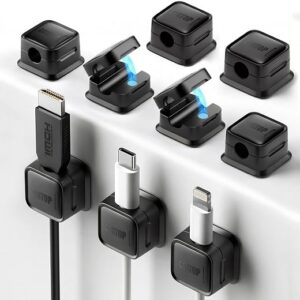
- Magnetic cable clips review — what to do with the cables the clamp does not hold
- BESIGN swivel laptop stand review — the other thing bolted to a desk edge
Last updated: 27 September 2026. Pricing and availability for the desk clamp power strip change frequently; check the retailer listing for the current figure.
User Reviews
Be the first to review “Anker Nano Power Strip 10-in-1 — Desk Clamp Power Strip with 70W USB-C and 1500J Surge Protection”
Related Products



$69.99

There are no reviews yet.