
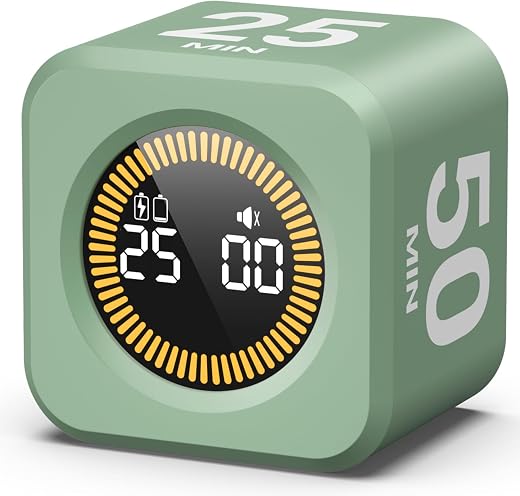
Pomodoro Cube Timer Review — KADAMS Visual Focus Timer
KADAMS Pomodoro Cube Timer Review (2026) — Does Flipping a Cube Beat a Phone?
The Pomodoro technique is a scheduling trick with an unusually good record: work in a fixed block, stop when it ends, take a short break, repeat. What makes it work is not the twenty-five-minute figure, which is arbitrary, but the commitment device — for the length of the block you are not deciding whether to work, because the decision was made when the timer started.
That is exactly the thing a phone timer cannot do, because the phone is also the thing you are trying not to look at. A dedicated cube removes it from the equation: turn the KADAMS so the interval you want faces up and it starts, turn it flat and it stops. Four presets of 5, 10, 25 and 50 minutes, a customisable side, an LED ring that fills as the time runs out, and a silent mode, for around $14.
In short: the pomodoro cube timer earns 8.1/10 from the Blue Rays Technologies team. The rest of this review sets out exactly how that score was reached.
What is in this pomodoro cube timer review
Key Specifications
Published specifications for the pomodoro cube timer, taken from the manufacturer listing.
| Reviewed model | pomodoro cube timer |
| Brand | KADAMS |
| Model | K5273-02 |
| Presets | 5, 10, 25 and 50 minutes |
| Custom countdown | Yes, assignable to one face |
| Display | LED ring that fills as time elapses |
| Silent mode | Yes, mute function |
| Operation | Flip to start, flip flat to stop |
| Number of settings | 5 |
| Dimensions | 2 x 2 x 1.5 inches |
| Weight | 2.72 oz |
| Material | ABS |
| Colour | Green |
| Power | Rechargeable, USB |
| Amazon rating | 4.7 / 5 from 571 ratings |
Everything that follows is based on those published figures for the pomodoro cube timer, together with aggregated owner feedback from verified buyers.
Why a Pomodoro Cube Timer Beats the One on Your Phone
Every phone has a timer, and almost nobody uses it for focused work, because reaching for the phone to start a work block is the exact gesture that ends work blocks. The cube exists to move the timer out of the device that generates the interruptions, and that single separation is the whole product argument.
The interaction is also faster than any app. There is no unlocking, no app switching and no numeric entry — the interval you want is written on a face, and turning that face upwards is the entire operation. In terms of the friction between deciding to start and actually starting, this is about as low as it goes.
The visual element matters more than expected. The LED ring fills gradually as time elapses, so remaining time is legible at a glance from across a desk without reading digits. For anyone who works with time blindness — a well-documented feature of ADHD — a shape that changes is far more useful than a number that has to be read and interpreted.
The Intervals, the Custom Face and the Silent Mode
The four presets follow the classic pattern loosely: 25 minutes for a standard work block, 5 for the short break, 10 for a longer one, and 50 for a deep block. Fifty is the one that gets used more than the theory predicts, because a great deal of real work does not fit into twenty-five minutes and stopping mid-thought costs more than the break returns.
The custom face is the feature that turns it from a Pomodoro tool into a general one. Assign any duration to one side and it becomes a fifteen-minute tidy-up timer, a twenty-minute nap alarm, a seven-minute egg timer or a ninety-minute revision block, depending on the household.
Silent mode is not a small thing. A beeping timer in a shared office or a room where somebody is sleeping is a timer that gets left in a drawer, and the mute function plus the visual ring makes the cube usable in places a sounding timer is not. The alarm itself, when enabled, is a soft chirp rather than a shriek.
Build, Size and Where It Lives
At two inches square and under three ounces it is small enough to live permanently next to a keyboard and light enough to travel in a laptop bag, which is the correct size for something that only works if it is always within reach. It is ABS rather than anything premium, and it feels like a fifteen-dollar object because it is one.
The flip mechanism uses an accelerometer, which means it is genuinely orientation-based rather than switch-based, so there is no button to wear out. The cost is that it can be triggered by knocking it over, and it needs a flat resting place — a cluttered desk with a sloping stack of paper will occasionally start a countdown nobody asked for.
Charging is by USB and a charge lasts a long time in normal use, because the LED ring is the only real draw. It is a device you charge every few weeks rather than every few days, which is the right side of the line for something that has to be reliable on demand.
Limitations and Compromises
No product is without compromise, and the pomodoro cube timer has a few worth knowing before you buy.
It does one thing. There is no logging, no session count, no history and no way to see how many blocks you managed this week, all of which the phone apps do. If the reason you want a timer is to gather data about your own working habits, this is the wrong tool and a free app is the right one.
The 571-rating base is modest. It is a strong average at 4.7, but a few hundred ratings is a much weaker signal than the tens of thousands behind an established brand, and the general category record for cheap accelerometer cubes includes units that stop registering a face after a year.
And the four fixed presets will not suit everyone. Only one face is customisable, so a routine built on 45-minute blocks and 15-minute breaks needs two custom faces and only has one. Some competing cubes offer a fully configurable set.
Setting Up, Charging and Making It a Habit
Getting the best out of the pomodoro cube timer over a long life comes down to a few simple habits.
Charge it fully before first use and then leave it plugged in one evening a month rather than waiting for it to die. A focus timer that is flat when you sit down to work is a focus timer you stop trusting, and trust is most of its value.
Give it a flat, dedicated spot on the desk. Because it starts on orientation, a stable resting place prevents accidental countdowns, and having one fixed home is also what stops it disappearing under paper for a fortnight.
Set the custom face deliberately rather than experimentally. The single most useful configuration for most people is a break length that suits them — often 15 minutes rather than 5 — because the standard break is the part of the technique people abandon first.
Who Should Buy It?
The pomodoro cube timer suits some households far better than others. It is a clear buy if you recognise yourself here:
- You work or study at a desk and lose blocks of time to your phone
- You want the timer to be a separate object from the source of interruptions
- You benefit from seeing time as a shape rather than reading digits
- You need a silent timer for a shared office or a quiet house
- You want a one-gesture start with no app and no unlocking
The pomodoro cube timer is the wrong purchase if any of the following apply:
- You want session logging and statistics, which an app does for free
- Your routine needs several custom intervals rather than one
- You already use a physical kitchen timer happily and it is within reach
- You want a proven long-term product rather than one with a few hundred ratings
The Verdict
This does the one job it exists for cleanly, and the job is worth doing. Moving the timer off the phone is the entire point of buying a dedicated one, the flip gesture is about as frictionless as starting a work block can be, and the filling LED ring communicates remaining time faster than any digit display.
It is held back by a thin rating base, a single customisable face, and the total absence of any record of what you did. None of those matter if you want a commitment device on your desk; all of them matter if you want a productivity system. Know which you are buying.
Review score for the pomodoro cube timer: 8.1/10. An honest, well-judged single-purpose object at a price that makes it easy to try. Blue Rays Technologies researches independently and earns a commission from qualifying purchases, which never affects the score.
Current pricing and the colour options are on the listing for the KADAMS Pomodoro Cube Timer at Amazon. For the wider evidence on why breaking work into timed blocks with real breaks helps rather than hinders output, the NIOSH work schedules research overview collects the occupational studies on rest breaks and fatigue.
Frequently Asked Questions
The questions buyers ask most often about the pomodoro cube timer, answered plainly.
How does a pomodoro cube timer actually start?
You turn the cube so the interval you want faces upwards, and an internal accelerometer starts the countdown. Turning it flat, or onto a blank face, stops it. There are no buttons to press and nothing to unlock.
Can I set my own intervals?
One face is fully customisable, so you can assign any duration you like to it. The other four are fixed at 5, 10, 25 and 50 minutes. If your routine needs two non-standard intervals, check a fully configurable cube instead.
Does it beep, and can that be turned off?
It has a soft alarm rather than a shriek, and a mute function that turns it off entirely. With sound off, the filling LED ring is still visible, which is what makes it usable in a shared office or a quiet house.
How long does the battery last?
It charges by USB and, because only the LED ring draws meaningfully, most owners charge it every few weeks rather than every few days. Charging it on a schedule rather than when it dies is the habit worth adopting.
Related Reviews
If the pomodoro cube timer is not quite the right fit, these Blue Rays Technologies reviews cover the nearest alternatives.
- Raymay Fujii Pen Case review — the other desk object worth owning
- Swingline Paper Cutter review — for the paper side of a desk
- Adjustable Dumbbells review — from the same batch, for timed rest periods
Last updated: 28 August 2026. Pricing and availability for the pomodoro cube timer change frequently; check the retailer listing for the current figure.


There are no reviews yet.