
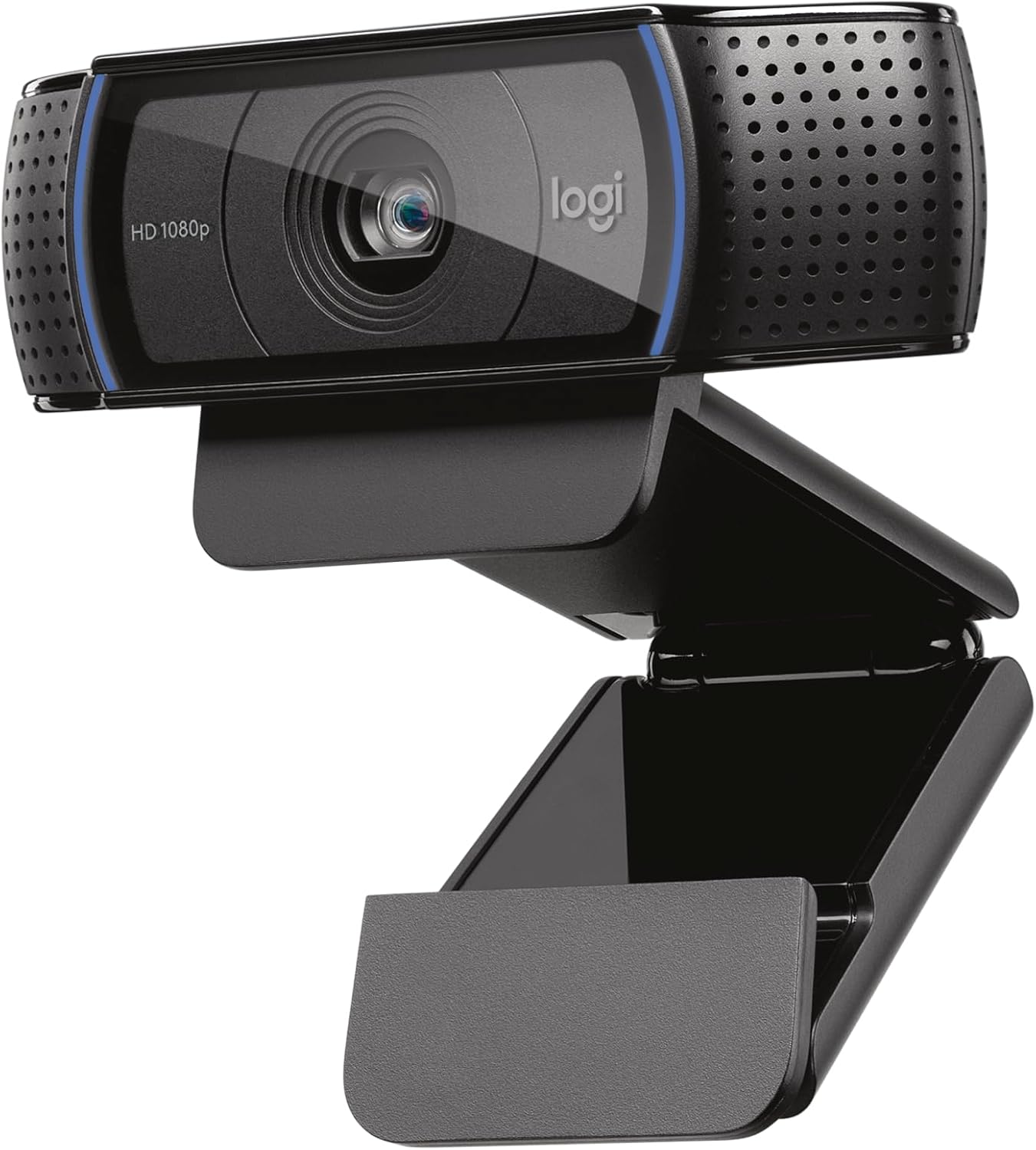
Logitech C920x HD Pro Webcam — Best Webcam Under $100 for Video Calls & Streaming
The Logitech C920x HD Pro is the best webcam under $100 — and the most widely recommended 1080p webcam across expert review sites including Wirecutter, PCWorld, Tom’s Guide, and RTINGS. Features Full HD 1080p video at 30fps with five-element glass lens for razor-sharp clarity, HD autofocus that locks on in under one second, automatic HD light correction for bright images even in dim rooms, dual stereo microphones capturing natural voice from both sides, 78-degree field of view wide enough to include a second person, H.264 hardware encoding that offloads compression from your CPU, universal clip mount fitting monitors/laptops/tripods without adapters, and plug-and-play USB-A connectivity requiring zero driver installation. Works out of the box with Zoom, Microsoft Teams, Google Meet, OBS, Skype, and FaceTime on Windows, macOS, and ChromeOS. Includes free 3-month XSplit VCam premium license for background removal, replacement, and blur. Recommended by Wirecutter, PCWorld, and streaming communities as the default webcam recommendation for anyone spending under $100.
$59.99
Logitech C920x Review — Best Webcam Under $100 for Video Calls and Streaming?
The Logitech C920x HD Pro is the most recommended webcam under $100 in 2026 — and for good reason. Whether you work from home, stream on Twitch, attend online classes, or simply want sharper video calls with family, the C920x delivers Full HD 1080p clarity at 30 frames per second with zero setup required. Just plug in the USB-A cable and every major platform — Zoom, Microsoft Teams, Google Meet, OBS, Skype, and FaceTime — recognizes it instantly.
According to International Telecommunication Union (ITU) video conferencing standards, 1080p resolution remains the benchmark for professional-quality video communication. The C920x meets this standard while keeping the price well below competing 4K webcams that cost two to three times more — making it the sweet spot for anyone who wants to look professional without overspending.
Video Quality — 5-Element Glass Lens and HD Autofocus
The Logitech C920x uses a five-element glass lens — not a plastic lens found in cheaper webcams. This delivers razor-sharp, vibrantly colored images with natural skin tones and accurate detail. The HD autofocus system locks onto your face in under one second and continuously adjusts as you move, lean forward, or gesture during presentations. You never have to manually refocus or worry about blurry video mid-call.
The automatic HD light correction is one of the C920x’s strongest features. It detects your room lighting and digitally brightens and balances the image — so even in a dimly lit home office or a room with a window behind you, your face stays clear and well-exposed. This eliminates the washed-out or shadowy look that plagues built-in laptop cameras in anything less than perfect lighting.
Audio Performance — Dual Stereo Microphones
Two omnidirectional microphones are positioned on either side of the lens, capturing your voice in natural stereo. For everyday video calls, team meetings, and casual streaming, the built-in mics are clear enough that you can skip buying a separate USB microphone. The stereo placement picks up your voice evenly regardless of whether you turn your head slightly left or right during conversation.
For professional streamers or podcasters who already own a dedicated microphone, the C920x works seamlessly alongside external audio equipment — simply select your preferred mic in your app’s audio settings while the C920x handles video only.
H.264 Hardware Encoding — Less CPU Load, Smoother Performance
Unlike budget webcams that rely entirely on your computer’s processor to compress video, the C920x includes H.264 hardware encoding built directly into the camera. This offloads video compression from your CPU to the webcam itself — meaning your computer stays responsive during video calls even if you have multiple browser tabs, documents, and applications running simultaneously. This is especially valuable for older laptops or low-powered machines where CPU-based encoding can cause frame drops and stuttering.
Remote Work and Telecommuting — Why a Dedicated Webcam Matters
Data from the U.S. Bureau of Labor Statistics shows that remote and hybrid work arrangements continue growing across industries. Built-in laptop cameras typically capture video at 720p with poor low-light performance, narrow field of view, and unflattering upward camera angles. The C920x’s 78-degree field of view, 1080p resolution, and monitor-top mounting position create a straight-on perspective that looks significantly more professional — the same angle used in broadcast television and corporate video production.
The 78-degree field of view is wide enough to include a second person sitting beside you — useful for pair presentations, interviews, or family video calls — without the barrel distortion that ultra-wide-angle webcams introduce at the edges of the frame.
Setup and Compatibility — True Plug and Play
The C920x requires zero driver installation. Connect the USB-A cable to any Windows, macOS, or ChromeOS computer and the webcam is immediately recognized by your operating system and video apps. The universal clip mount attaches securely to monitors of any thickness, laptop screens, and standard camera tripods — no adapters needed. The compact, lightweight design makes it easy to move between your desk setup and a laptop when traveling.
Supported platforms include Zoom, Microsoft Teams, Google Meet, Webex, OBS Studio, Skype, FaceTime, Discord, Slack, and virtually every video conferencing or streaming application available in 2026. The included 3-month XSplit VCam premium license lets you remove, replace, or blur your background without a physical green screen — a feature that normally costs $8 per month on its own.
Logitech C920x Specifications
| Specification | Detail |
|---|---|
| Video Resolution | Full HD 1080p / 30fps |
| Lens | 5-element glass lens |
| Field of View | 78 degrees |
| Autofocus | HD autofocus (locks in under 1 second) |
| Light Correction | Automatic HD light correction |
| Microphones | Dual omnidirectional stereo mics |
| Encoding | H.264 hardware encoding (on-camera) |
| Connection | USB-A (plug and play — no drivers) |
| Mount | Universal clip (monitor, laptop, tripod compatible) |
| OS Compatibility | Windows, macOS, ChromeOS, Android TV |
| App Compatibility | Zoom, Teams, Google Meet, OBS, Skype, FaceTime, Discord |
| Included Software | 3-month XSplit VCam premium license |
| Privacy Shutter | Not included (available on C920S variant) |
| Dimensions | 3.7 x 2.8 x 1.7 inches |
| Weight | 5.71 oz (162g) |
| Warranty | 1-year limited warranty |
Who Should Buy the Logitech C920x?
The Logitech C920x HD Pro is the best webcam under $100 for remote workers, hybrid employees, online students, beginner streamers, content creators, freelancers, and anyone who wants a significant upgrade over their built-in laptop camera without spending premium 4K webcam prices. The combination of 1080p video quality, dual stereo microphones, HD autofocus, automatic light correction, H.264 hardware encoding, and universal plug-and-play compatibility makes it the most well-rounded webcam in its price range — and the reason it remains the default recommendation from Wirecutter, PCWorld, Tom’s Guide, and RTINGS heading into 2026.
What to Consider Before Buying
The C920x caps at 30fps at 1080p — there is no 60fps option at full resolution. For most video calls this is perfectly smooth, but dedicated streamers who want buttery 60fps will need to step up to the Razer Kiyo X (720p/60fps) or invest in a camera above the $100 price range. The C920x also lacks a built-in privacy shutter — if that matters to you, the Logitech C920S includes one for approximately $10 more. These are reasonable trade-offs for the price-performance positioning, and neither impacts the core video and audio quality that makes the C920x the category leader.
User Reviews
Be the first to review “Logitech C920x HD Pro Webcam — Best Webcam Under $100 for Video Calls & Streaming”
Related Products

$59.99

There are no reviews yet.