
RayNeo Air 3s Review — Best 201-Inch Wearable Display for Movies and Gaming?
On the panel itself this is a strong product for the money: micro-OLED at 1080p and 120 Hz with TÜV SÜD flicker-free and low blue light certification, in a frame that weighs under three ounces and needs only a single USB-C cable. For films on a flight or a handheld console on a sofa it does what it promises. The score reflects everything around the panel rather than the panel: USB-C compatibility is real homework, prescription users face an extra cost, 650 nits confines it indoors, and the 3.9 average from 475 buyers is the honest aggregate of all of that.
$269.90
RayNeo Air 3s XR Glasses Review (2026) — Is a 201-Inch Virtual Screen Usable?
The pitch for wearable displays has been the same for a decade: a cinema screen anywhere, in something that folds into a case. What has changed recently is that the panels got good enough and the price came down far enough that the pitch is testable rather than aspirational, and the honest answer is more interesting than either the marketing or the backlash.
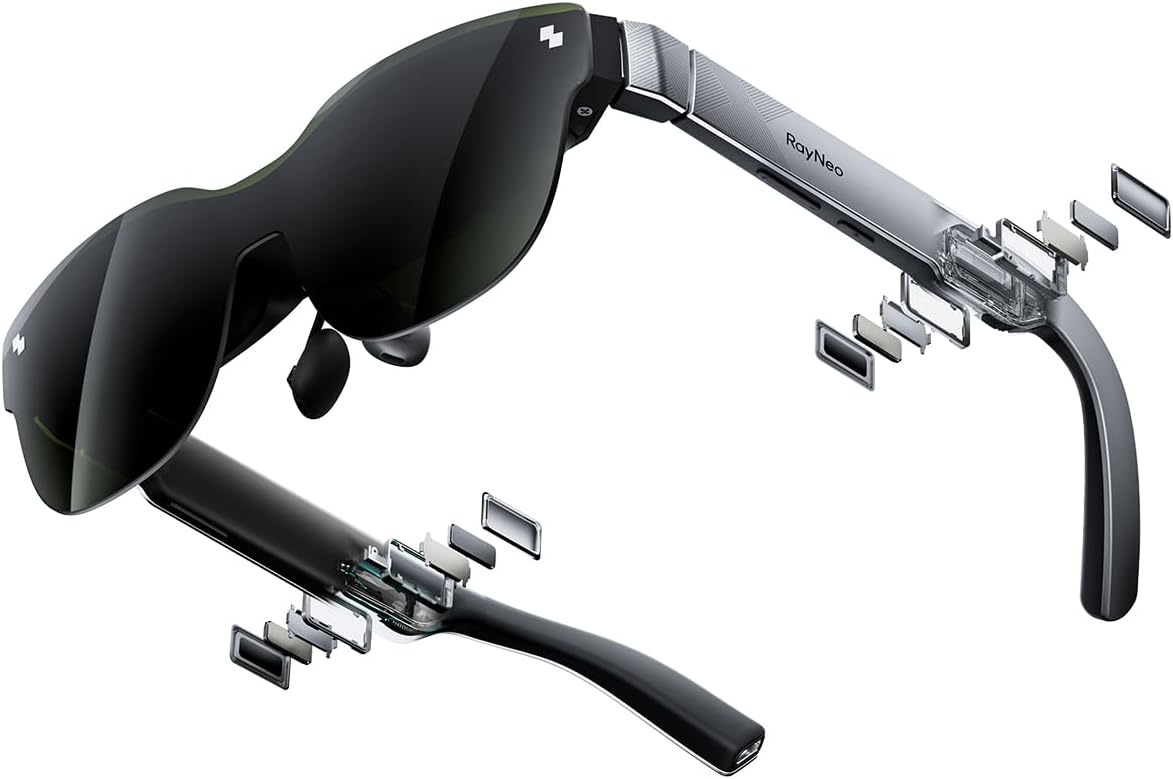
RayNeo’s Air 3s are a pair of XR glasses that plug into a phone, console or laptop over USB-C and present a 1080p micro-OLED image at up to 120 Hz, described as a 201-inch virtual screen. They weigh 2.88 ounces, cost around $270, and carry a 3.9 average from 475 buyers — the lowest rating in this week’s batch, which is a signal worth taking seriously rather than explaining away.
In short: the XR glasses earns 7.8/10 from the Blue Rays Technologies team. The rest of this review sets out exactly how that score was reached.
What is in this XR glasses review
- Key Specifications
- What XR Glasses Actually Are, and What They Are Not
- Image Quality, Eye Comfort and the 120 Hz Panel
- The 3.9 Rating and What Buyers Actually Complain About
- Limitations and Compromises
- Setup, Compatibility Checks and Safe Use
- Who Should Buy It?
- The Verdict
- Frequently Asked Questions
- Related Reviews
Key Specifications
Published specifications for the XR glasses, taken from the manufacturer listing.
| Reviewed model | XR glasses |
| Brand | RayNeo |
| Model number | XRGF35 (Air 3s) |
| Display type | Micro-OLED |
| Resolution | 1920 x 1080 per eye |
| Refresh rate | 120 Hz |
| Virtual screen size | 201″ equivalent |
| Peak brightness | 650 nits |
| Dimming | 3840 Hz DC plus PWM |
| Certification | TÜV SÜD Low Blue Light and Flicker-Free |
| Audio | Built-in dual opposing chamber speakers |
| Weight | 2.88 ounces |
| Connection | USB-C |
| Warranty | 1 year manufacturer |
| Amazon rating | 3.9 / 5 from 475+ ratings |
Everything that follows is based on those published figures for the XR glasses, together with aggregated owner feedback from verified buyers.
What XR Glasses Actually Are, and What They Are Not
These are a display, not a computer. There is no processor, no operating system and no battery inside them; they take a video signal over USB-C from a phone, a handheld console, a laptop or a games console with an adapter, and they show it. Understanding that before buying resolves most of the disappointment recorded in the negative reviews.
That architecture is also the main advantage. Because there is no computing hardware in the frame, the whole thing weighs 2.88 ounces, which is roughly the weight of a pair of heavy sunglasses rather than a headset. Nothing in this category that carries its own processor is anywhere near that light.
The 201-inch figure is a viewing-angle equivalence rather than a physical measurement, which is standard for the category and is not a trick, but it is worth translating: it means the image fills roughly the field of view a very large television would at normal seating distance. It does not mean you can see more detail than 1080p provides.
Image Quality, Eye Comfort and the 120 Hz Panel
Micro-OLED at 1080p per eye with 120 Hz refresh is a strong specification at this price, and the refresh rate is the part that matters most for gaming. Smooth motion is what separates a wearable display that works for a handheld console from one that induces a headache after twenty minutes.
RayNeo has clearly taken eye comfort seriously, and the certifications behind that are unusual for the price. TÜV SÜD Low Blue Light and Flicker-Free certification, combined with 3840 Hz DC dimming, addresses the flicker that makes cheaper panels tiring at low brightness. Peak brightness of 650 nits is adequate indoors and is the limiting factor outdoors.
Even so, viewing distance guidance still applies. OSHA’s monitor guidance puts a comfortable viewing distance at 20 to 40 inches with the screen centre slightly below eye level, and a virtual screen fixed to your head satisfies neither condition automatically. Long sessions in XR glasses need deliberate breaks in a way that a desk monitor does not.
The 3.9 Rating and What Buyers Actually Complain About
Three point nine from 475 ratings is the weakest score in this batch and it deserves a straight answer rather than a defence. The complaint pattern across this whole product category is consistent: compatibility surprises with specific phones and consoles, prescription wearers finding the supplied inserts insufficient, and buyers who expected a standalone device and received a monitor on a cable.
Compatibility is the one to check before ordering. The device you intend to use must output video over USB-C, and a great many phones and laptops do not, or do so only in certain ports. Where the source cannot output video, an adapter is required, and adapters are where a lot of the frustration originates.
Prescription is the second. These come with an adjustable dioptre range in most configurations, but anyone with a strong or astigmatic prescription should assume custom inserts will be needed and price them in. That is a real additional cost and it is not optional for the people it affects.
Limitations and Compromises
No product is right for everyone, and these are the places where the XR glasses asks something back from the buyer.
It is not a standalone device. There is no battery, no processor and no store of its own; without a compatible USB-C source that outputs video, these do nothing at all. Check your specific phone, laptop or console before ordering rather than after.
The 3.9 average from 475 buyers is the lowest in this week’s batch. That is not a verdict on image quality so much as a reflection of how often buyer expectations and compatibility do not survive contact with the product.
Prescription users may need custom lens inserts, which is an additional cost and a wait. The supplied adjustment does not cover everyone, and astigmatism in particular is generally not addressed by simple dioptre adjustment.
At 650 nits these are an indoor display. Bright daylight washes the image out, and the darkened lens that helps with that also means you cannot see much of the room, which limits where they can safely be worn.
Setup, Compatibility Checks and Safe Use
Getting the best out of the XR glasses over a long life comes down to a few simple habits.
Confirm your source device outputs video over USB-C before you buy. This one check prevents the majority of the disappointment recorded in reviews across the entire wearable-display category.
Clean the lenses with a microfibre cloth only, dry or very slightly damp. Micro-OLED optics carry coatings that solvents and paper towel will strip, and there is no way to restore them afterwards.
Take breaks. A screen fixed to your head does not let your eyes change focal distance the way glancing away from a monitor does, and the standard advice about viewing distance and regular pauses applies with more force here, not less.
Store them in the supplied case rather than a bag pocket. The frames are light because they are thin, and thin frames are exactly what gets bent when something heavy lands on them.
Who Should Buy It?
The XR glasses suits some households far better than others. It is a clear buy if you recognise yourself here:
- You want a big private screen for films, flights or a shared room
- You game on a handheld console and want a large display without a television
- Your phone or laptop already outputs video over USB-C
- You value 120 Hz and flicker-free certification over resolution beyond 1080p
- You want something that weighs under three ounces rather than a full headset
The XR glasses is the wrong purchase if any of the following apply:
- You wanted a standalone device with its own apps and battery
- Your source devices do not output video over USB-C
- You have a strong or astigmatic prescription and do not want to buy inserts
- You want to use them outdoors in bright daylight
The Verdict
On the display itself this is a strong product for the money. Micro-OLED at 1080p and 120 Hz with TÜV SÜD flicker-free and low blue light certification is a serious specification at $270, the 2.88-ounce weight is genuinely comfortable in a way that headsets are not, and the built-in audio is better than the size suggests. For films on a flight or a handheld console on a sofa, it does what it promises.
The score reflects the surrounding experience rather than the panel. Compatibility is a real hurdle, prescription users face an extra cost, brightness limits it to indoors, and a 3.9 average from 475 buyers is the honest aggregate of all of that. This is a good display wrapped in a category that still asks too much homework of its buyers.
Review score for the XR glasses: 7.8/10. Strong on panel quality, refresh rate, eye-comfort certification and weight; the compromise is USB-C compatibility homework, prescription costs and indoor-only brightness. Blue Rays Technologies researches independently and earns a commission from qualifying purchases, which never affects the score.
If you want to see the current price, the full options and the latest buyer feedback, it is listed as the RayNeo Air 3s AR/XR Glasses on Amazon. On viewing distance and screen height, the underlying ergonomic guidance for any display is set out by OSHA’s monitor guidance.
Frequently Asked Questions
The questions buyers ask most often about the XR glasses, answered plainly.
Do XR glasses work with any phone or laptop?
No. The source device must output video over its USB-C port, and many phones and laptops either do not or only do so from one specific port. Checking your exact model against the compatibility list before ordering is the single most important step, and skipping it is the main reason people are disappointed.
Is the 201-inch screen a real measurement?
It is a field-of-view equivalence, not a physical size. The image fills roughly as much of your vision as a very large television would at normal seating distance. It does not mean more detail than the 1080p per-eye panel actually provides.
Can I wear them over glasses or with a prescription?
Not over glasses comfortably. Most configurations include some dioptre adjustment, but anyone with a strong prescription or astigmatism should plan on buying custom lens inserts, which is an additional cost and a delivery wait.
Can they be used outdoors?
Not well. Peak brightness is 650 nits, which is fine indoors and washes out in daylight, and the tinted lenses that improve contrast also block much of your view of the surroundings. Treat them as an indoor and in-transit display.
Related Reviews
If the XR glasses is not quite the right fit, these Blue Rays Technologies reviews cover the nearest alternatives.
- Ray-Ban Meta Gen 2 review — smart glasses with cameras instead of a display
- Kindle Paperwhite review — the low-tech answer to a screen on a flight
- Swivel Laptop Stand review — the desk answer to screen height
Last updated: 29 August 2026. Pricing and availability for the XR glasses change frequently; check the retailer listing for the current figure.
User Reviews
Be the first to review “RayNeo Air 3s Review — Best 201-Inch Wearable Display for Movies and Gaming?”

$269.90

There are no reviews yet.