
DYMO Label Maker Review — Best LetraTag 100H Handheld Bundle?
DYMO LetraTag 100H Label Maker Review (2026) — The Simple One That Still Wins?
Every organising project stalls at the same place. The containers are bought, the shelves are cleared, and then everything gets a strip of masking tape and a marker pen because the labelling step is the boring one. A label maker exists to remove that friction, and the ones that succeed are the ones you can pick up and use without reading anything.
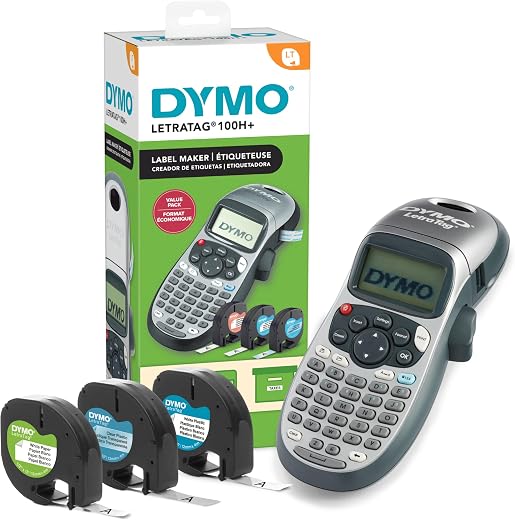
This is the model that has been doing exactly that for over a decade. The DYMO label maker in this bundle is the LetraTag 100H handheld with three LT tape cassettes included — one paper, one white plastic, one clear plastic — offering five font sizes, seven print styles, eight box borders and a graphical preview display, for around $43. It holds a 4.7-star average across more than 31,000 Amazon ratings, which makes it one of the highest-rated office products on the platform.
In short: the DYMO label maker earns 8.5/10 from the Blue Rays Technologies team. The rest of this review sets out exactly how that score was reached.
What is in this DYMO label maker review
- Key Specifications
- Print Quality, Fonts and the Preview Display
- DYMO Label Maker Tape Types, Costs and Where Each One Sticks
- Battery Life, Portability and Bluetooth Alternatives
- Limitations and Compromises
- Setup, Tape Loading and Maintenance
- Who Should Buy It?
- The Verdict
- Frequently Asked Questions
- Related Reviews
Key Specifications
Published specifications for the DYMO label maker, taken from the manufacturer listing.
| Reviewed model | DYMO label maker |
| Brand | DYMO |
| Model | LetraTag 100H Plus |
| Bundle | Machine plus 3 LT tape cassettes |
| Tapes included | Paper black-on-white, plastic black-on-white, plastic black-on-clear |
| Tape width | 1/2 inch (12 mm) |
| Fonts | 5 sizes |
| Print styles | 7 |
| Box borders | 8 |
| Display | Graphical preview |
| Keyboard | ABC layout |
| Power | 4 x AA with auto-off |
| Weight | 16 ounces |
| Warranty | 1-year limited |
| Amazon rating | 4.7 / 5 from 31,000+ ratings |
Everything that follows is based on those published figures for the DYMO label maker, together with aggregated owner feedback from verified buyers.
Print Quality, Fonts and the Preview Display
This is a thermal transfer printer working on half-inch tape, and the output is crisp black text that survives handling, wiping and years in a cupboard. Five font sizes, seven styles including bold, italic, outline and vertical, and eight box borders cover everything a home or small office needs. Vertical printing is the underrated one — it is what makes spine labels for box files and binders work.
The graphical display previews the label before it prints, which sounds minor until you consider that every character of tape you waste costs money. Being able to see the box style and font applied before committing is the difference between three attempts and one. The keyboard is ABC-ordered rather than QWERTY, which divides opinion sharply and is worth knowing before you buy.
Two lines of text are supported on the wider tapes, and labels can be printed in fixed lengths for consistent shelf edges. Print speed is fast enough that a batch of twenty pantry labels takes a few minutes rather than an afternoon.
DYMO Label Maker Tape Types, Costs and Where Each One Sticks
The bundle gives you all three LT tape types, which is a genuinely useful way to learn what you need. Paper tape is cheapest and best for cardboard boxes, file dividers and anything temporary. White plastic is the workhorse: it tolerates damp, wipes clean and holds on plastic tubs, jars and cables. Clear plastic disappears against glass and light surfaces, which is what you want on spice jars and storage canisters.
Tape cost is the running expense to weigh up. LT cassettes are proprietary and sit at a few dollars per 13-foot roll, and third-party compatible cassettes exist at roughly half the price with slightly more variable adhesion. Over the life of the machine the tape will cost more than the machine did, so factor it in — this is the printer-and-ink model applied to labels.
Adhesion is good on clean, dry, smooth surfaces and poor on anything textured, dusty or freshly washed. Wipe with isopropyl alcohol and let it dry fully before applying, and labels stay put for years rather than curling off in a fortnight.
Battery Life, Portability and Bluetooth Alternatives
It runs on four AA batteries with an auto-off function, and typical household use gives months rather than weeks. There is no rechargeable cell and no USB port, which is either a limitation or a feature depending on your view — a device with no battery to degrade is still working in ten years, which is exactly why this model is still on sale.
The obvious alternative is a Bluetooth label printer driven from a phone app, which unlocks unlimited fonts, symbols, barcodes and QR codes. Those are better for complex or design-led labelling and worse for the actual job most people want, because they require a charged phone, a working app and an account. This model works from a drawer, cold, with no setup at all.
Limitations and Compromises
No product is perfect at this price. Here is where the DYMO label maker asks you to compromise.
The ABC keyboard is the most divisive thing about the machine. If you touch-type, hunting for letters in alphabetical order is genuinely slow and mildly infuriating for the first few labels. Most owners adapt within a session, but it is the single most common complaint in lower-scored reviews.
Proprietary LT tape is the second issue. The cassettes are not interchangeable with D1 tape used by other DYMO models, the choice of colours is narrow, and the per-roll cost adds up. Third-party alternatives help but vary in adhesive quality.
Finally, it is limited by design: no symbols beyond a basic set, no barcodes, no QR codes, no computer connection and a maximum of two lines. For labelling a pantry, a filing cabinet or a cable run that is ample; for asset tagging or anything requiring scannable codes it is the wrong tool entirely.
Setup, Tape Loading and Maintenance
Setup is four AA batteries and a cassette, and the machine is usable within a minute of opening the box. Cassettes drop in one way only and the lid will not close if the tape is not seated, which prevents the most common jam. Feed and cut a short length after loading so the first label starts clean.
Keep the print head clean with an occasional pass of a cotton bud dampened with isopropyl alcohol — faded or patchy print is almost always head contamination rather than a failing machine. Remove the batteries if it will sit unused for several months, since leaking alkaline cells are the main cause of dead units in a drawer. Store cassettes flat and away from heat so the adhesive does not migrate.
Who Should Buy It?
The DYMO label maker is the right buy for the following people.
- Anyone organising a pantry, freezer, filing system, workshop or cable run
- Home offices and small businesses labelling files, shelves and equipment
- Teachers and parents labelling supplies, storage bins and lunch boxes
- People who want a tool that works instantly with no app, account or charging
- Buyers who want three tape types included to learn what they actually need
Choose a Bluetooth model instead if you need barcodes, QR codes, custom symbols or long multi-line labels, and choose a D1-compatible DYMO if you already own D1 tape stock — the cassettes are not cross-compatible and buying into the wrong tape family is an expensive mistake.
The Verdict
Review score: 8.5/10. This is a deliberately simple machine that has outlasted a decade of more sophisticated rivals, and the 4.7-star average across 31,000 owners explains why. The DYMO label maker prints clean, durable half-inch labels the moment you pick it up, with no app, no account, no charging and no setup — and the three-tape bundle means you can start on the same day it arrives.
- Crisp thermal print in five sizes and seven styles
- Graphical preview prevents wasted tape
- Three tape types included: paper, white plastic, clear
- Runs for months on four AA batteries with auto-off
- Works instantly with no app, account or connection
The compromises are the ABC keyboard, proprietary LT cassettes that cost more over time than the machine itself, and a hard ceiling on what it can print — two lines, no codes, no computer link. For organising a home or a small office, none of those get in the way, and the simplicity is precisely the point.
This DYMO label maker verdict is assigned by the Blue Rays Technologies editorial team from published specifications, manufacturer documentation and aggregated owner feedback. We do not accept payment for a score. Prices and availability change often — check the retailer listing before you buy.
Frequently Asked Questions
Common questions buyers ask about the DYMO label maker, answered.
Does the DYMO label maker need a computer or phone app?
No. It is fully standalone, with its own keyboard and display, and prints directly from four AA batteries. There is no USB port, no Bluetooth and no software, which is why it works instantly out of a drawer years after purchase.
Are LetraTag LT tapes the same as DYMO D1 tapes?
No, and this catches people out. LT cassettes fit only LetraTag machines; D1 cassettes fit the Label Manager range. They are physically different and not interchangeable, so buy LT refills for this model.
Will the labels survive a dishwasher or a freezer?
Plastic LT tape handles freezer temperatures and occasional wiping well. Dishwasher cycles will eventually lift any LT label — for containers washed frequently at high temperature, apply to the lid rim and expect to reprint annually.
How long does a tape cassette last?
Each LT cassette holds about 13 feet of tape, which is roughly 60 to 100 typical shelf labels depending on length and margins. The bundle’s three cassettes cover most of a full pantry and filing reorganisation.
The three-tape bundle and the machine-only listing are frequently priced within a few dollars of each other, which makes the bundle the obvious buy when it is in stock. Check the current DYMO LetraTag 100H bundle price on Amazon — compare the machine-only and three-tape listings before ordering.
Related Reviews
If the DYMO label maker is not the right fit, these Blue Rays Technologies reviews cover the nearest alternatives.
Last updated August 2026. This DYMO label maker review is written and maintained by the Blue Rays Technologies editorial team.


There are no reviews yet.