
KODAK Step Instant Photo Printer Review — Best 2×3 Sticker Printer?
$79.99
KODAK Step Instant Photo Printer Review (2026) — Still the Best 2×3 Sticker Printer?
Phones hold thousands of photographs that nobody ever looks at. Pocket printers exist to rescue a handful of them onto paper you can stick inside a journal, on a fridge, into a scrapbook or onto a card. The category settled years ago on a common format — 2 by 3 inch Zink prints with a peel-off sticky back — and the question for buyers is no longer whether the technology works but which body to buy it in.
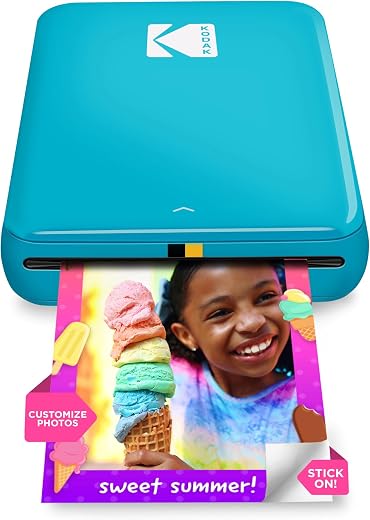
The KODAK Step instant photo printer is the value option among the established names. It connects over Bluetooth or NFC to any iOS or Android phone, weighs under a pound, prints 25 photos on a charge, and its 4.4-star average across more than 20,500 Amazon ratings makes it one of the most thoroughly reviewed devices in the whole category.
In short: the KODAK Step instant photo printer earns 8.0/10 from the Blue Rays Technologies team. The rest of this review sets out exactly how that score was reached.
What is in this KODAK Step instant photo printer review
Key Specifications
Published specifications for the KODAK Step instant photo printer, taken from the manufacturer listing.
| Reviewed model | KODAK Step instant photo printer |
| Brand | KODAK |
| Print technology | Zink zero-ink, embedded dye crystals |
| Print size | 2 in x 3 in, sticky-back |
| Resolution | 300 x 300 dpi |
| Connectivity | Bluetooth and NFC |
| Compatibility | iOS and Android |
| Prints per charge | Approximately 25 |
| Paper capacity | 10 sheets |
| Dimensions | 1 in D x 3 in W x 5 in H |
| Weight | Under 1 lb |
| Amazon rating | 4.4 / 5 from 20,500+ ratings |
Everything that follows is based on those published figures for the KODAK Step instant photo printer, together with aggregated owner feedback from verified buyers.
How Zink Zero-Ink Printing Works
There is no cartridge, no ribbon and no toner in this device. Zink paper contains layers of colourless dye crystals embedded in the sheet itself; the printer applies precisely controlled heat pulses that activate those crystals to produce cyan, magenta and yellow. Everything needed to make the image is already in the paper before it goes in.
The practical consequences are all good ones. Nothing dries out if the printer sits unused for six months, there is no cartridge to run out at an inconvenient moment, and the prints are smudge-proof, water-resistant and tear-resistant the moment they emerge. The trade-off is colour accuracy: Zink output is punchy and slightly warm rather than photographically precise, and deep shadow detail compresses. For scrapbooks and fridge doors that is a fair exchange.
KODAK Step Instant Photo Printer Quality, Speed and the Sticky Back
At 300 by 300 dpi across a 2 by 3 inch print, resolution is not the limiting factor — the dye chemistry is. Faces, bright outdoor shots and high-contrast images come out well. Dim indoor photographs and anything relying on subtle shadow gradation come out flatter than they look on a phone screen. Editing exposure up slightly in the app before printing produces noticeably better results.
Every sheet is sticky-backed as standard, which is the feature that makes the KODAK Step instant photo printer genuinely different from a small photo printer. Peel and stick straight into a bullet journal, onto a gift tag, inside a locker or across a scrapbook page. It reframes the device from a printer into a craft tool, which is exactly the audience it is built for.
App, Connectivity and Running Costs
The KODAK app handles collages, filters, borders, stickers and text, and pairing over Bluetooth or a single NFC tap is quick. It is a competent rather than beautiful app, and it does what most users want: crop, brighten, add something silly, print.
Running cost is the number buyers consistently overlook. Zink paper works out at roughly 50 to 60 cents per sheet when bought in 50-packs, which is far more per print than any home inkjet. That is the real price of the technology, and it makes this a device for printing selected favourites rather than whole albums. Buy paper in bulk rather than 10-packs and the per-print cost falls appreciably.
Limitations and Compromises
No product is perfect at this price. Here is where the KODAK Step instant photo printer asks you to compromise.
Print quality is the first honest limitation. Zink is a fun format, not an archival one, and anyone expecting lab-grade colour will be disappointed. Prints also fade faster in direct sunlight than proper photographic paper.
Second, consumable cost is high per sheet and never goes away. Third, the 10-sheet paper tray means frequent reloading during a busy session. Fourth, the format is fixed at 2 by 3 inches with no larger option in this body. Finally, battery life of roughly 25 prints per charge is modest if you are printing at a party, so a power bank is a sensible companion.
Setup, Paper Loading and Care
Setup takes minutes: charge over USB, install the KODAK app, then pair by Bluetooth or tap the NFC point. Load paper with the blue calibration sheet at the bottom of the stack and the pack’s barcode facing down — the printer reads that sheet first to calibrate colour, and skipping it is the single most common cause of a complaint about washed-out output.
Keep paper in its sealed foil until you load it, since Zink sheets are sensitive to humidity and heat, and never load more than the ten-sheet capacity. Store the KODAK Step instant photo printer away from direct sunlight and charge it every couple of months if it is idle. If prints start showing streaks, run a blank calibration sheet through before assuming a fault.
Who Should Buy It?
The KODAK Step instant photo printer is the right buy for the following people.
- Scrapbookers, journallers and crafters who want peel-and-stick prints
- Parents and teachers making labels, charts and keepsakes
- Anyone giving cards or gifts that benefit from a personal photo
- Travellers who want physical prints without carrying a camera
- Gift buyers looking for something a teenager will actually use
Look elsewhere if you want photographic-quality prints, larger formats, or low per-print running costs. A dye-sublimation printer such as the 4 by 6 inch models delivers far better colour, and an online print service is cheaper per photo for volume.
The Verdict
Review score: 8.0/10. Judged as a craft tool rather than a photo lab, this is a strong product with an enormous, well-established review base behind it. The zero-ink design removes every maintenance headache a small printer normally brings, the sticky backing is genuinely useful, and the KODAK Step instant photo printer costs meaningfully less than the equivalent HP Sprocket while doing the same job.
- No ink, cartridges or maintenance ever required
- Every print is sticky-backed as standard
- Prints are water, smudge and tear resistant immediately
- Bluetooth and NFC pairing with iOS and Android
- Enormous 20,500-plus rating base at 4.4 stars
The compromises are the Zink format’s: punchy rather than accurate colour, weak shadow detail, high cost per sheet and prints that fade in sunlight. None of that matters for a journal page or a fridge door, and all of it matters if you wanted to frame the result. Know which of those you are buying for and the decision is easy.
This KODAK Step instant photo printer verdict is assigned by the Blue Rays Technologies editorial team from published specifications, manufacturer documentation and aggregated owner feedback. We do not accept payment for a score. Prices and availability change often — check the retailer listing before you buy.
Frequently Asked Questions
Common questions buyers ask about the KODAK Step instant photo printer, answered.
Does the KODAK Step instant photo printer need ink?
No. It uses Zink zero-ink technology, where the colour dye crystals are embedded in the paper itself and activated by heat. There is no cartridge to buy or replace — your only consumable is the paper, which costs roughly 50 to 60 cents per sheet in 50-packs.
Are all the prints stickers?
Yes, every sheet has a peel-off adhesive backing as standard. That is the main practical difference from a plain mini photo printer and the reason the device is popular with scrapbookers, journallers and teachers.
How many photos can it print per charge?
Around 25 prints from a full charge of the internal lithium-ion battery. The paper tray holds 10 sheets at a time, so expect a reload roughly every ten prints during a busy session.
How does it compare to the HP Sprocket?
Both use the same 2 by 3 inch Zink sticky-back format and produce comparable output. The KODAK is usually the cheaper of the two and has a far larger review base; the Sprocket has a slightly more polished app. Print quality differences between them are marginal.
Bundles pairing the KODAK Step instant photo printer with 50 or 100 sheets of Zink paper are frequently cheaper than buying the printer and paper separately. Check current bundle pricing on Amazon — the paper is where the long-term cost sits, so buying in bulk matters more than the printer discount.
Related Reviews
If the KODAK Step instant photo printer is not the right fit, these Blue Rays Technologies reviews cover the nearest alternatives.
Last updated August 2026. This KODAK Step instant photo printer review is written and maintained by the Blue Rays Technologies editorial team.


There are no reviews yet.